AGC
Hi,
Couple of questions:
(1) I am trying to find the AGC parameter for implementation. How do you implement and design the AGC? Is there a AGC on the record path filter as well?
(2) Is there real-time tuning to the AGC and other playback enhancements (i..e EQ, bass boost)
(3) Text file? Binary? or object?
Thanks.
Alex,
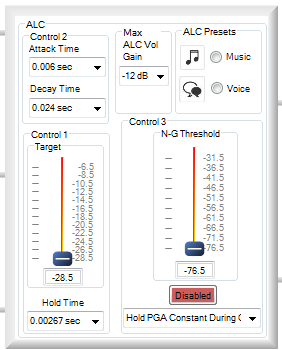
Are you asking about the Automatic Level Control (ALC) on the ADAU1761's record path? This hardware is implemented as a way to control the PGA gain from either the ALC hardware or the SigmaDSP core. The hardware ALC control is configured in SigmaStudio's Hardware Configuration window, under the Record Input Signal Path, as shown here:
All of the ALC parameters can be configured in real-time to tune its performance. Other signal processing, such as EQ and bass boost, can be handled in the SigmaDSP core.
Please clarify if I've misunderstood your questions.
Thanks. Actually does the ADAU1761 Sigma Studio EVB support AGC and real-time tuning? I believe AGC is not equivalent to ALC.
My understanding is that AGC refers to Rx and ALC refers to Tx
An AGC amplifier maintains a constant output level while the input receiving signal varies across a very wide dynamic range.
An ALC normally has a known input signal level and it is used to adjust the output level (such as audio volume, RF power, etc.)
Can the playback enhancement features (i.e. EQ and bass boost) be handled in H/W or only in the SigmaDSP core?
You are correct that automatic gain control (AGC) is typically applied to and input/record signal path and automatic level control (ALC) is applied to an output/playback signal path. Their basic function, is similar - to keep a constant-level output with an input with a level that is varying over time. On the input side, this could be a signal being picked up by a microphone, and on the playback side this could be used to keep the output volume constant as the level changes between TV programs and commercials.
All of the SigmaDSPs can be tuned in real-time with SigmaStudio. SigmaDSP is a programmable DSP core, so all algorithms are executed with software code; there are not hardware blocks for discrete functions like filtering (EQ) and bass boost.
Sorry for the myriad of questions but can you also advise on the following:
1) Is there a relative instruction manual for the ADAU1761 or ADAU176x manual for me to utilize? The current SigmaDSP S/W I have supports 1701/1702.
2) Can you please show me where the ALC block is in the drop down tree diagram? I cant seem to find it in the drop down tree diagram to the left.
3) I am suprised AGC is not supported. What was the logic not to include AGC?
4) In the ADAU1761 datasheet it mentions there is analog PGA gain. How would I be able to adjust that in sigma studio?
5) Can DRC be implemented?
6) Is there a foundation library for visio?
7) Can user create library components?
8) Does SigmaStudio allow you to look at the frequency amp domain?
9) What are the simulation capabilities? (what can be down on screen vs. board)
Thanks in advance!
Alex,
In response to each of your questions:
The datasheet and evaluation board user guide for the ADAU1761 can be found on our website. All documentation on SigmaStudio and its algorithms is in the software's included help file.
We do not have a block specifically designed for ALC. You could use the dynamics processors (compressors, expanders) set with sufficiently long time constants to implement an ALC function.
The same dynamics processing blocks can be used to implement AGC as are used for ALC. Some of our SigmaDSPs, such as the ADAU1761, have a hardware ALC in the analog signal path before the ADCs.
The ADAU1761's PGAs are register-controlled through SigmaStudio's register control window. The AGC (controlling PGA gain) could also be set in the SigmaDSP with your own signal flow writing to a dedicated DSP control block.
Dynamic Range Control (DRC) is another function of the dynamics processors.
I'm not sure what you mean by "foundation library for Visio," but there is no Visio interface to SigmaStudio.
Custom algorithm blocks cannot be user-generated in SigmaStudio. Please see this FAQ.
SigmaStudio does not simulate your signal processing on the PC, nor does it perform FFTs to be read back to the PC. You can use the multi-band level detector blocks to see the signal levels in different frequency bands.
SigmaStudio does not have a SigmaDSP simulator.
For the ADAU1761/1681:
What is the analog PGA range and step size:
ADC Input Voltage Range (full scale input single/diff):
Support Input Impedance (mic) if so at what values?
Are there are tradeoffs when using higher analog PGA value (i.e. SNR etc)
Alex,
All of these questions are answered in the datasheet's spec table:
PGA range: -12 to 35.25 dB
PGA step size: 0.75 dB
Full-scale analog input: AVDD/3.3 (1.0 Vrms when AVDD = 3.3 V) on each pin, so 2 Vrms differential
Input impedance: See Figure 25 in the datasheet
I did look at the datasheet but it was still unclear:
PGA range: -12 to 35.25 dB
>>typically range is from 0 to 40, 50 or 60. I am confused why it says -12 to 35.25 please clarify
Full-scale analog input: AVDD/3.3 (1.0 Vrms when AVDD = 3.3 V) on each pin, so 2 Vrms differential
>> I was looking for Vpp and not Vrms. Is this available?
Input impedance: See Figure 25 in the datasheet
>> Input impedance usually 10, 20 and 40kohm? Datasheet shows varies with the gain of the PGA: 1.7kohm (35.25dB) to 80.4kohm (-12dB)
I'm not clear why you say that a PGA's gain range is "typically range is from 0 to 40, 50 or 60". The ADAU1761's PGA enables an analog gain in the signal path to bring the level of the input signal up to match that of the ADC's full-scale input. The available range, with a maximum gain of about 35 dB, is useful for interfacing to microphones such as ECMs or MEMS element devices. Do you need additional gain for you application?
The peak-to-peak input is 2*sqrt(2)*Vrms = 2.83 V. This value is listed in parentheses in the datasheet spec table.
The PGA's gain is set by changing the resistors in the circuit around the amplifier. This results in the changing input impedance for different gain settings.
Ok that makes sense. In what cases would one need to use PGA gain < 0 ?
Since it goes down to -12dB?
I might need more gain for my application. I understand 35dB is good enough for those element devices but I was looking at other solutions that go up to 47 or even 59dB. In what cases/applications will you need that higher gain?
You can apply additional gain digitally in the ADAU1761's SigmaDSP core. Doing this, though, will raise the noise level as well, so your SNR will degrade by the amount of gain added. For example, if you have an input with a 98 dB SNR, then add 10 dB gain digitally in the SigmaDSP, then your new SNR will be 88 dB.
I forgot to mention that the ADAU1761 also has a switchable +20 dB gain following the PGA, which bring the maximum gain in that path to about 55 dB. Between this switchable gain and the volume control gain, you have a usable gain range of -12 dB to +55.25 dB in 0.75 dB steps.
I'm implementing the ad8367 in ACG configuration and it's not working, I am applying a sinusoidal waveform with amplitude variable at this range: 1.96 to 10 MHz, and does not keep constant the outout voltage. I measure the deto pin and it is at 2.5 always.So I change the Cagc to 1uF and the Cdecl too. With these modifications I get a voltage range from 0.6 to 0.9 on deto pin. Also the output voltage does not achive 1 Vpp and still follows the voltage input.
Somebody help me!!
Regards
Thanks so much for your attentionJMAT
This question has been assumed as answered either offline via email or with a multi-part answer. This question has now been closed out. If you have an inquiry related to this topic please post a new question in the applicable product forum.
Thank you,
EZ Admin
Please log in to reply.