Can't find the "Up/Down Control, Index Output" Block
Hello,
for my new project I need - as a part of it - this block show in the topic to synchronisize two different tables (the first for a log. volume control and the second for LED outputs via the Index Selectable Demultiplexer).
The design is a "simple" mono rotary encoder volume control but with five add. o/c outputs I will light up LEDs which shows me the actual attenuation.
Due to the log. characteristcs can't use the first index table to activate the demultiplexer - and I do not find the Up/Down Control box without "build-in" index table.
Can anybody help me or has a better idea to solve this problem?
Many thanks
Thomas,
I'm not entirely clear what block it is you're looking for. The Up/Down volume control blocks have the lookup table built in because the up/down input signals trigger the indexed value output from the block to be changed. It sounds like for your application that you need a single index value to control two different tables. You could use the output from a single Up/Down Control with Index output to address two separate look-up tables. The output of the first block will point to the same index in the two output tables, which can each have separate values saved in the tables.
Does this answer your question?
High Jeradl,
this is exact what I mean but this block I do not found within the SigmaStudio 3.1.9 Toolbox.
At GPIO Conditioning / PushButton / Up & Down there are only two control blocks with Lookup Table and not more.
Even in the help file there's an example with such a block without Lookup Table.
So where I can find this block in the Toolbox?
It sounds like you need to find the look-up table that can be indexed from the output of the up/down, block, correct? The look-up tables, without the up/down inputs, can be found in the Level Detectors/Look-Up Tables library in the SigmaStudio library.
High JeradL
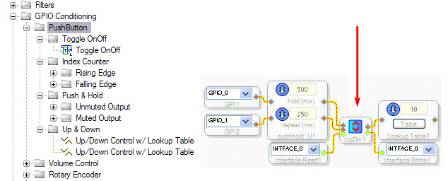
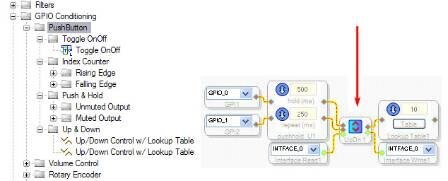
The "stand-alone" index block I've just found. Please see the picture below for the UpDn block I can't find in the library
Note that this picture is a part of a hardcopy from the included SigmaStudio help file.
Hello Thomas,
Sorry for the delayed response due to the Thanksgiving holiday.
It appears that this UpDn block may have been "obsoleted" from SigmaStudio when the updated cell including the index table was added. Probably your use case of having the UpDn block controlling several index tables was not anticipated. I've requested that the software team restores this older cell in the next revision of SigmaStudio.
For now, the workaround is as follows:
This method requires more memory, but should accomplish your goal.
Hello BrettG
thanks a lot for the workaround; I will try it soon, but of course I'm waiting for the upgrade of the SigmaStudio software 3.2.0 with the restored "old" simple up/down block.
This question has been closed by the EZ team and is assumed answered.
Please log in to reply.