Algorithm Information in help file
Hello,
As I'm trying to build an interface to control the Biquad filter, I'd just like to get confirmation on the following statement made in the Help File of Sigma Studio - > Algorithm information - > EQ.
"In the implementation on the DSP, when the coefficients are stored in parameter RAM, a1 and a2 need to be inverted. This is done in software before the parameters are written to memory."
When I implement the Biquad equations in my custom uC code and pluggin the coeffs into an IIR block, a1/a2 don't have to be inverted to create the correct filter. On the other hand, the results I would get from the "Fixed point filter table generation tool" would indeed have a1 and a2 inverted. Just confused by the "this is done in software" line and where I actually have to invert the coeff...
Also just wondering as It is stated that these equations come from the work of Robert Bristow-Johnson, if the implementation is different. For example, comparing with his other publication, I've noticed that b0 and b2 would have to be inverted (-) in order to work correctly for both High Pass filter (Butterworth and Bessel).
b0 = -(1 + cos(ω0)) * gainLinear / 2
b2 = -(1 + cos(ω0)) * gainLinear / 2
Should it be the following instead?
b0 = (1 + cos(ω0)) * gainLinear / 2
b2 = (1 + cos(ω0)) * gainLinear / 2
Maybe if you could confirm the equations from the help file that would be great!
Thanks
Tony
Hello Tony,
Could you please let me know what target SigmaDSP IC you are using?
Thanks,
Brett
Brett,
I'm using ADAU1701 however wouldn't my question be more gnereric to all platforms?i.e. is the algorithm information from the help file different for each IC?
I may be wrong but i've tried a couple of times on both my simulations and with the Fixed point filter generator tool and got the same results.
here is how to reproduce it: generate a1/a2/b0/b1/b2 for a HPF Butterworth with the Fixed point filter tool and try plugging them into a second order IIR filter coefficient. Plotting the simulated response with a probe, I can see that:
-I need to invert a1/a2 results from the Fixed point generator tool. Any reason for that?
- b0/b2 results from the Filter tool are correct, however it's the Help file equations that are incorrect (inverted maybe as a typo) as I realize that my C code results (using these equations) are inverted.
Anyway, to summarize 1) the a1/a2 are inverted in software somehow 2) The Help file equations for b0 and b1 are incorrect.
If i'm wrong, thanks for letting me know where,
Thanks,
Tony
Hi Tony,
Sometimes algorithms have slightly different implementations based on the core architecture of the IC, which has been evolving over time as new SigmaDSPs are released. I just wanted to know which IC you were using so we could remove as many unknowns as possible from the debugging process.
Before I talk about the a1 and a2 inversion issue, I'll start by saying that I believe the b0 and b2 equations for the butterworth HPF are incorrect as you suspected. This must be a typo. I'll try to get it updated ASAP.
Now, on to the a1/a2 inversion issue. I thoroughly tested this today and I agree with your statements. Here is my understanding of the way SigmaStudio is handling these coefficients:
-The equations in the help file are correct from a mathematical standpoint.
-The values of a1 and a2 that are obtained with the equations must be inverted before they are stored in RAM.
-The fixed point filter coefficient table generator tool automatically inverts a1 and a2 so the values can be copied to RAM.
-Any standard graphical-based filter in SigmaStudio automatically inverts a1 and a2 before downloading them to RAM.
-The 2nd order direct entry IIR filter block automatically inverts a1 and a2 but only AFTER you type them in. So, you must enter the values as they are obtained from the equations (NOT as they appear in the filter coefficient table generator).
The reason is as follows:
People who enter IIR coefficients in the IIR cell usually do so because they obtain these coefficients from external filter tools like MatLab. The coefficients a1 and a2 are not inverted in that software, so we allow them to input the values directly.
The filter coefficient table generator is designed to be used by people who want to generate large coefficient tables to store in the RAM of their microcontrollers. They need to do direct memory transfers to the SigmaDSP. Therefore, the coefficients must already match what SigmaDSP expects (that is, a1 and a2 should be inverted). This saves extra instructions in the microcontroller code.
I hope this answers your questions.
Thanks,
Brett
Thanks Brett for the great support,
Exactly the information I was looking for! :-)
Will get back to my biquad calculations...
Tony
I've noticed some isssues with the formulas for filter coefficient calculation given in the SigmaStudio Help File. Under 2nd Order Filters the following formula definitions are given. These values seem to fail to include a definition for how to determine the intermediate value for 'A' used in calculating the coefficients. Is there a SigmaStudio definition for this value somewhere?
Additionally, "Cookbook Formulae for Audio EQ Biquad Filter Coefficients" by Robert Bristow-Johnson (in the following image) includes the 'A' value definition. My concern is that the formulas for determining the 'b' coefficients differ from those given in the Help File. Would this definition for 'A' work for the SigmaStudio formulas? Also, what's the significance of these differences?
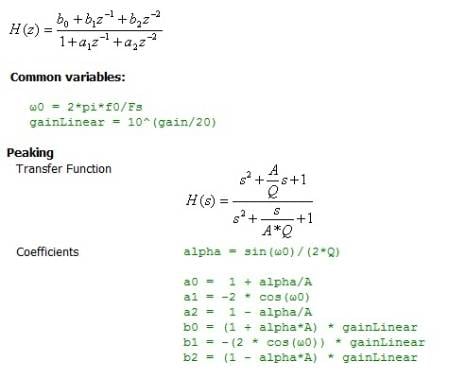
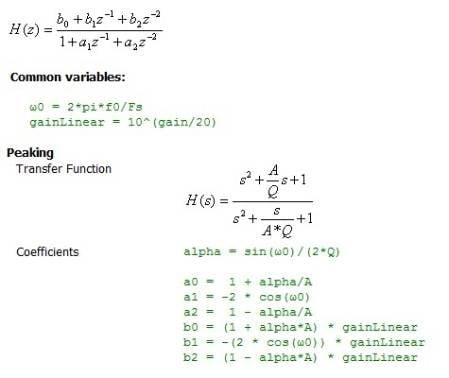
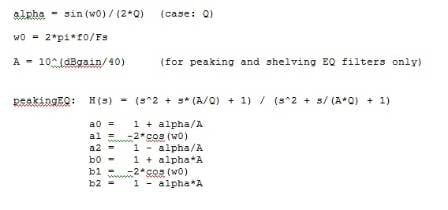
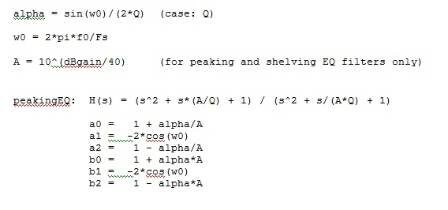
A is calculated from boost/cut setting, and only used for peaking and shelving filters. The same calculation applies to all of them. gainLinear is just a post gain applied to the signal, i.e. same gain for all frequencies; phases are not affected.. Setting it to 1, i.e. 0dB, makes them identical to what's in the cookbook.
I think I follow along with most of what you're saying. To summarize:
- For the purposes of calculating the filter 'b' coefficients, 'gainLinear' can be ignored if you want to set the filter post gain to 0dB.
- 'A' is calculated from the boost/cut dBgain setting using the formula given in the "cookbook", and sets the peaking filter gain/attenuation.
Does that look right?
Looks alright to me
Quick question, with reference to the a1 and a2 inversion discussed earlier. Is the sign being inverted, i.e. a1 > -a1, or is the value being inverted, i.e. a1 > 1/a1 ?
The a1 and a2 inversion is a sign inversion.
> The 2nd order direct entry IIR filter block automatically inverts a1 and a2 but only AFTER you type them in. So, you must enter the values as they are obtained from the equations (NOT as they appear in the filter coefficient table generator).
Dang, Brett, good thing you posted this. Would have taken me hours to figure out why SigmaStudio was turning my allpass into something approximating a low shelf. It seems unnecesarily confusing to have the docs show a standard direct form 1 filter and have the tool maybe implement something else depending on which part of it you're using. Granted, making the behavior consistent at this point would re-confuse everbody who's gotten used to the quirks. But it wouldn't hurt to put some notes about the behavior in the docs and the UI (I'm using 3.4, haven't picked up the beta), especially as the IIR Table tool in the parametric EQ block doesn't update its display to show that its inverted a1 and a2. The idea of putting an "Invert a1 and a2 after entry." check box in the IIR Table UI occurs to me. I'm sure it'll confuse people but at least they'll know what they're confused about instead of checking and rechecking correct math trying to find an error which doesn't exist.
> People who enter IIR coefficients in the IIR cell usually do so because they obtain these coefficients from external filter tools like MatLab. The coefficients a1 and a2 are not inverted in that software, so we allow them to input the values directly.
Not for me; since SigmaStudio's filter generator and parametric EQ doesn't support allpasses I simply copy/pasted the coefficient formulas from the allpass page in the SigmaStudio docs into MATLAB. ;~)
Hi Twest,
Yes, this is easily the most confusing element in SigmaDSP. If only the hardware didn't require the inversion of certain parameters in order to simplify the calculations! I wonder if there's an easy way to include hints about this in the UI. Your idea about the checkbox is interesting. I will give that some thought.
Thanks!
Brett
Eh, it's kind of none of my business but IMO this isn't really a hardware issue. Seems to me more like this is classic software design mistake where the contract on an interface isn't kept consistent, The UI could could easily have been coded to accept only standard coefficient input and multiply a1 and a2 by -1 internally when programming the part (or exporting hex data)---both the user and the DSP end up happy in this case. The UI could have just as easily been coded to accept only the negative denominator form with the minus signs in front of the coefficients and documented as such. This is nonstandard and is likely to trip up more users than the other case, but the contract remains consistent. Instead, the UI presents as standard but instead manipulates the user's input data into a different form without notifying the user. Such silent modification of user intent is just about always a bug so it's competely unsurprising this is a pain point.
The fix is both conceptually and programmatically straightforward---make it clear which contract is active and allow the user to select the one they want. The challenging part is designing the UI so it's clear to the user what the options are and which one the should choose. Ordinarily I'd try to avoid this by cutting one of the options, but the coefficient copy/paste scenario seems to be important and hence I'm assuming support for the less standard filter form needs to be retained. Thanks for considering the checkbox idea I tossed out but, thinking about this more, I think it presents insufficient context to the user to be clear. I would be inclined to do something like expand the IIR Table dialog to display the transfer function's definition (e.g. H(s) = b0 + b1 z^-2 + b2 ^ z-2 / (1 +/- a1 ^ z-1 +/- a2 ^ z-2), only prettier), a sentence noting the sign of a1 and a2, and a help link to the docs for more information along with the coefficient entry boxes. Then put in a dropdown to select between the two forms and have the displayed transfer function and text update accordingly. There are numerous other approaches which are similar but, personally, I'm favoring this one as the change in the displayed transfer function provides immediate feedback to the user about what they're doing and helps train them on where to look if they hit problems.
~Todd
This question has been assumed as answered either offline via email or with a multi-part answer. This question has now been closed out. If you have an inquiry related to this topic please post a new question in the applicable product forum.
Thank you,
EZ Admin
Please log in to reply.