Difference between stand alone and self-boot. As well as trouble getting self-boot to work correctly on ADAU1701
1.
Is there a difference between stand alone and self-boot? The Datasheet for the ADAU1701 clearly says that is supports self-boot, however when looking at this table the ADAU1701 does not say it supports self-boot, but it does say stand alone.
2.
I can't seem to get the development kit for the 1701 to self boot. Iv'e tried all of the instructions that I have seen in the various user guides, as well as instructions people have written here. To test this I made a very simple design that just passes the input to the output. When its plugged into the computer, I click "Link Compile Download", and then right click the 1701 in the hardware configuration and click "Write Latest Compilation to E2PROM" making sure the self-boot switch is towards the 10 pin connector (J8) on the evaluation board. A box pops up with various EEPROM properties, I don't change them, and I click "OK" it then downloads and seems fine so I flip the self-boot switch. When I press the reset button it works, it continues passing the audio from the input to the output. However, if I unplug the 10 pin connector, and plug in a barrel jack, nothing happens. Its clearly not performing the self boot, I just don't understand why. Any suggestions would be greatly appreciated.
I have attached images of exactly what it is I am trying to do.
Thank you
-Brad
Audio Signal Processors
adau_1701
SigmaDSP Audio Processors
stand alone
adau1701
self-boot
1701
Show More
Hello Brad,
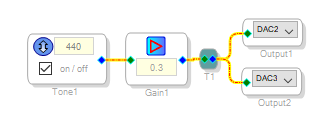
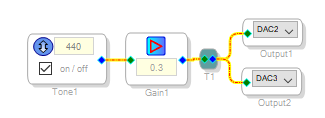
"Stand-alone" describes all the features allowing you to build a complete system around just the DSP and a E2PROM. These features include self-boot, internal A/D and D/A converters, and GPIOs for user controls and LEDs. The ADAU1701 has all these, and it definitely can self-boot. Sorry to hear you're experiencing trouble with self-booting your eval board. I tried duplicating your steps but my board booted fine. The only thing I did differently was running an oscillator instead of the ADC inputs, my being too lazy to hunt down an audio source:
Your program coming up at reset shows that the 1701 self-booted from the E2PROM, since neither SigmaStudio nor the USBi loads the program just from pressing the reset button. So your difficulty really starts with the board powered via the barrel connector. Here's a few possibilities to check:
My ADAU1701 board did not come with a power supply, so I used one that came with a different board. It's rated 6V DC, tip positive. A 5V supply should also work. If in doubt, measure the voltage under load.
The green LED near the barrel connector should light when you plug in your external supply.
It's good that you disconnected the USBi's 10-pin ribbon to run with the DC supply. If instead you merely unplug the USB cable while leaving the USBi joined to the 1701 board, the inactive USBi would hold the 1701 in reset.
According to the board schematic, the chip's self-boot pin is hard-wired high. Switch S5 near J8 controls the E2PROM write protect -- you can program the E2PROM only when the switch is toward J8, but the -1701 can self-boot with the switch in either position. The other slide switch near the headphone jack selects external clock -- with no external clock supplied, this switch must always point toward the board edge.
My friend the mechanic used to say, "Got gas, got spark -- should run." That's about the case here, as well.
Best regards,
Bob
Hi Bob,
Thank you for your reply. All of that information was very helpful.
I would also like to apologize for how long it took me to reply, I got caught up in many other projects.
Unfortunately, I still can't get the board to work off the barrel connector. I set up basically the same schematic that you showed. I have also tried two different power supplies. Both caused the green power LED to light, also while wearing headphones I can "hear" it turn on. If it is plugged in through USB it seems to work fine, the reset button works as expected and it reboots and continues playing that tone. If I then plug in the barrel connector it continues playing. If I then press the reset button is stops playing the tone altogether. If I have the both plugged in and I unplug the USB it continues functioning. I also tried powering it off a bench supply so I could monitor the current, it seems to be drawing 125mA.
Iv'e looked at the schematic and I'm not sure what could be causing this. Do you think it could be faulty hardware?
Thanks,
Brad
Hi Bob,
One other thing too. You said you were powering it with 6 volts? The board says 5.5V is the max up near the barrel connector. With that said I looked at the schematic and the datasheet for the regulator and decided that 6V wouldn't do any damage. I had it plugged into a variable lab supply and slowly increased the voltage from 5V to 6V while pressing the reset button over 0.1V or so. The only thing that changed was the volume of static coming through the headphones.
Thanks,
Brad
Hello Brad,
Honestly I can't tell from here. I tried playing with the program in E2Prom making a 220 Hz tone while SigmaStudio is set up for a 440 Hz tone, just to make sure I'm actually self-booting when pressing Reset. Running with just the eval board and the barrel plug supply (no USBi at J8), pressing the reset button interrupts the tone for a moment as the -1701 boots, then it resumes.
When running with both the USBi and the barrel plug connected, pull the USB jumper -- otherwise the external supply may backfeed into the USBi, which could cause problems especially if the external supply is above 5V.
I used the 6V supply because it was handy, not noticing the "5.5V max" notice on the board. I'm about as old as my avatar and don't see very well. Possibly this spec is more for the board's SSM2306 Class-D amplifier, which carries an absolute maximum spec of 6 volts. Anyhow, 5 volts is plenty to provide the regulated 3.3V for the ADAU1701 and E2Prom -- the board should run fine on 5 or even 4.5 volts.
When the -1701 doesn't boot out of RESET when you suspect it should, check that its crystal oscillator is running with a scope. There's been a problem with the oscillator not starting when the -1701's Vcc rises too quickly -- see 1701 Oscillator start problem
Just in case it matters (and I don't know why it should) -- if your PC is on Windows 10, use only SigmaStudio 4.1 for your tests. It fixes some USBi comm issues which apparently Microsoft caused with one of those unannounced minor updates last February/March. I've been running my tests with either Windows 7 and SigmaStudio 3.17, or Windows 10 and SigmaStudio 4.1.
Finally, it could be hardware. I seem to remember reading somewhere on these boards that AD does test the eval boards, and it's hard for me to think of a specific hardware problem that would prevent the board from starting up with the barrel plug when it does when powered via the USBi. You could check the 3.3V output of the regulator when powered either way. If the board is new, perhaps you could arrange for an exchange.
Best regards,
Bob
Hello Brad,
Just thought of one more thing -- Please attach your project so I can try it on my hardware. This would help to verify if HW is actually to blame, as well as possibly turn up some hidden setting which neither of us have thought of so far. To attach your project, first select the Use advanced editor link at top right of your reply post.
Thanks, Bob
Hi Bob,
This is the specific project that I am working with. I also just tried updating to 4.1 and I re-made the project (didn't just open old project in 4.1) and still no luck. I don't see how it could be that oscillator issue either, that seemed like a hardware issue, and I am using the development board for the 1701.
Thanks,
Brad
Hi Brad,
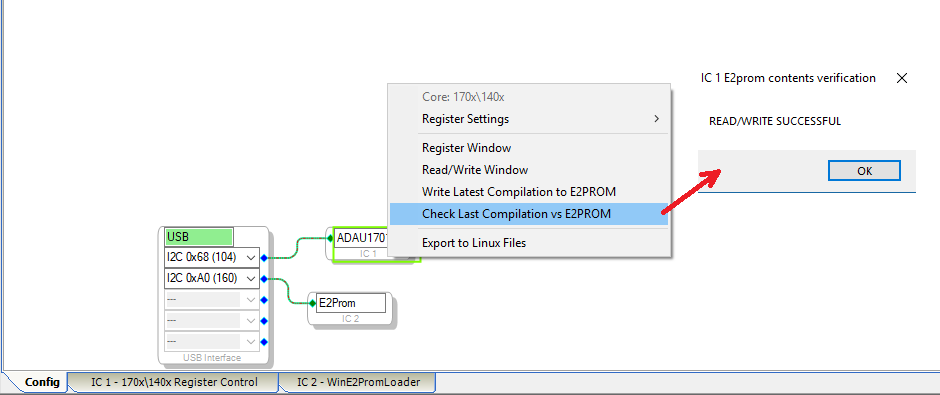
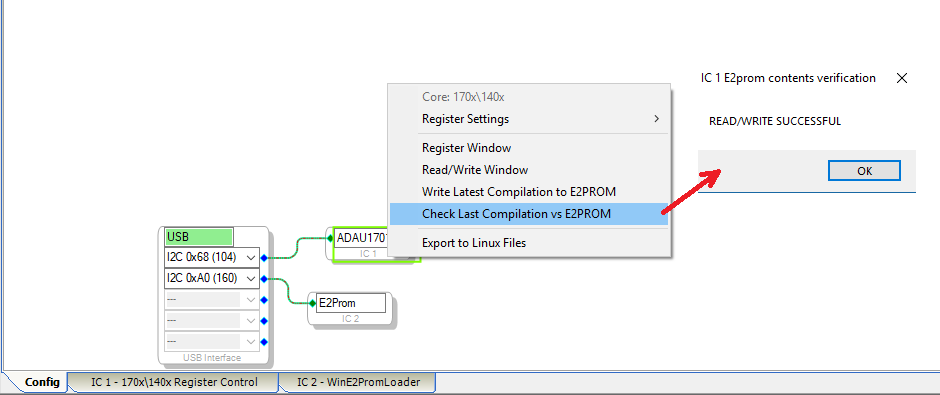
I just took a few minutes from my lunch break to try your project and it self-booted fine with a 5V supply that was lying around at work (not the same one I had used at home). The code checked OK:
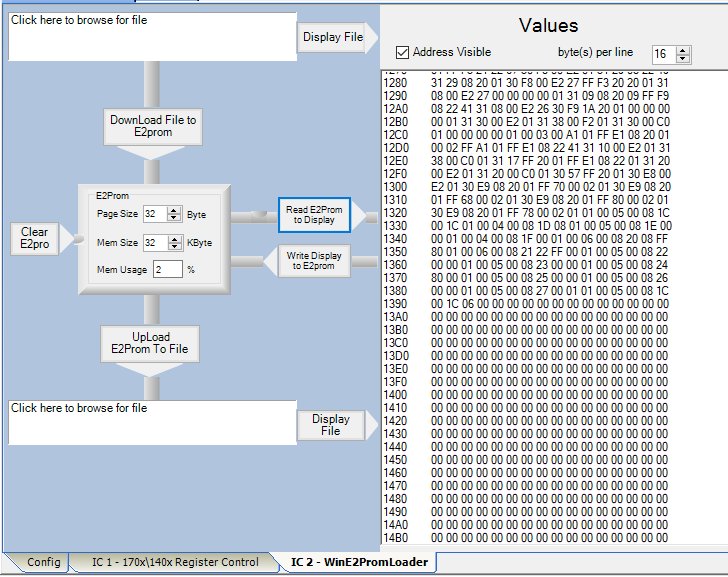
It appears in the E2Prom (mostly zeros since it's a small program):
... and when I plugged only the power supply into the eval board, the thing booted with your 440 tone. I had previously written a 220 Hz tone so I know it was yours. I can't think of anything else to do, so it sure seems your hardware has some subtle but definite problem. Sorry for the trouble you're experiencing.
Best regards,
Bob
Hello Brad,
This is a strange one...
Try to plug the DC supply into the eval board first, then plug the power supply into the wall. This should cause the power supply to come up in a much more controlled way. The reset generator should smooth that out and wait for the power to be stable before releasing the reset but obviously something is not working correctly.
When it is in a bad state, see what you have. Look at DC voltages, look at the master clock as KJBob suggested. See if you can pick up a clue as to where to look deeper. See with a scope if the reset is happening once the power is clean. See if the EEPROM is being read from? Is the DSP attempting to read from it?
Is the DVDD power supply coming up?
Is there a lot of noise on the DC? We do have huge caps on the input side of the regulator. One of those 220uf caps could go away if needed.
See if you can find some anomaly that we can chase further.
Dave T
Hello Brad,
I think you are in Northborough MA correct? If you are then do you ever come over close to Wilmington MA? That is where I am. Bring it over here and I will have a look at it in person.
Dave T
Now that's what I call service!
Dave,
Than you for all your suggestions, I will look into them. I measured the voltages on the regulator and they seemed wrong.
When plugged into USBi (Barrel disconnected):
pin voltage
1 - 4v
2 - 4v
3 - 4v
4 - 0.240v
5 - 0.240v
6 - 4.16v
7 - 4.16v
8 - 4.16v
Measuring at the jumper that connects the +5 from the USBi gives 4.48v
When plugged into barrel connector (10 pin USBi disconnected):
pin voltage
1 - 5.04v
2 - 5.04v
3 - 5.04v
4 - 0.240v
5 - 0.240v
6 - 5.12v
7 - 5.12v
8 - 5.12v
With all that said, it works fine when powered off the USBi. To me this looks more like a regulator problem. Is is possible it stopped working when I have it plugged into both the barrel and USBi?
After writing all this is tried plugging it into a variable bench supply set to 4v and it works fine. I guess it is just a bad regulator?
Thanks,
Brad
Hello Brad,
Your experience with this is no fun, yet it does remind me of an old joke:
Q: How many Windows programmers does it take to change a light bulb?
A: "That's a hardware problem!"
Sorry I had to do this after a rotten morning when I've been standing in front of a huge X-ray machine inspecting boards, taking pictures like Hollywood, seeing BGA spots before my eyes and probably glowing in the dark by now.
Best regards,
Bob
Hello Brad,
The voltage at pin 5 is totally wrong. It should be over 1V. The fact that it is at the same potential that you measured for pin 4 tells me that there is a problem with R7. It is either open or there is a bad solder joint?
This means that the regulator is not getting any feedback and so the "little guy in the silicon" who has his hand on the throttle to increase the output or decrease the output based on what he "sees" coming into the regulator. Since he is not seeing anything he is turning the output all the way up and he still does not see anything! This is why you are seeing almost the same voltage coning into the regulator as there is going out. That should NOT be the case. You should see 3.3V out on pins 1,2,3 with either voltage source.
Bob, the reason why I suggested he stop by if he was close is that it would be faster. I can usually find a problem very quickly if it is in front of me. I am rather good at troubleshooting from afar but it is difficult. In a past life, I once had a pro audio client with a serious issue with his large format recording console. These large complicated beasts. I ended up getting on a plane and flying in. I walk in the control room, took one look and saw a button pressed that should not be pressed and fixed it in seconds. Oops. Oh well! Nothing beats having it in front of you.
Dave T
I finally figured it out!!
The regulator was NOT the problem. We ordered regulators as well as a whole new dev kit (hoping the regulator would fix it so we could return the new dev kit) I replaced the regulator and nothing changed. I then decided to pull off the resistors that make up the voltage divider for the regulator (R6 and R7) which should be 78.7k and 140k. R7 was within tolerance of 140k, but R6 was not even close, it measured 79 ohms. I replaced it with a resistor that was still a bit off, but it was a lot closer (75k is the closest we had in a package that would work). When I tested the board it still wasn't working. Thinking that the 79 ohm resistor could have broken the regulator I replaced the regulator again and it worked! The output of the regulator was now measuring 3.6 volts (I'm guessing because I used a 75k not a 78.7k). Our suspicion is that the second dev kit we received had the same problem since it also does not self boot off the barrel connector.
Dave, can you please confirm the values of R6 and R7? On the schematic for the ADAU1701MINIZ schematic they say 78.7k and 140k. Also in the datasheet for the ADP3336 (regulator) it says the same. To me this seems more like it was an assembly problem rather than a defective one-off that we received initially (78.7 ohms vs 78.7k) Both of our dev kits seem to have the same problem and they were ordered weeks apart (both from Digikey if it makes a difference).
Not exactly sure where to go from here, but I feel it is important that someone from Analog Devices tests this for themselves to confirm my findings and then correct the issue so more people don't run into this problem.
Thank you both Dave and Bob for all of your help in figuring this out.
-Brad
Hi Dave,
Would it be possible for me to email you to ask for more of your help? We are in the middle of a design and have a few other questions that don't seem like they deserve their own thread on this forum. It would be very helpful to talk to an applications engineer who works for Analog Devices.
Thank you,
-Brad
Hello Brad,
Thanks for the update and the very important feedback. For the record, I did not think the regulator was the problem. It was doing as it was being told to do by the external divider. My error was thinking the resistor to power was open making the feedback voltage too low where the problem was the pull down resistor was too small making the feedback voltage too low. Either way the regulator was doing its job. Sorry if I was not clear in my response.
I expect this is an assembly problem but more important, it should have been caught by QC testing. Many of our evaluation boards have been moved to a new assembly location so this may be an error that was injected in the process. I will start tracking down where the issue started. I agree, if one is bad then most likely all are bad.
Thanks for your help in finding this.
Dave T
Bob, the reason why I suggested he stop by if he was close is that it would be faster. I can usually find a problem very quickly if it is in front of me. I am rather good at troubleshooting from afar but it is difficult. ...
David,
Absolutely it's far easier to troubleshoot something that's in front of us. On Engineer Zone, however, we're often stuck with troubleshooting remotely. Consequently we must rely on the whatever information our fellow member feels relevant to provide. For best results under these circumstances, anyone requesting help on this forum would do well to first read this blog post: Asking for Helping Yourself
Please log in to reply.