Sure (wondom) ADAU 1701 adaptive filtering/ problems with iUSB
Hello
I bought WONDOM AA-JA32172 JAB 3-50 amplifier board with dsp 1701.
I am gonna use it for my subwoofer. First of all could you please tell me is it possible to use adaptive filters inside 1701. Or can it be implemented by combining some tools of 1701?
I need to use different filters (different shape) depending on the level of signal. For example at low level loudspeaker does not have distortion at 40 Hz ( linear behaviour) but when increasing the level of signal, at some moment, at 40 Hz speaker reaches maximum excursion and gets distortions. So I need to create a filter with signal level dependence. Is it possible in Sigma studio?
Secondly, Sure provides WONDOM SigmaStudio Programmer Board, but I can not find the drivers for this, since its a China manufacturer they don't provide much information. So maybe you know where i can find the drivers for this. Because know I have ''unknow device'' (w7 64, Sigma studio 4).
on another computer it was possible to somehow install the driver and write the settings into the EEPROM of this programmer (but I can not find out how). Sometimes during self-loading, the subwoofer channel is cut off after 2-3 seconds (there may be a pulse in the subwoofer), but the second high-frequency channel is not turned off. What could be the problem?
I also wanted to know, when selecting a self boot mode (switch on the board) is it possible to use sigma in real time (or it is not possible?)
Thank you so much!
Hello,
ADI's Dynamic Bass block provides a variable filter to protect your speaker. See how it works at:
Dynamic Bass Boost [Analog Devices Wiki]
Dynamic Bass Boost Basics
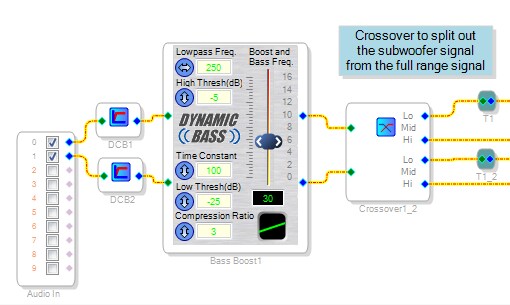
Place it before your crossover -- this way its phase shift won't interfere with the crossover's phase matching:
Set the Bass frequency (the green number under the slider) to the lowest frequency your speaker can handle. It rejects lower frequencies so your speaker won't shake itself apart trying to reproduce them. Increasing the slider boosts bass at low levels, thus you can then reduce your woofer gain and still hear the bass. The boost goes away at higher levels, to protect your speaker.
If your project in SigmaStudio is identical to the compiled project in your E2PROM, you can use the Link function (above Link-Compile-Download in the Actions menu) to link the two, activating the real-time adjustments.
Hopefully someone familiar with the Sure DSP products can help you with the drivers, etc.
Best regards,
Bob

Hi Bob.
Reading your answer and comparing it to what's in your wiki, I'm a bit puzzled...
You say:
Set the Bass frequency (the green number under the slider) to the lowest frequency your speaker can handle. It rejects lower frequencies so your speaker won't shake itself apart trying to reproduce them.
Wiki say:
Bass Freq. - This field below the boost slider ranges from 20 to 300Hz and designates the center frequency for the boosting filter. Enter your desired value directly into the field or use the two horizontal arrows at the sides of the slider. Note: When the slider is all the way down at 0dB, the block is still not truly bypassed.
I like your explanation with the feature of rejecting anything below the frequency to protect the driver. But somehow that's not what I am getting from reading the wiki... Can you elaborate? And "rejects" in what manner? 6/12/18/24/36 dB/oct, or how to understand that?
BR
Peter
Hello Peter,
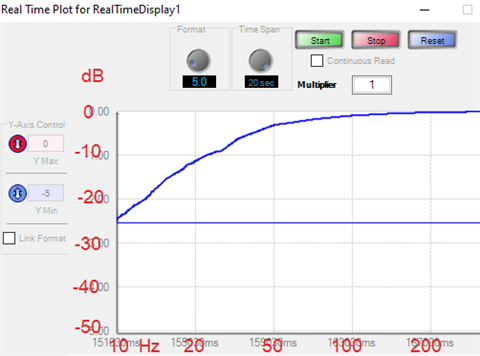
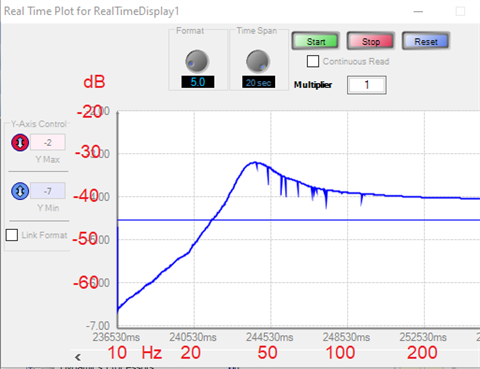
Experimenting with the algorithm produced the results you see in the post referenced above, "Dynamic Bass Boost Basics." Looking at the two frequency response graphs, the first one at full level (where you might worry for your woofer) shows only bass rolloff beginning at the frequency under the slider, at about 12 dB/octave. The one at reduced level shows the peak boost occurring at that same frequency, with rolloff below at a somewhat steeper slope (apparently from the algorithm's variable Q filter). So you always get rolloff of 12 dB/octave or better, for frequencies less than the setting below the slider -- but at low level, that rolloff starts from a boosted position. So to this extent the test results agree with the wiki.
In any event, my tests were merely an attempt to expand upon what's in the Wiki with a few graphs to show what this algorithm did for me in practice. The original question was about Dynamic Bass for the ADAU1452 -- and as it turned out, its math functions proved convenient for producing the graphs. Which DSP are you designing with? SigmaStudio algorithms generally work the same on any supported DSP, however there's occasional exceptions.
Best regards,
Bob
Hi Bob.
Thank you for swift reply.
I'm using the ADAU1701.
You are referring to some graphs, showing what the algorithm did for you... I don't see them in this post.
Would you like me to start another post for the Dynamic Bass Boost/Super Bass?
BR
Peter
Hello Peter,
Bob had put the link right at the top of his first reply:
Dynamic Bass Boost Basics
Dave T
Hello Peter and Dave,
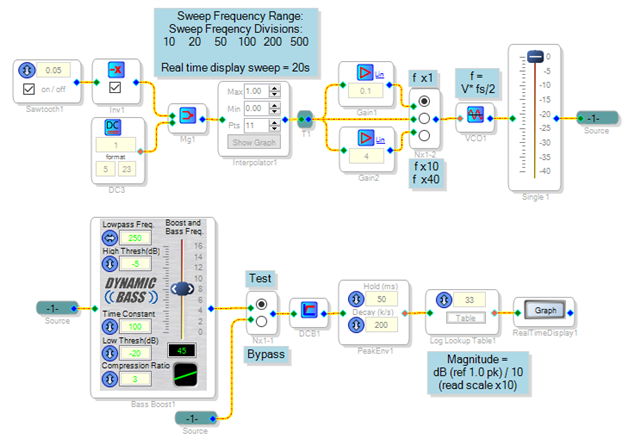
Here's a test circuit and measured results for Dynamic Bass on the ADAU1701:
The original test circuit used a square root block and a hokey lookup table to achieve its log amplitude plot. With a Log Lookup Table now available it looks much neater.
The response with full input level:
The response at -40 dB input level:
Best regards,
Bob
ADI-D-Bass-FreqSweep_1701.zip
Please log in to reply.