ADAU1701: Readback of MS Signal Envelope
Hi
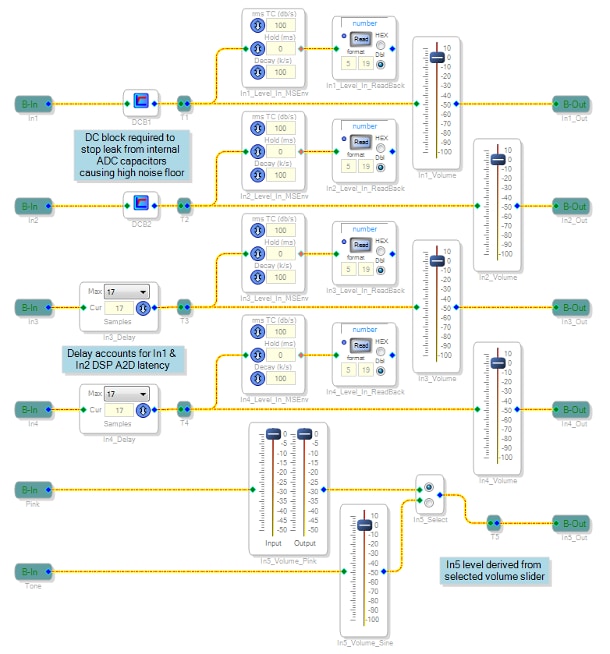
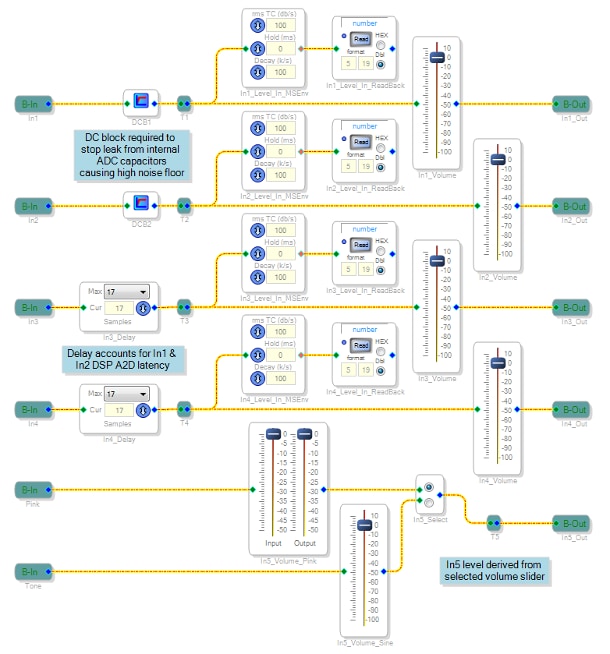
I am using an ADAU1701 to implement a four channel audio mixer. The first two input channels are routed to the DSP's ADC0 & ADC1, the second two input channels are routed to the DSP's SDATA_IN0 via an external ADC. A fifth internal DSP input channel may be selected from either pink noise or sine tone. The input stage (shown below) depicts the MS Signal Envelope / Readback block used. The mixer & output stages (not shown below) contain more MS Signal Envelope / Readback blocks, for a total of 12.
The DSP is compiled for a 48kHz sample rate with PLL_MODE1 tied high and PLL_MODE0 tied low.
Number of instructions used (out of a possible 1024 ) = 992
Data RAM used (out of a possible 2048 ) = 425
Parameter RAM used (out of a possible 1024 ) = 328
The DSP is hooked up to a STM32 micro vis a SPI bus. On power up or reset, the micro resets the DSP, waits 25ms for the PLL to stabilize, activates SPI slave control (toggles the CS line three times) then writes the program & parameter to the DSP (as per function default_download_DSP() from the code generated by Sigma Studio).
In order to extract audio signal levels from the DSP, the micro performs a read every 100ms of all the DSP readback blocks. Each readback block reads the value from a MS Signal Envelope with TC = Decay = 100dB/s. These read values are then converted to dB and fed to a VU-meter style display. The final effect is quite satisfactory and working well with the chosen TC and decay values of the MS Signal Envelopes.
However, I have come across two issues, one of which is a showstopper.
After a reset of micro with no audio signal present on any input (i.e. all power supply & audio voltage levels are stable) the micro then resets the DSP, goes through the DSP startup procedure described above and proceeds every 100ms to read all readback blocks.
Issue #1:
After every reset, some of the MS Signal Envelope / Readback blocks "misbehave", returning a random value that decays to zero over a period of time. This period ranges from ~200ms to ~3 seconds after reset. The remaining blocks return zero (as expected since there is no audio signal present).
Once the affected block's value had decayed to zero, normal operation is seen where the readback value follows any applied input signal.
It will not always be the same MS Signal Envelope / Readback block that is affected. It appears to be a random infliction with no discernable pattern. No two affected blocks will have the same initial value or decay time. Once the affected blocks have decayed to zero, the "misbehaviour" is not seen again; it only occurs after the DSP reset / startup procedure.
One interesting point to note is that when I remove some of the filters in the DSP and thus reduce the number of instructions (MIPS), this "misbehaviour" is then rarely seen. When seen, the initial value read is much smaller & the decay time very small (< 300ms).
Issue #2 (showstopper):
Occasionally, after reset, one of the MS Signal Envelope / Readback blocks "lock up", permanently returning a value of 0xFFFFFF. The value does not change over time. Only another reset will return the block to normal operation.
Again, it will not always be the same MS Signal Envelope / Readback block that is affected. It appears to be a random infliction with no discernable pattern. This issue is rare, only seen in one out of five resets.
Since the issue does not resolve over time (as with issue #1), this is a major problem with the VU meter display showing full scale when no signal is present.
Hoping that someone can shed some light on what is happening & how I can resolve it.
Regards
Mark
Audio Signal Processors
ms signal envelope
SigmaDSP Audio Processors
adau1701
readback
Hello Mark,
Let's start looking into this...
First, the Decaying level you see at startup can very well simply be the DC offset of the ADC converters that is being filtered out by the DC block. I see that also when I use these and when it starts up you get a pop and then the filter starts doing its job and filters out the DC so the level slowly goes down. Try placing a mute right at the ADC input before the DC block and see if this issue goes away.
The second problem is a bit more difficult.
Here is my first hunch...
Something is stepping into the code (the parameters) of one of the envelope generators. I would look for any index selectable cells like a mux or a lookup table. Many of these are not checking of out-of-range values and so will simply write to the offset given even if this points to memory held by another object.
Another way this could happen is with the communications of the host to the DSP. If a memory write is either incorrect or is corrupted upon transmission, then it will write to the incorrect memory location. Since you are using SPI this could happen if the rates are really high and the traces are long or even worse if the SPI lines are going through a wire from another PCB. So if this is a possibility then slowing down the SPI rate might be a good diagnostic test.
If it is possible to stop the host processor and read from the DSP then you can look at all of the parameters of the envelope generator that has "locked up" to see if any of the other settings have changed.
Dave T
Hi Dave
Thanks for the feedback.
Placing the mute (mute active) after the DC block does not eliminate the decaying level. The strange thing I did note is that the decaying level is not always directly after the DC Block; it sometimes occurs further down the audio chain with the readback earlier in the audio chain reporting zero.
Another thought I had:
After reading another post (
https://ez.analog.com/thread/105305-adau1701-dsp-setup-error
) and coupled with the fact that when I removed some of the filters and thus reduce the number of instructions, the glitch / decaying level is vastly reduced to the point where it is rarely seen. Could the fact that my instruction count is so high (992/1024) mean that I am running out of MIPS and the DSP is struggling to process the audio fast enough?
Regarding the second problem, I don't use a mux or lookup table. However your point about writing to an incorrect register is noted; I will double-check my code.
As for my SPI bus, the traces are fairly short (~ 4cm) and I am running the bus at 3MHz. Dropping the speed to 1.5MHz had no discernable affect; the "lock-ups" still occur.
Yes, I can halt the processor and will attempt this & check the register values are not being overwritten/corrupted later this morning.
FYI: In further tests yesterday, I placed two readbacks after the same MS Signal Envelope. I a few instances I saw one readback report zero and the other report 0xFFFFFF. Not sure what this means.
Regards
Mark
Hi Dave
You are not going to believe this - I have found the cause & resolved both issues!
After writing the program & parameter to the DSP (as per function default_download_DSP() from the code generated by Sigma Studio), I had added a check routine to read the first 256 bytes of program memory, just to ensure the DSP initialization had been successful. It was this routine that was the cause of all my problems.
While investigating issue #2, as per your suggestion to check whether the program & parameter RAM had been corrupted, I expanded this check routine to check the entire DSP program & parameter RAM and called it when a readback returned 0xFFFFFF. I noticed that when this check routine was run, a large audio pop was generated, which was quite irritating on the ears. So in the routine I added a write 0x01C0 to the DSP core register (mute the ADC's & DAC's, clear internal registers), then did the validation of the program & parameter RAM, followed by a write 0x01DC to the DSP core register (unmute the ADC's & DAC's, allow signal to pass through DSP core).
After adding the DSP core register writes (to mute / unmute), the problem described in issue #1 disappeared; after a reset all readbacks now report zero, and I have not seen any recurrence of issue #2 problems; all readbacks always report zero.
So thanks for leading this horse to water! Much appreciated.
Regards
Mark
Hello Mark,
That is great news!
Often I have found issues simply by explaining the issue to someone else, anyone, My wife, the kids, the dog! It is then you realize what you are doing wrong or forgot to do. So I am glad I was able to be the dog today!
Your question about the program size, I have found that you can go over 1000 instructions with no issues. Once you start getting closer to 1010 does it start to get iffy. I wish I had a definitive answer to the number of overhead instructions SigmaStudio inserts but I do not. However, with this core, if it runs the program once properly then it will run it that way every time. There are no loops in program execution and no interrupts so it is deterministic.
So what you found is mentioned in the Rams and Registers section of the datasheet in the Direct Read/Write paragraph. Page 30. So you are doing the correct thing.
Also, if you are not using safeload for this core it can be a problem. I think you may already be aware of this but I will mention it for others who may read this.
If you perform a direct read of a parameter in this DSP, the memory is not available to the core during that period of time. There is no buffer or memory controller to prevent contention. So what happens is that either the core is not able to store or retrieve data or the control port is not able to. Depends on who was first. So this DOES lead to clicks and pops in the audio seemingly at random. There are two ways to avoid this that was designed into this core.
The Safeload registers are used for transferring up to five words of data into five consecutive memory locations. This is part of the code that is run as part of the "overhead" code. It will execute these writes to memory at a time when the core is not trying to access memory for the audio program.
Then there are two Data Capture Registers setup such that the core will stuff data into these registers at the proper time during the program execution. These at located at address 0x081A and 0x081B. If you look at the capture window in SigmaStudio when you click "Read" on a readback cell, you will see it uses these registers to gather the data from within the running DSP program. This is why you see a "Read Request" and a "Read Result". The request sets up this register with the program counter address and the register to be transferred and then the read comes back and picks up the result.
Hi Dave
Thanks for the confirmation & info on program size. And yes, I am using safeload to read the DSP parameters.
Thanks & regards
Mark
Please log in to reply.