ADAU1701 Auxiliary ADC resolution
Hi
I have a question regarding the resolution of the auxiliary ADC on the ADAU1701 DSP's. According to the Datasheet the ADC has 8 bit resolution with a 3.0V full scale analog input.
My problem is that the ADC works correctly as long as the input voltage is between 0 an 1.5V which gives me up to 0b0111 1111 set bits in the Register Control Window in SigmaStudio (so the step size of about 12mV is OK). But when the ADC input goes above 1.5V and up to 3.0V the seven lower bits remain set and the eight bit never gets set.
I have experienced this behavior on all 4 channels and an multiple DSPs.
Am I doing something wrong, or has the ADAU1701 only 7 bit resolution?
Thanks,
Flavius
Audio Signal Processors
SigmaDSP Audio Processors
adau1701
Hello Flavius,
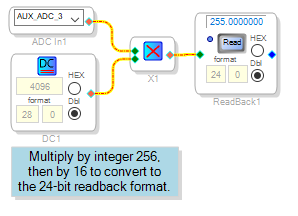
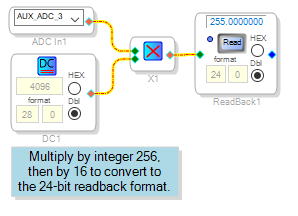
I couldn't figure out how to read the Register Control window -- in my case it stays at zero all the time -- so instead I made a project which looks at the Aux ADC output as it appears within the project. The 1701's Aux ADCs provide a 0 -- 1.0 decimal range, which we can convert to 0 -- 255 integer by multiplying times integer 256. We can then read back the resulting integer, but there's a catch: The 1701's readback truncates the last four bits, effectively dividing integers by 16. So the conversion multiple needs to be 256 x 16 = 4096, as shown below.
The ADAU1701MINIZ eval board has a pot wired to Aux ADC 3, so I can turn the pot slowly and see any number from 0 to 255 -- no missing codes. Thus, 8 bits of resolution.
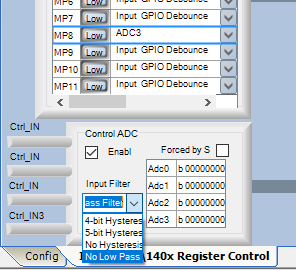
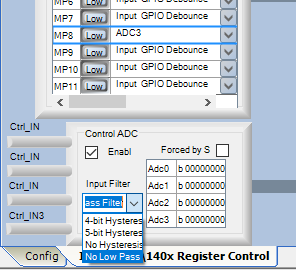
The observed resolution can be affected by the Aux ADC hysteresis setting -- you'll observe full resolution with the hysteresis switched off. Unfortunately the settings are labeled incorrectly. Thus to disable hysteresis, select No Low Pass Filter:
For more info on these choices, see: ADAU1702 hysteresis settings
Best regards,
Bob
Thanks Bob,
the 8 bit resolution readout works now.
The ADC (and other) registers in the Register Control window don't get updated automatically, so you have to press the "Read All" button in the top left. But there must be presumably a bug in the display, because there are still only 7 bits being updated.
Best regards,
Flavius
Please log in to reply.