.dspproj file will not open "Error reading graph from a file"
I am running SigmaStudio 4.1 on my Windows10 machine. I created a .dspproj project file and saved it but when I attempt to re-open the project I get the error below and the file will not open.
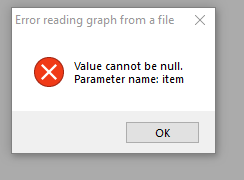
Error reading graph from a file
Value cannot be null.
Parameter name: item
Please help I put a lot of work into creating this project.
Thanks,
Rob
Hello Rob,
I am running SigmaStudio 4.1 and have a new Windows 10 machine and have not run into this issue. Can you upload your project so I can look into this further?
What cells did you use that are looking for a file?
Dave T
Hi Dave,
The file is attached.
Regards,
Rob
Hey, guys, this just happened to me too. Dave, were you able to help Rob, or what did you find? I tried to attach my file here but couldn't figure out how..
P.S. I downloaded and tried to open Rob's file as well, same thing. Sure hope: 1) that the file(s) can be recovered; 2) that when the project is rebuilt, that it won't do this again! Help, please.
Hello Rob,
I obviously missed your post way back in July. I went on vacation right about then and so this was missed. Sorry about that. It was not intentional.
I am certain this is too late but here is the file that is recovered.
The programmer who debugged it said it looks like it was from one of the AUXADC inputs. Perhaps it was not assigned to an input. But, that happens automatically so I am not certain what exactly caused it. We have your file so we can look into it a bit deeper.
Thanks for reporting the issue.
Dave T
CorruptedFileRPD recovered.zip
Hello Jim,
Attach your file and I will send it over to the programmer to trap the error and fix it. Then we can submit it to the main programming team to find the root cause.
Now this new EngineerZone platform has been a bit of a learning curve for me. There appears to be a bug when uploading files. It does NOT like the x.dspproj file extension and says there is an error. The workaround for the moment is to zip the file.
So pull-down the "Insert" menu and choose "image/File" and then in the window that pops up change it from Web link to be an Image/File and then clock browse and select the Zip file. You will have it from there.
So attach it and I will get it fixed.
Dave T
Hi Dave,
the same thing happend to me. Might it be possible to help me too? The code is not very complex, but some constants were found via trial n error. I'd rather have to do that again.
thanks a lot,
Best regards
3e-Stack.rar
Hello Lukas_Jani,
Here it is.
Dave T
3e-Stack Fixed.zip
Good evening, thanks a lot for the quick fix!
Hi Dave.
I have a problem similar to This one.
"error loading graph from a file , an entry with the same key already exists"
It is a prototype speaker project, with several hours of sound-tweaking, that suddenly didn't want to open anymore :(. Is it in any way possible to ask you to help me as well? I saved it using sigmaStudio 4.5.1 beta.
Is there a guide how to upload a zip file here?
Best regards,
Rune
Please log in to reply.