Sigma Dsp Compressor Level Readout
I am using the ADAU1452 processor and have implemented our dsp to be controlled via a Linux coprocessor. While all of this is working well the code export seems to be lacking. I am looking for the parameter addresses to read back things such as input, output, and compression levels displayed on a std rms compressor block and other level types in general. I know there has to be a readable address as sigma studio has to be able to access this data but I do not see any read back parameters. Any help would be appreciated as i would like to expose as much functionality as possible.
Thanks
ed
Audio Signal Processors
adau1452
adau1452 + mcu
SigmaDSP Audio Processors
Hello Ed,
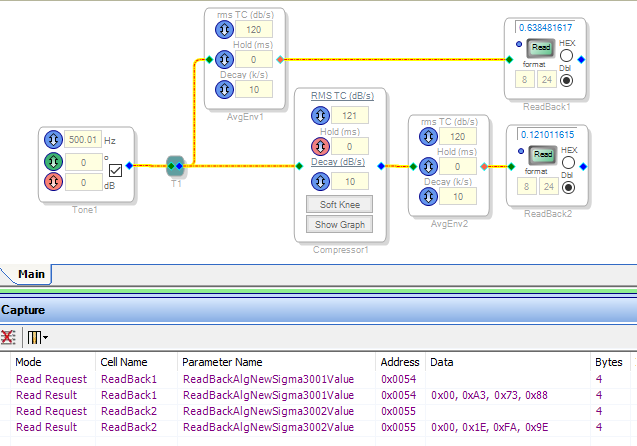
The Multiband RMS Compressor does show the levels via SigmaStudio, and while in operation I see the USBi's yellow LED rapidly blinking indicating data transfer -- similar to what we see when the Real-Time Display is in use. Unfortunately, the Capture Window shows none of this activity. And this is the only compressor that actually lets SigmaStudio know what's going on. The remaining compressors (such as the one shown below) do not send any data back.
The usual workaround is to read the necessary levels back yourself -- via Envelope Follower and DSP Readback blocks. Peak and RMS Envelope blocks are available. The AvgEnv one shown here appears to be average responding, as it yields a reading of 0.64 instead of 0.71 for a sine wave of peak value 1.0.
When you press the Read button(s), the Capture Window shows what your microcontroller needs to do in order to get the readings. You can then perform calculations to render the level data as your application requires.
Best regards,
Bob

Bob,
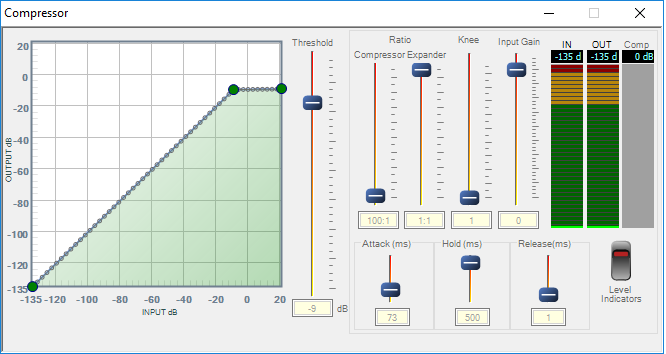
Thanks for the input but i was looking at this from a more programmatic implementation outside of sigma studio. I already use an average envelope to read the end level if our signal chain but this level does not appear to match the threshold values in the compressor. We are using the compressor with levels but when i look at the coefficient address output for the project I do not get the in out or compression level read back addresses. If that data is available to sigma studio it has to have a coefficient address and therefor should be exported for use programmatically. We are using sigma studio to generate our project but we are modifying the coefficients and reading back data from the DSP in linux and displaying on a web ui.. In the below compressor, which we are using, i see level windows but they are nowhere to be seen in the code. This can also be said of the level meters available in sigma studio. While these things are useful when using sigma studio i nee to access them from my code to see what levels the compressor is seeing as it does not seem to correlate with an avg envelope read back.
Hello emcnicholas,
I apologize for the delay and also that the person I need to ask about this is on vacation. But, I can get started on this and fill in some of the details later. This should be able to get you started.
If you look at the parameters window you will find the following parameters associated with the limiter that are shown in red below.
Parameter X is the upper word of the input data and X_lo is the lower word of the input data. (56 bits from the accumulator)
So this is what is being read by SigmaStudio for the input.
The "Y" parameter I do not know exactly what it is at the moment. It seems to be the output level but it only changes when the compression parameter is not "1". But the "Y" may be something different. It may be used for the bouncing ball display. In that case you can take the input data and apply the multiplication factor and then display that as the output level.
Note that the Compression parameter is in 8.24 format so as shown in the screen shot it is a "1".
In this example there is no compression happening so the compression is 1. This number goes down once there is compression. I suspect that this is the multiplication factor being applied to the incoming audio, in other words, the compression ratio.
The SigmaStudio GUI then will be doing a lot of calculations. It will be calculating the output level based on the multiplication factor being used on the input level. I am not sure if the integration is happening in the DSP but I think it is. Because the "X" data does not seem to ever go negative so that will make your programming easier.
You can use a DC source to look at the behavior. It stays constant that way. You can send the DC source through a volume control if you want to lower/raise the DC level in decibels.
So I am sorry that I do not have all the details right now, we try to chain the programmer to his desk but every once in a while he gets loose.
Please update us on your progress.
Dave T
David,
Thanks for the help this information is very useful and I can integrate it with the code i am developing. While this is helpful i do feel that it would be useful to export these parameters and addresses in the code generation process as this would make for a simpler integration. I will see if i can not find similar data points on other objects. Also if your developer could chime in on what the exact format of the data is that would be very useful. Looking at the data in compression both y and compression values match and are equal to the compression amount. I See the x parameter being split over 56 bits but how does that convert to a floating point value? Is it a 64bit float with the leading zeros what is the format?
David,
Just now looking at a level i have in my signal chain the code address for the level is 0 and the actual address of the x and x low is 73 and appears to be in the same 56 bit format.
Thanks,
Ed
Dave,
In analyzing the date i also noticed that x_lo in the read out never goes above 0x7fffffff which is odd if this is indeed the low word of a double precision value. Do we have any feedback on what format this data is in?
OK Dave doing some more digging today. The y parameter is input gain minus compression, and comp is the compression amount. I have also seen when i drive the input very hard the x_lo flips back and forth from 7fffffff to 80000000. I still can not determine a fixed point data format for the x and x_lo parameters.
Hello emcnicholas,
I am sorry about the lack of information. It is a tough time of year. The person I need to ask to get the definite answers is still on vacation. So today I had some time to look at this myself a bit further. By using a DC cell I was able to figure some of this out.
Let me start with the compression variable. It is in an 8.24 format so to convert it to a real number you will need to multiply the hex value by 2^-24. So that will give you the factor to use to multiply the input level to obtain the output level and then you can calculate the ratio between the two levels to come up with the amount of gain reduction being applied in dB.
The "Y" variable. For now just ignore this variable. I am pretty sure it is used for the bouncing ball in the display and we will be changing that in the future so don't use this variable.
Input level:
First, this level is definitely processed by an envelope generator. It is always positive and I also noticed that it does not have any resolution below -70. If a signal is at -70 it shows on the meter and if it is below that it goes to zero. However, in my testing I did notice that the meters in the GUI are not really correct. The scale seems to be compressed. I will bring this up with the programmer when he returns. The only way I can get down to -70 on the meters is to send it a -160dBFS signal from an oscillator. But, you need a meter so let's continue.
The X variable seems to be a 32 bit number that saturates when I send it a DC value of 128 in 8.24 format. This seems all correct. The X_lo value it seems like it is only using the top 8 bits of that 32 bit variable. The lower bits are either all zeros or all 1's or when there is no signal it sits at the value of 4 for some reason. But the top 8 bits are the only ones that seem to be holding a value. So I would combine then into a 40 bit number. It will be in 8.32 format so to convert it to floating point you multiply that by 2^-32.
If you do not care about the lower levels then you could simply use only the X variable and use it as an 8.24 number.
Dave T
Dave,
Thanks for the feedback i will look into that. I did notice that there is a good bit of inconstancy in the GUI feedback. I have been reading x as an 8.24 value and that does get you so far but it has to be divided by 2 it seems as from what i get vs what is on the scale. I tried 8.32 and the value still does not match the levels in the compressor. -34 in yields -72.38076510500011 db level in 8.32 and 8.24. I have noticed that when you drive past positive db on the input the x_low goes to -128 from 128 so i am having to assume this is a multiplier of some sort. I was able to get it to track close to the rms level by using 8.24/2 and multiply by 1.03 which is a good enough start but i would imagine that there is some fudging going on in the gui looking at the output.
Thanks
Ed
Dave,
I am also working on a project that is further out where we will be using the adau1701/2 in a similar configuration but for smaller devices. I was looking for the same parameters in the params for the 1701 and they are not included. I assume this has something to do with the split ram configuration so whenever your developer gets back feedback on that would be helpful too.
Thanks
Ed
Dave,
Still looking for a solution on this for the ADAU1701 as well.
Thanks
Ed
Please log in to reply.