Driving Multiple ADAU1452 from One USBi
Is it possible to drive multiple ADAU1452 from a single USBi and flash different configurations to each DSP?
Audio Signal Processors
adau1452
i2c
spi
usbi
sigmastudio
SigmaDSP Audio Processors
SigmaDSP
Show More
Hello sgoldburg,
Yes, you can. You can use two SPI latches to address the two different parts. You can program them both in SigmaStudio and it will download the two different programs to each processor. In SigmaStudio the "wires" will be a different color and it will not let you connect a signal inside one DSP to a signal inside the other DSP because that is impossible to do in the hardware. But, you can have both programs inside one project file which is really handy.
You should look at this document to see how to use the USBi to its fullest extent.
https://www.analog.com/media/en/technical-documentation/application-notes/AN-1006.pdf
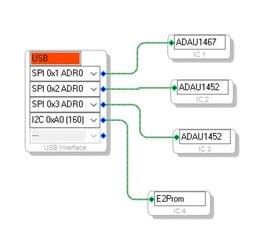
In your project configuration you would do something similar to this:
As you can see, you can even connect to different processors if needed.
Dave T
Thanks Dave. Can you point me to any resources beyond AN-1006 that detail the setup necessary to enable this functionality?
Hello sgoldburg,
This should be enough info. What is still not clear so I can focus on your application?
Dave T
Hi Dave,
It's mostly a question of implementation. I understand that I will need to de-solder the header / ribbon cable from the USBi so that I can access the additional SPI latch pads. I am wondering whether there are any off-the-shelf solutions like a passthrough header that will allow me to piggyback the two ADAU1452EVAL's from the USBi (w/ independent latch signals of course). Or perhaps an even simpler solution?
Thanks
Hello sgoldburg,
You will not need to desolder the header from the USBi. I had done a modification of a different eval board to be able to control two codecs using the additional SPI latches. I soldered a wire to the bottom of the board. You can see what I did in this document. I used a purchased single header pin to another single header cable and cut it in half. But that eval board had posts to connect to.
Mod for SPI Comms and codec control to Eval-ADAU1442Z.pdf
I was thinking you had your own hardware but you need to use two eval boards. So which eval boards do you have? We are updating some of the 1452 eval boards so I want to make certain which ones you have.
What you will most likely need to do is build a short ribbon cable with two male and two female connectors on it. So you connect the USBi to the male on the end. Then the ribbon will need to go to the first eval board. Then continue to the second male connector but you will have to cut the white wire ( number 9) which is the slave select for the first eval board. Then crimp on another male header to allow you to connect the second Slave Select signal onto the ribbon. Then the ribbon will continue to the last female connector that will plug into the second eval board.
If you have the EVAL -ADAU1452MINIZ then there is no way to interrupt the slave select signal between the USBi connector and the DSP. There are no resistors to lift, you would have to cut a trace and then try to solder to a cut trace. Clearly doing it on the ribbon would be easier.
If this is not clear then I will draw up a diagram and upload it.
Dave T
Thanks Dave, this was the info I was hoping for. Yes, I'm using two EVAL-ADAU1452MINIZ.
I understand the necessary connections but I'm a little unclear on your third paragraph outlining modifications to the ribbon cable. If you could share a quick sketch I would greatly appreciate it.
Hello sgoldburg,
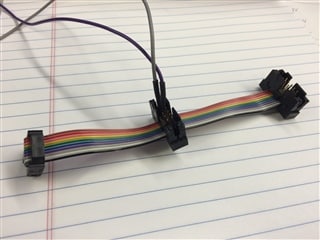
This is what the ribbon cable will look similar to. This one I use to connect a Beagle to monitor the transmissions but it will be similar to this.
You can see that I used some cables with sockets to connect to the pins. In this case I was connecting to the I2S pins but you will bring in the extra SS signal with one wire.
SPI Ribbon Cable adapter.pdf
The PDF above is my very fancy sketch of the cable.
I showed the cut in the cable as a small black rectangle and then detailed it below the cable drawing. This is to interrupt the first SS signal so you can insert the second SS signal in its place on the second eval board. I also included the part number for the pre-made jumpers. They are available on Digi-Key and probably other sites. I also have found really cheap versions on Amazon. Even at the higher price it is worth it.
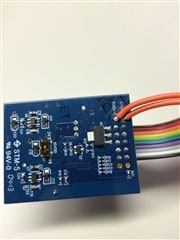
I cut them in half and then solder one side to the USBi to pick off the SS signal.
The picture above I connected two additional SS signals using the jumpers cut in half.
Let me know if there are some details I left out.
Thanks,
Dave T
This is great, thank you!
Please log in to reply.