ADAU1467 How to setup in SDATAIOx as I2S.
Hello,
I'd like to know how to set the SDATAIOx as I2S.
The configuration GUI of SigmaStuio4.1's SDATAIOx seems to be unable to use these pins as I2S.
Please let me know how to configure.
Thanks and Regards,
Audio Signal Processors
adau1467
sigmastudio
SigmaDSP Audio Processors
Hi.
There is a slight idiosyncrasy on the INPUT side only when using the SDATAIOx pins in I2S mode.
When assigning I2S signal inputs to SDATAIOx pins, the primary serial port must be set in TDM4 mode. This is counterintuitive, but I2S will be received correctly both on the main SDATA_INx pin and on the SDATAIOx pins assigned as inputs.
Please see the attached example for configuring the IO on the evaluation board.
Ken
/cfs-file/__key/communityserver-discussions-components-files/396/Example_5F00_IO_5F00_Project_2D00_EVAL_2D00_ADAU1467Z.zip
Hi, Ken
Thank you for your answer. (I'm working with takumi3952.)
Plerase let me confirm more.
>When assigning I2S signal inputs to SDATAIOx pins, the primary serial port must be set in TDM4 mode.
I can confirm that the primary serial port (SDATA_IN2) is set as TDM4 in your attached example.
In the other hand, the serial output port (SDATA_OUT0) is set as TDM2(I2S).
Why is it different in the output side?
I am confusing a little.
Best regards, TomY
The short answer is that this is a silicon anomaly. The functionality is all there, but the control registers are not implemented as intended. I apologize for the confusion.
Ken
Hi Ken,
Thanks for your reply.
I understood that it is a silicon anomaly.
Please let me know the schedule to be improved and updated the document.
Thanks and Regards,
Hi Ken,
I found the following article.
https://ez.analog.com/dsp/sigmadsp/f/q-a/64330/adau1467-can-t-set-sdata-io
According to this article, I can read that this problem is a SigmaStudio tool's bug and not a hardware problem.
Which is correct?
Thanks and Regards,
The answer in the link above refers to an older version of SigmaStudio that had graphics that were not correct. This has been fixed in version 4.2.
Ken
Hi Ken,
Thanks for your reply.
I tried using SigmaStudio 4.2. The screen is as follows.
This still can not be selected I2S mode.
I expect that I2S mode can be selected.
Is this a tool problem and my recognition that it is not a hardware problem (silicon anomaly) is correct?
Thanks and Regards,
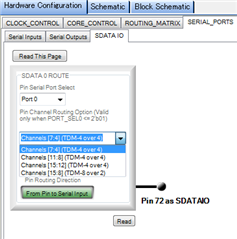
My answer above is correct. For I2S inputs on SDATIOx pins, TDM4 mode must be selected. In the thread that you referenced, please scroll down to the post by gotoh on Jan 16, 2018 6:01 AM . That graphic has been removed in later versions of SigmaStudio because the logic driving it is incorrect. Unfortunately, there is no plan to fix the silicon anomoly since there is a relatively easy (though not intuitive) workaround.
Ken
Hi, Ken
Is it possible to provide an anormaly list of ADAU1467?
I know that it is not available on ADI web site.
I want to grasp these informations.
Best regards, TomY
Please log in to reply.