ADAU1467 SigmaStudio4.2 The specification of each block in the toolbox
Hi,
I'd like to know the specification of each blocks in the SigmaStudio4.2 toolbox.
1. There are 2 Volume Control blocks as below. Please let me know clearly the difference between these specifications.
Volume Controls -> Adjustable Gain -> Clickless SW Slew -> RC Optimized
Volume Controls -> Adjustable Gain -> Clickless SW Slew -> RC Accurate
2. There is "Adjustable Gain -> Clickless HW Slew" block in the Tree ToolBox.
How do I change Tr / Tf ?
3. There is an item of "Adjustable Volume Control" when I look at the help of the SigmaStudio4.2, but that block does not exist in the Tree Toolbox of the actual tool.
Is this an item that does not already exist?
Thanks and Regards,
Audio Signal Processors
adau1467
sigmastudio
SigmaDSP Audio Processors
Hello takumi3952,
takumi3952 said:
1. There are 2 Volume Control blocks as below. Please let me know clearly the difference between these specifications.
Volume Controls -> Adjustable Gain -> Clickless SW Slew -> RC Optimized
Volume Controls -> Adjustable Gain -> Clickless SW Slew -> RC Accurate
The short answer is the RC Accurate is an accurate RC curve but it takes more MIPS to do it. The Optimized version is more of an approximation of an RC curve and uses less MIPS.
takumi3952 said:
How do I change Tr / Tf ?
I think you are asking for Rise time and fall time?
We had answered all of these questions in great detail about two years ago for another customer that your company supports. Do you have that information available? I will look back at some of my documentation, I think I still have it. This would have to be shared directly and not via the forum since it was in great detail.
takumi3952 said:
3. There is an item of "Adjustable Volume Control" when I look at the help of the SigmaStudio4.2, but that block does not exist in the Tree Toolbox of the actual tool.
Sorry, Can you show me which page of the help file you are talking about? I am not certain so I do not want to answer your question incorrectly.
Dave T
Hi Dave,
Thank you very much.
1 and 2 have been solved.
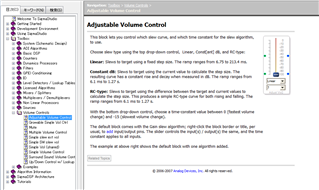
Item 3 is present in the help window as shown below.
This module does not exist in the toolbox of SigmaStudio4.2.
I guess this module is integrated into "clickless HW Slew" of "Adjustable Gain" in "VolumeControl".
Is my recognition correct?
Thanks and Regards,
Hello Takumi3952,
This description in the help file is a little old. I think this cell has been gone for a while. This functionality is still there for the hardware slew but it is not in a pull down box. I need to get a different screen capture program because I cannot capture pop up menus. So sorry I do not have a screenshot.
If you mouse over the lower part of the volume control GUI. Then right click and a menu will pop up. In this menu is a sub-menu called "Slew Type". Here is where you can set the slew type for the hardware slew. But I am not certain if you can change the slew time without writing directly to the memory.
Dave T
Hi Dave,
Thank you always.
Please let me know one more thing.
There is "DC Blocking" module in the Filter toolbox.
Please tell me the detailed specification of this filter.
Thanks and Regards,
Hello takumi3952,
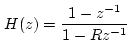
R = 0.9999 which is a cutoff of 0.1 Hz. at 48kHz fs. It does not change when the sampling rate is changed.
Dave T
Hi Dave,
Thanks you always.
I'm sorry for the basic question. My recognition is below.
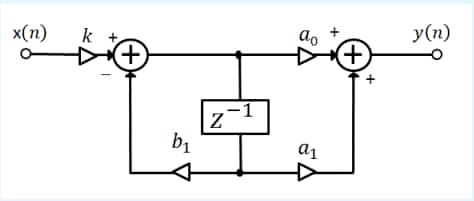
Is it equivalent to the filter like the below?
k = 1.0
b1 = 0.9999
a0 = 1.0
a1 = -1.0
Thanks and Regards,
Hello Takumi3952,
Yes, it is equivalent.
Dave T
Hi Dave,
Thank you always.
Please let me know one more thing.
There are 2 types of "General 2nd Order" filter in following document page.
https://wiki.analog.com/resources/tools-software/sigmastudio/toolbox/filters/general2ndorder
Please let me know about the following options.
"Coefficient Calculations on DSP"
Choosing this type of filter requires a lot of processor resources.
What is the difference in specification between "coeff calculation" filter and normal General EQ filter?
Thanks and Regards,
Hello takumi3952,
The coefficient calculator version will calculate the filter coefficients on the DSP when parameters are changed. So it requires a lot of resources to do this but it off-loads this task from a system controller.
With the normal General Filter EQ, the coefficients for the filters have to be calculated on the system controller (or SigmaStudio) and then safeloaded into the DSP. So only the filter coefficients and the filter formula are stored on the DSP. So if changes need to be made during operation the system controller must either calculate new coefficients or retrieve stored coefficients and download them to the DSP.
You can see SigmaStudio do this by watching the Capture Window while changing a general type filter GIU on the screen. You will see all the coefficients being downloaded. With the Coefficient Calculating type all you see are parameters being transferred.
Dave T
Hi Dave,
Thank you always.
I understood very well.
Regards,
Please log in to reply.