ADAU1457 Sigmastudio4.2 How to export filter coefficients
Hello,
1) The filter coefficients aren't exported by default.
Is there any way to include filter coefficients in exported files?
2) In addition, the block name and parameter name described in each exported file are automatically defined.
Can I define these names user-defined?
Thanks and Regards,
Audio Signal Processors
adau1467
sigmastudio
SigmaDSP Audio Processors
SigmaDSP
Hello Takumi3952,
I am not sure which files you are referring to? When you output the System Files you do get the filter coefficients. It is not an option.
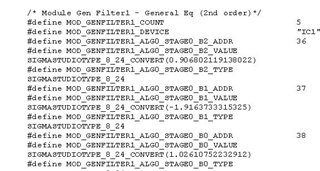
Look inside the "xxx.params" file. Here is a sample:
As you see the filter coefficients are shown.
For your second question, Yes, you can define the block name. The parameter name you cannot change.
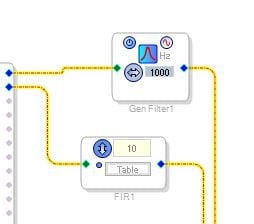
Here is an example:
Above you see the default names.
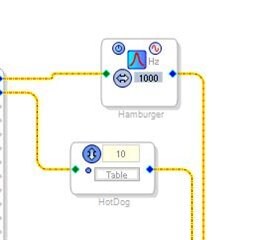
In the SigmaStudio schematic you click on the name and change it.
Below you see where I changed them. You can also tell it is close to lunch time for me. :)
These new names will appear in the system files outputs and in the params window in SigmaStudio.
Be careful to not make the names too long because it will make the entire name in the exported files really long.
Also, another good feature in SigmaStudio is the ability to exclude a block from the export files. If you right-click on the block in SigmaStudio you will see an option to exclude from export files. This will reduce the size of the output files by removing objects that will never need to be controlled or monitored from an external controller. Personally I think all blocks should be excluded by default and then you select what you want to include in the files. That is usually the shorter list. However, right now SigmaStudio includes all blocks in the export files.
Dave T
Hi Dave,
Thank you always.
There is a file like "ParamAddress.dat".
The name of the contents of this file cannot be user defined.
On the other hand, the content of "xxxx_PARAM.h" file has been changed by user definition.
The "ParamAddress.dat" file is not affected, but the "xxxx_PARAM.h" file is affected.
Is my recognition correct?
Thanks and Regards,
Hello takumi3952,
You are correct, the full file extension is xxx.params.h
Sorry about that. Typing too fast sometimes.
Dave T
Please log in to reply.