ADAU1467 SigmaStudio4.2 The difference between two filters
Hello,
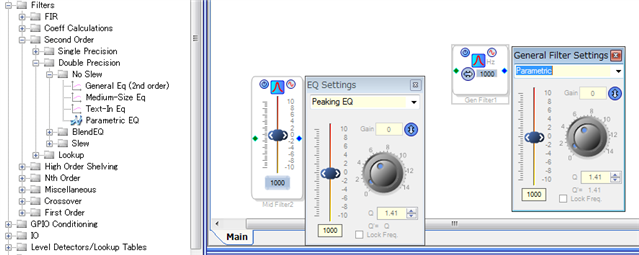
There are two filters as follows. General Eq(2nd order) and Middium-Size Eq.
Please let me know the difference in specification in detail.
These seem to be different in memory usage etc.
Basically it seems to be the same IIR filter, is there a difference in detailed specifications?
Thanks and Regards,
Edit Notes
added filter name.
[edited by: takumi3952 at 9:30 AM (GMT 0) on 5 Feb 2019]
Audio Signal Processors
adau1467
sigmastudio
SigmaDSP Audio Processors
SigmaDSP
Hello Takumi3952,
The General EQ has many more options for filter types. The Medium EQ is only a Peaking or Shelving. These differences are only in the SigmaStudio program GUI and not in the DSP code. If you set them to the same type of EQ with the same settings you get the exact same resulting EQ. The memory footprint and instructions cycles are exactly the same. The parameters and filter coefficients are exactly the same.
The only difference is in SigmaStudio GUI. The Medium has the gain control handy on the front of the GUI rather than having to click on the blue square to open up the controls. So it is only a user interface difference.
Dave T
Hi Dave,
Thanks a lot.
There is one more question.
In this module I can define the max and min limit of the gain as follows.
Is there any limit value on the max limit?
It seems that about +6dB is the max limit. Is it correct?
Thanks and Regards,

Hello takumi3952,
If you are talking about the slider parameters that you have opened up, that number limit is very high. For a test I put in a boost of 100dB and it worked fine. I took an oscillator and reduced the gain by 100dB and then the EQ boosted it back up to 0dB.
I experimented some more and the GUI lets me set a limit of +200dB but it only lets me actually set the filter boost to +167dB before giving me a computational error. This is certainly not a problem. If that much gain is required then there are other issues with the design.
The "Gain" parameter in the small box to the upper right of the GUI has a limit of +-15dB. This may be a holdover from the older SigmaDSPs that used a different number format with only four bits for the whole number portion of the fixed point number. This still should be plenty for most applications. If more broadband gain is needed then a simple gain block before or after the EQ can be used.
Dave T
Hi Dave,
Thank you always.
I also made an experiment and understand roughly.
It is also possible to gain +100dB as computing ability.
However, if the amplitude of the input data is too large, the output is not linearly expanded.
My understanding is correct?
Thanks and Regards,
Hello Takumi3952,
Of course it is too large for most levels. I was demonstrating that SigmaStudio will calculate the filters that can do things that do not make sense. So SigmaStudio is not limiting the filter. It is up to the user to setup the gain structure to work properly in their application. If you have a signal level at a "1" in 8.24 signal. This would be a full scale 24 bit number transmitted into the core and then the extra bit is added to the LSB side and 7 bits are added to the MSB side to make an 8.24 number. So there are 7 bits of headroom. So that equates to 42 dB. A boost above 42dB will clip the signal. Then it becomes non-linear.
So if you boost a signal up close to the +42dB level, then the signal will have to be reduced before being transmitted out of the core back to the 24 bit domain. So the user must build their application to account for the headroom limitations.
If the input signal is really small, -20dB from 0dBFS in a 24 bit signal as an example, Then you could boost it 62 dB before it will clip.
You really want to avoid clipping in the core since it will create harmonics that are above the Nyquist and will alias when sent to a DAC.
So you can sum up many channels in the core and most likely will not clip the signal since 42dB is a lot of headroom. Then you must gain the signal down before sending it out of the serial ports. Most people use limiters to do this. It is a good idea to use a limiter at the very output of the core to limit the signal to a 1.23 number. In the core this would be less than a "1" in 8.24 format.
Dave T
Please log in to reply.