ADAU1467 SigmaStudio4.2 How to output audio data from the SDATA_OUT1 pin
Hi,
I'd like to output audio data from the SDATA_OUT1 pin.
Please let me know the method of hardware configuration.
The data sheet has the following description.
SDATA_OUT1 : Serial Data Output Port 1 (Channel 16 to Channel 31). Capable of 2-channel, 4-channel, 8-channel, and 16-channel modes.
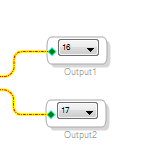
So I set the output to ch16 and ch17 as below.
Unfortunately it seems to output no data.
I'd like to output it with I2S very simply.
Can you let me know?
Thanks and Regards,
Audio Signal Processors
adau1467
sigmastudio
SigmaDSP Audio Processors
SigmaDSP
Hello Takumi3952,
I think you are using an evaluation board. I would like to be certain what revision you are using? There is the part number then right below it is the Rev and another number that is a date code. Can you give me the numbers?
So I will guess about your board. I think the issue is that the serial port 1 does not come out on any of the 3.5mm outputs on the evaluation board you have. That output goes out to a header to go to the Mic Canvas board.
Send me your project and if you are slaving to something external to the eval board? There are so many ways to configure these ports that I need a little more detail to be really helpful.
(If you attach a project you must Zip it first.)
Dave T
Hi Dave,
Thanks for your reply.
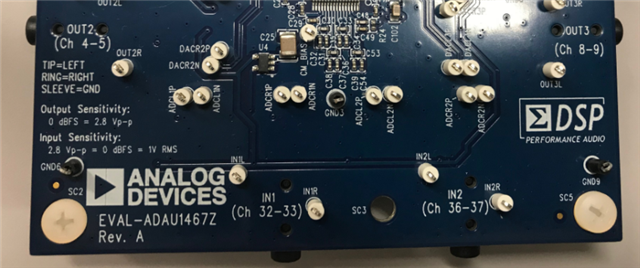
Yes, that is a problem on the evaluation board. The photo of the board is below. Is the information sufficient?
I know that SDATA_OUT1 serial output is not output from analog 3.5mm plugs.
I think that the serial signal is output from the J11 PIN_HEADER.
In case of MIC CANVAS, which pin is output?
I will attach a project.
I'd like to simply output the internally generated sine wave from SDATA_OUT1 by I2S.
Design5_Q37.zip
Thanks and Regards,
Hello Takumi3952,
The SDATA_OUT1 pins do not appear on headers in this revision of the evaluation board. This oversight was corrected in the more recent revisions.
You can find the signals on the SDP connectors. You will have to solder small wires onto the SMT pins of the connector to bring out the signals. The pins are detailed in the schematic and the schematic is available on the Web page for this evaluation board.
Dave T
Hi Dave,
Thanks for your reply.
I checked EVAL-ADAU1467Z-UG-1134.pdf on the web.
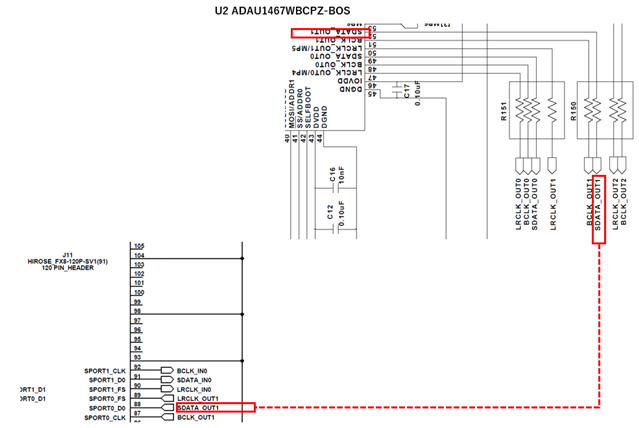
The connection of SDATA_OUT1 is shown as follows.
Is this schematic mean that SDATA_OUT1 is connected to J11 pin header? Is this incorrect?
Then, do the project I attached last time have a mistake?
Specifically, to output from SDATA_OUT1 What output is needed in the project?
What number pin does it appear on the device?
I am sorry to have asked a lot of questions.
Thanks and Regards,
Hello Takumi3952,
If you want to output to SDATA_Out_1 then you have the correct port numbers, 16 and 17. You have found where you can solder a wire to on the eval board to get that signal.
If you want to output to one of the audio jacks using the codec on the eval board then you have to use serial ports 2 or 3.
Serial port 0 is used by the mic canvas board and will appear on those headers. This should all be detailed in the schematic. Sorry, I don't have time to look up all the details. I wanted to have a reply back to you today so you would have it in the morning your time.
Dave T
Hi Dave,
Thank you always.
I just want to know the way I2S signal will output from SDATA_OUT1.
Please let me know the pin number to observe.
Thanks and Regards,
Hello takumi3952,
I am confused by your question?
The answer is in the diagram you provided. Pin 52 of the DSP but I think it would be easier to look at the signal on R150. The connector J11 is on the bottom of the PCB and it very difficult to find the correct pin.
The signal also appears on the similar connector J2, in the top of the PCB but on a different pin. So I suggest you look for the signal on R150.
Dave T
Hi Dave,
I am sorry if my question is confusing you.
What I want to do is simply to output an audio signal from SDATA_OUT1 and observe it.
Please let me continue the discussion a little more.
I'd like to confirm the setting method in SigmaStudio for outputting I2S signal from SDATA_OUT1.
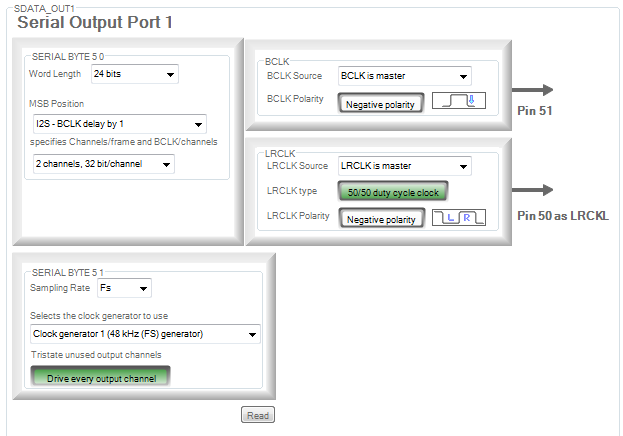
By default, it is set as follows, BCLK is output from Pin 51, and LRCLK is output from Pin 50.
Is there any problem as it is?
To output an audio signal from SDATA_OUT1, use output 16 and output 17 in the schematic.
These outputs are connected to the Pin 52.
Is there any problem?
However, I tried it in the above way, but I could not observe anything from pin 52.
So, I guessed that I mistook the pin number to observe.
Assuming that the settings in SigmaStudio and the pin numbers to observe are correct,
I do not know how to get the output from SDATA_OUT1.
Thanks and Regards,
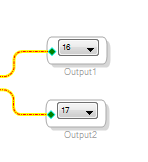
Yes. SDATA_OUT1 is pin 52, and you should send stereo data (I2S) to channels 16 and 17. If you would like to upload your project, I would be happy to have a look.
Note that evaluation board for this part does not use SDATA_OUT1 to feed DAC OUT2. As seen in the silkscreen, channels 4 and 5 are sent to that DAC using one of the SDATAIOx pins.
Ken
Hello takumi3952,
I think I understand now.
Your settings are all correct.
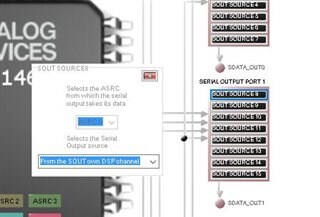
Once more place to check is in the routing matrix. There you can shut off a serial port or take the data from a different place. Make sure it is getting its data from SOUT of its own DSP channel.
Here is a screenshot. This is on the Routing Matrix tab:
See if this have been set to something besides the default.
Dave T
Hi Ken,
Thanks for your reply.
I uploaded the project file.
Since the sound source is internally generated, it is only necessary to check the output.
Basically it is the default setting. Why I cannot observe the output?2021.Design5_Q37.zip
Thanks and Regards,
Hi Dave,
Thanks always.
I confirmed it is basically default setting.
Thanks and Regards,
Hello Takumi3952,
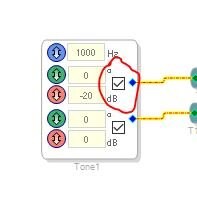
I think I found the issue. The oscillators were not enabled. The project had them off and when I turn them on I see output from Serial Port 1.
The original oscillator GUI had the button labeled as "enable", When the GUI was expanded to have phase and gain the label was removed.
Dave T
Hi Dave,
Thank you.
It was very successful.
Regards,
Please log in to reply.