Square / Sawtooth / Triangle Wave Frequency Control
I've just started learning SigmaStudio, using the EVAL-ADAU1701MINIZ, with the end goal of creating a mini synthesizer with external controls.
One requirement is external control of the frequency of square / sawtooth oscillators via a potentiometer. There is a VCO component, however this only controls a sine wave.
I'm aware that using information from the Capture Window, external I2C commands can adjust the frequency, however I am wondering how I can link this to inputs from a potentiometer? Perhaps using the SigmaStudio scripting engine?
Cheers.
Edited title and tags to better reflect the question and answers received
[edited by: Daz3 at 5:58 AM (GMT 0) on 13 Mar 2019]
I have just discovered that Pulse waves can have control signal inputs that can vary the frequency, so that solves square waves
I suppose now my question is how other shaped waves, such as triangle waves and sawtooth waves can have their frequencies changed by control signals?
Hello Daz3,
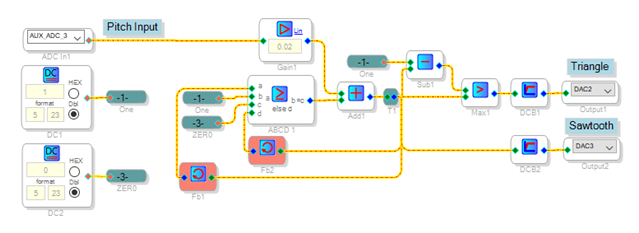
You can build a VCO-like circuit that makes sawtooth and triangle waves. An example is shown below:
The heart of the sawtooth oscillator is the feedback around Add1 which adds the scaled Pitch input to itself -- the adder's output accumulates with each sample interval. Once it reaches 1.0, comparator ABCD1 breaks the feedback and the ramp repeats. More input makes the ramp rises faster, and thus the frequency increases.
Sub1 inverts the sawtooth wave and Max1 selects the higher of the rising and falling sawtooths to produce a triangle wave. The DC Block Filters AC-couple the output waveforms.
Best regards,
Bob
Saw-Tri_Gen.zip
KJBob, you are a legend and a scholar. This is exactly what I was after, it works perfectly, and your explanation is fantastic. You have my gratitude.
I suppose my only other question is how were you able to come up with the answer? I'm still new to SigmaStudio, and I find the interface and logic flow somewhat less intuitive than sequential code. While I'm grateful there are tutorials, I find them somewhat brief in their overview of what is possible. I saw your example of possible synth as an answer to another question, and while again well described and performing very well, it is quite difficult to see the flow of logic in the system. Are there any tutorials you can suggest, or is it just a case of "practice makes perfect"?
Many thanks again,
Daz
Hello Daz,
KJBob is a legend on this forum.
When I first started learning how to program using SigmaStudio, what helped me was to understand that the flow you see is executed every sample period. So the number being manipulated is a single sample so it is a snapshot in time. Then after that being aware of the number formats is important.
Learn to use the Capture window and the Params window to "see" what is going on to control the objects running in the DSP. Then learn to use Readback and Level Displays (meters) in your project to "see" what is going on in the DSP. Then you can see a little better what is going on in the program and figure out why something is not working like you think it should. You can test small parts of a program as you build a larger program. However, like you said, practice makes perfect. It is a bit of a learning curve. But, if I can do it, you certainly can.
Then most important... Follow KJBob in the forum! :)
Dave T
Wow, thanks for all the compliments! Dave T. has been providing some really good answers; often on the I2S stuff and the higher-end products I haven't figured out yet. These answers deserve more "likes," yet I can't find the "like" button in this Telligent incarnation of EZ (it's in here somewhere...). Meanwhile. I tend to specialize in cramming as much as possible into the humble ADAU1701 because it's what we're using in products where I work -- and because it's just plain fun. To amplify Dave's excellent remarks above:
Some blocks such as index filters and multiplexers expect integer (28.0 format) control inputs, others such as external volume controls, use decimal (5.23 format). Absolutely learn the number formats --.See this explanation by the legendary Brett G. Brett was the SigmaDSP support engineer during my own learning curve.
Dave suggested you test unfamiliar processing blocks in small signal flows -- no doubt you have already done this in your computer work, trying out new function calls and etc. Same idea.
When you change the dialog entry into (for example) a sawtooth oscillator which lacks a control input pin, you'll see the resulting change in the Capture Window -- the new corresponding parameter value and its address. You can have your system's microcontroller safeload this by I2C to make the same setting. This is very efficient, since the sawtooth oscillator uses fewer instructions than my circuit above. For me the I2C thing took forever to figure out, but that's because my C programming experience is mostly chasing lost semicolons. Searching EZ and the doc wiki will likely provide sufficient help for those who are more uC savvy.
The Real-Time Display is great for slow-moving control signals. To see an audio waveform inside your signal flow, bring it out to an unused DAC and scope it. You may need a simple RC filter to get a clean waveform on the scope, or perhaps the filter in your scope will do. Also remember that the ADAU1701's DACs invert their signal.
So go ahead, make all the beginner's mistakes as everyone has before you, and you'll be up to speed shortly. SigmaDSP -- it's more fun than riding a Parasaurolophus!
Best regards,
Bob

Hello Bob,
The "like" function is hidden at the bottom of the post. It is the number with the up and down arrows next to it. I think it also serves to validate the answer and bump it up in priority. I would still prefer a simple "Like" button but this is progress. :)
Dave T
Thanks!
Thank you both so much for the replies. I've seen you both lurking about the forum being dangerously helpful to everyone, and I really appreciate it.
I'll be sure to try build everything up slowly and use the DSP readback and Real Time Display to my advantage, and also bust out the scope. Hopefully in time it'll click, and I'll get some banging filthy synth sounds coming from that wee DSP.
Thanks again. Also I read that dinosaur article Bob and it's brilliant. However I felt that the Parasaurolophus was missing a hat, so I took the liberty of lending it my top hat. I must say it looks rather dapper.

Neat hat! Would go well in the civilized areas of Dinotopia.
Best regards,
(Bob)

Please log in to reply.