How to use 1452 or 1701 make a signal level detector to make LED has different brightness while signal strength change?
Hi,
I want to use 1701 and 1452 to make a level detector to detect the signal strength,
but I don't know how to use blocks to make led brightness will follow the signal strength.
The led brightness level will follow the signal strength, if signal is stronger the led will more bright, the other side, the lower signal level will cause lower led brightness
(I think this may use the PWM to make led bright level)
any tips for making this function?
Thanks!
BR.
Audio Signal Processors
adau1452
led
level detector
sigmastudio
SigmaDSP Audio Processors
pwm
SigmaDSP
adau1701
Show More
Hello Alvis,
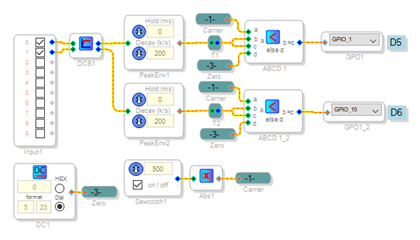
PWM can be done by comparing the signal in question to a ramp or triangle waveform. The example shown below performs this function. Incoming audio passes through a DC Block Filter to remove residual DC caused by the A/D converters -- use this filter anytime you're making level measurements; otherwise this DC, which typically measures about -45 dB, shows up with no input. Peak Envelope blocks measure the left and right signal levels. The Sawtooth Oscillator's output goes from -1 to +1; taking its absolute value provides a 1 KHz triangle wave spanning 0 to +1. The two ABCD Comparatorsperform the PWM -- I show their logic inverted simply to make the schematic appear neater, and re-using the level signal for the logic "high" level saves a DC source. The GPIOs accept any nonzero input as a logic "high." The attached project runs on a ADAU1701MINIZ board.
Best regards,
Bob
PWM-1701-Level.zip
Hi Bob,
Thank you for your reply,
I have tested on my evb, and I changed to the single channel, and it works well.
very appreciated!
Hello there,
If I want to make a signal light and a peak light, use two IO ports to connect a two-color LED. When there is a signal, one IO port outputs high. When the signal reaches a certain level, the other IO port outputs high. At this time, the signal LED output Low level? Note that I don't need PWM.
thank you very much!
Hello,
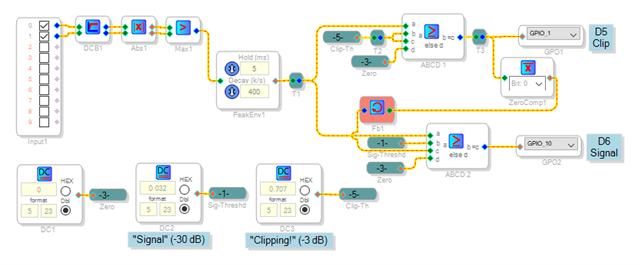
Your desired circuit features three output states -- No signal, both outputs Low, LED dark. A normal signal drives the "green" output High. An excessive signal drives the "red" output High and the "green" output Low, reversing the LED polarity so it lights red. One way to perform this logic is shown below:
Taking the Absolute Value of the Left and Right signals rectifies them into peak levels. The Max block selects the higher of the two. The Peak Envelope block stretches the peaks into a smooth envelope. Sharing this block instead of using one for each channel saves about 15 instructions. Comparator ABCD1 lights the red LED for a level of -3 dB or higher, set by source DC3. Comparator ABCD2 does the same for the green LED, except its output is allowed High only if the Clip output is low -- this is accomplished by ZeroComp1 and Fb1.
Level-Clip_LEDs.zip
Best regards,
Bob
Hello.
Thank you very much for your prompt reply. I forgot to explain that I am using the ADAU1451. I know that these settings are basically similar, but there are still some differences. The main reason is DC. I don't know what format to set. What is the value?
Also, when I use the ADAU1451, I want to adjust the EQ, treble and bass through the ADC port. Using the same method as 1701 does not work at all. Please advise again, I am grateful!
Hello zlb898,
Since the -1451 is more powerful, there's several differences to be aware of:
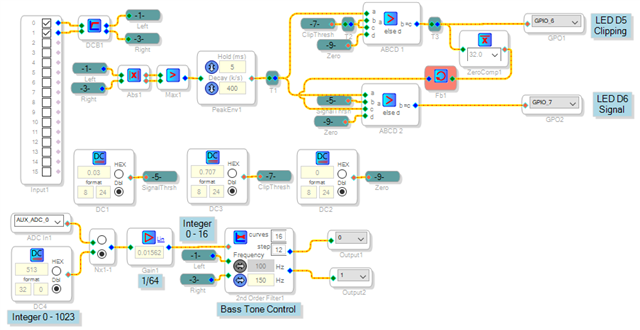
Number Formats -- The ADAU1451 handles 32-bit numbers compared to 28 bits for the -1701. Thus the integer format is 32.0, akin to the 1701's 28.0 format. Audio signals are in a 8.24 format. Compared to the -1701's 5.23 format, you get one more bit after the decimal point and three before. This provides twice the resolution in the audio signal range where +/- 1.0 is still full scale, and a whopping +/- 128 for internal calculations. To recap, your "analog" format is 8.24, and your "bit" format is 32.0.
Auxiliary ADC -- The ADAU1701's aux ADCs resolve to eight bits and convert to a 5.23 format analog signal. A full-scale input provides a 1.0 decimal output. The ADAU1451's auxiliary ADCs operate much differently. They have ten bit resolution, converting to an integer result (0 -- 1023 in 32.0 format). This turns out to be more convenient when you're having the Aux ADC driving an index filter or a standard lookup table -- both of which working with integer inputs. For example, if your Aux ADC is driving a 33 value lookup table, multiply the Aux ADC output by (32 / 1023 = 0.03128).
The LED level sensing is the same as the ADAU1701 example, except for the number formats. The bass control shown operates with the Aux ADC's 0-1023 integer output -- since the ADAU1452MINIZ board has no pots, I tested it with a DC source instead. Hope this helps...
1452-AuxADC.zip
Best regards,
Bob
Hello Bob,
I have verified all of this, the DSP works very well, thanks again for your support, the current product can meet the requirements. But I want to know more about RAM information, DM0 and DM1, I look at the compiled output, DM1 is allocated a lot, DM0 is very small, even if I increase the delay amount, DM1 overflow will not be automatically assigned to DM0, how can I manually assign these ?
Best regards,
Liangbin

Hello zlb898,
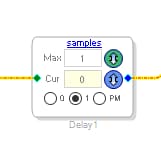
The delay cell has buttons for choosing which memory it uses. You can use DM0, DM1 or PM (Program Memory). If your program has lots of loops and is not really big then there is often lots of unused program RAM so this is a useful feature.
Dave T
Hello Dave,
Sorry, I didn't notice 0 and 1 below the delay unit. This design is very good. In fact, I just use the delay to explain how to allocate RAM. The problem I encountered was that I used the ADAU1450 to perform the reverb function. I found that RAM is not enough. Later I changed the ADAU1451 to solve this problem. Can I use the PM of the ADAU1450 as a reverb? This means I can save costs.
Hello zlb898,
If you have a lot of unused program RAM then yes, you can use it. The 1450 has a lot less data memory so it is a huge step down if memory size is important to your application. So this all depends on how much delay you need and the size of your program. The 1450 is also running at half speed so it can only execute half the program length.
Dave T
Hello Dave,
You mean I can use the ADAU1450 to perform reverb. How to assign reverb to PM? My program is very small. I just need to know how to assign reverb to PM.
Liangbin
Hello zlb898,
You select the "PM" button instead of the "0" or "1" buttons.
Dave T
Hello Dave,
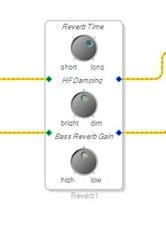
I didn't find a place to choose. Maybe you didn't pay attention. I said Reverb, not a delay.
Liangbin
Hi Bob,
If I want to make more limit on signal detect (PWM light function),
like I want to avoid the noise, because the noise will make led has a very weak brightness on LED.
the only way is adjust the DC1 block? (I mean the 5.23 format block)
or anything that I can change?
Thank you!
Hello Alvis,
The triangle wave "carrier" signal sets the PWM min and max levels. Presently it ranges from exactly zero to one. If you raise this waveform off the floor by adding a small DC level, then the PWM will ignore tiny amounts of audio. For example, inserting an adder and a 0.01 DC source between the Absolute Value block and the comparators would provide a -40 dB floor before the LED would light.
Best regards,
Bob
Hello Bob,
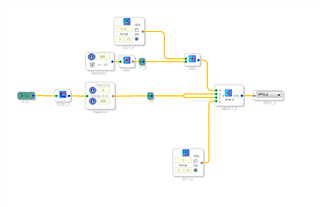
I follow your advise and I adjusted the pwm cell to this:
the adder is at the top side and it add with the sawtooth (after absolute value),
I am not sure this is correct, but it works!
thank you!
Sorry, I thought you might have been using delay lines to make your own reverb. I did not pay attention.
As you see, there is no choice on that cell. The feature of using the PM for delays is new. This is a good thing for me to suggest as an update.
Thanks,
Dave T
Hello
How to use delay to produce reverb effect? You have a recommended solution and I can try it.
Can you send me more reference routines? Currently we mainly use ADAU1701 and ADAU1451.
Sorry for asking a lot of questions.
Thanks,
Liangbin
Hello Liangbin,
No problem with the questions, you can keep asking them! I do not have any reverb solutions worked out so I cannot help you with that. The 1701 does not have enough memory and processing power to make a decent reverb but the 1452 has more capability and the 1466 has even twice the memory of the 1452. The 1451 is a little limited as well. Making a good reverb is all about getting many reflections at different times and so the more delay memory the better. I would guess there are some discussion boards on the web about how to construct reverb algorithms. The 1452/1466 family of parts do come with a reverb cell in the library that you already found. So that would save you a lot of time unless you are looking for more control of the reverb.
Dave T
Hello zlb898,
The ADAU1450 and 1451 both do not have a huge amount of Program RAM. So this will all depend on the size of your program as to if you can get much of a delay from the PM. All of these parts are pretty much compatible so if a cell works for one it will work for all of them as long as there are enough resources in the part.
Dave T
Please log in to reply.