ADAU1467 To write data to any address of SigmaDSP from SigmaStudio GUI
Hi,
I'd like to write data to any address of SigmaDSP from SigmaStudio GUI.
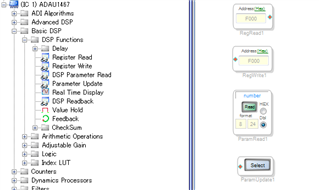
The following modules (Register Read / Register Write/ DSP Parameter Read / Parameter Update) are in the ToolBox.
Can they be used for that purpose?
If it can be used, please let me know how to use it detailed.
Thanks and Regards
Audio Signal Processors
adau1467
adau1463
sigmastudio
SigmaDSP Audio Processors
SigmaDSP
Show More
Hello Takumi,
Here are a couple of quick examples of their use. These examples are here to show the functionality of how they work but the actual program is very simple and on one case it would not be required to use this method. For instance, why would you use a DC cell to change another DC cell. It makes no sense since you would simply change the target DC cell! But it shows how it works, the data that changes the parameter could come from calculations or other data driven source. In the right application this can be a very powerful feature.
Dave T
3146.ADAU1452 Parameter Update Selecting an Osc.zip
ADAU1452 Parameter update using RegRed rough Example.zip
Hi Dave,
Thanks always.
I'll refer to the provided project.
I have a question about "Register Write".
Is it possible to write data to any address using this block?
If you have a sample, can you share it?
Thanks and Regards,
Hello takumi3952,
No, it is designed to write to registers. Registers are 16 bit locations and the rest of the memory is organized as 32 bit memory so it causes problems.
If you need to write to any address, generally, the parameter update can be used. You just have to find the parameter you want to change. The GUI helps you locate the object once you have compiled and then it will store its address in memory.
Now, if you want to write to some other address that has nothing to do with any parameters (I do not know why you would want to do that?) but if you have a microcontroller in the system you can write into the parameter update cell a new memory address to update.
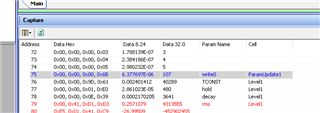
Look at this screenshot. I highlighted the address of the Parameter Update cell. The only data it has is the address of the parameter to update. So simply change the address and it will now be writing to another address that is different from the one it was pointed to when the program was compiled. This does allow you to change the parameter it is pointing to if you have the address of this other parameter.
Now there is one thing I am not certain of. For the ADAU1467 the memory has other pages. I am not certain if this will work properly if the address is on an upper page of memory. Ken will have to answer that one. I will look into it when I have time.
Meanwhile, can you tell me what the purpose is? What are you trying to change?
Dave T
Hi Dave,
SigmaStudio Wiki mentions Reading- & Writing-Cells are for ADAU145x only:
Background: I ported a a ADAU1452 schematic to an ADAU1463 and the RegisterRead didn't work :-( That's how I got to this Q&A.
Thanks for your help,
Tom

Hello Tom,
I just took a quick look at your question. If you ported the program and did not make a lot of changes it should still work.
You will have to recompile then go back and setup the Parameter Read cell again. This is because the compiler might put the data at a different address so you have to compile then the parameter cell will have the correct addresses to use so it is a two step process. Compile, set the address then compile again.
The ADAU1463 has paged memory but you should not be running into that issue if your program is the same. The two cores are interchangeable.
It might be good to attach your project but I need to mention that I may not see it for a while. I am about to head out to pack and get ready for my flight back home this evening. I have been in India for almost two weeks. I arrive home late on Friday but then all next week the entire company will be shutdown for a cost saving measure. So I will not be back in the office until after labor day.
Dave T
Hi Dave,
No worries, take your time.
Coming back to your answer. I will attach the project. Just to mention: It works... except the register read. For whatever b...y reason. I did as told, compiled, set address, re-compiled. Even deleted the cell and placed it from scratch. By the way the SPDIF register addresses I'm using are identical to the ADAU1452 (F600+)... makes it even stranger. For example: checking if SPDIF_RX is locked (F600 B0) gives 00 00 00 00 and so on. But it is locked, as I get sound at SPDIF_TX ;-)
Have a good rest,
Tom
ADAU1467 EVAL SPDIF Noise Gate inkl. SPDIF_TX_EN and pusing LED (green), 96kHz, Simple Schematic REYT 20230824.dspproj
Hello Tom,
The register read cell works as expected for me. I'm reading the same register F600. It shows '1' when successfully locked to the input stream and become '0' when I disconnect the cable.
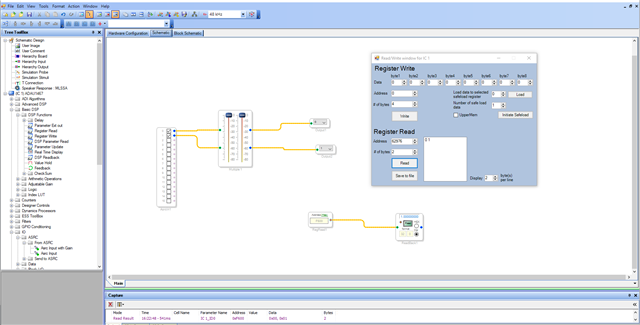
You can also read the registers by right clicking the processor block>> Read/write registers window will open like below.
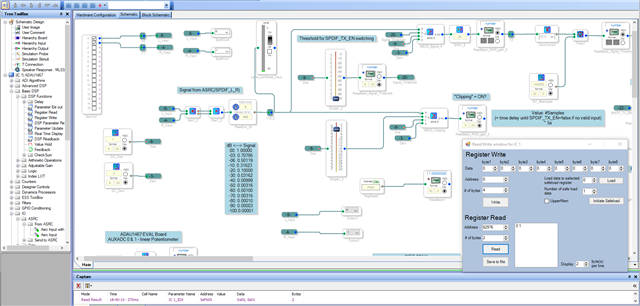
I have tried your project and this block read the correct value. please see below.
So, I'm wondering what the issue in your end might be. Every read and write work well with that USBi and only this block is a problem right?
Did you create a basic project and try to read some basic registers like PLL lock?
One other thing that I noticed in your project is that your software fs is set for 96KHz, and your core is still running at 48KHz. You will get into timing related issue if you use modules which need time reference like filters, compressors, timers, tones etc..
Regards,
Harish
Hi Harish,
Thanks for looking into it. I took your advice and built a new project. It works well and guess what, when I opened the old one it works well too. I feel like being a rookie :-(. I have no clue what was going on. No release change or whatsoever. Just opened the project again (after I ran the new one) and there it was... working.
Regarding the 48kHz: You are referring to Clock Generator 1 N=1/M=6 iso N=1/M=3?
Thank you very much,
Tom
Hello Tom,
Something might have gone wrong before, I'm glad that it works well now.
What I have seen in your project is that your software fs at the top of sigma studio is set for 96KHz but your CG1's ratio is N/M=1/6 and start pulse is set as base_fs. which shows that your core rate is 48KHz.
Yes, if you want to run the core at 96KHz, then set the CG1's ratio as N/M=1/3 and let the start pulse be base_fs (now your base fs is 96KHz since your CG1's output is 96KHz)
You don't need to touch the serial ports, let it be as Fs, since the base_fs is 96KHz, serial ports will follow the CG1's rate and run at 96KHz.
Kindly do reply if you have further queries.
Regards,
Harish
Hi Harish,
Thank you. I'll do so, as I don't need any serial ports so far. I just use SPDIF in/out.
Referring to different SPDIF-in signal frequencies: I guess start pulse SPDIF would make sense too, no? This would cover different SPDIF signal rates too. If I get it right, this would allow me to deal with "any" SPDIF signal up to core speed (96kHz in ADAU145x resp. 192kHz ADAU146x case)?
Have a great day,
Tom
Hello Tom,
Sorry for the delay in response.
According to your current register settings in your project the core is running at 48KHz only, you are receiving the SPDIF signal and have used ASRC. In the ASRC setting you set '' Use DSP rate ". which means that it follows the start pulse rate. Your start pulse setting is set for Base_fs (CG1's * 1 output) and now your CG1's output is 48KHz (since you set N/M=1/6). Hence start pulse rate is 48KHz.
So, the ASRC will sync the incoming signal with the start pulse rate which is 48KHz.
The SPDIF(Tx) output signal will always follow the start pulse rate.
If you want to run the core at 96KHz, then set CG1's ratio as N/M=1/3 and let everything be as is.
Regards,
Harish
Please log in to reply.