if and else case in sigma studio
Hey all,
I want to do something like this.
if a < 0
c = d;
else if a >b
c = e;
else
c = f;
I would really appreciate if could tell me with what blocks to be used to achieve this conditional case. Thank you all!!
Audio Signal Processors
adau1452
problem
filter
sigmastudio
SigmaDSP Audio Processors
gpio
sample
SigmaDSP
Show More
There is a block that does almost exactly what you need. You just need to put a few of them together to handle the rest of the logic. Look in the tree for: Basic DSP > Logic > AB in CD out Condition. The help page is here.
Ken
First of all, I thank you for the solution. It helped me with the "if" and the "else" cases in my equation (mentioned above). But I am unable to to figure out how to use the else-if case. I would really appreciate if you could check my equation and provide me with some solution. Thanks again!
Hello sdastari,
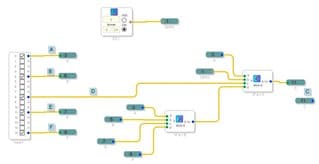
It is pretty much drawn out like you wrote it except it may seem a little backwards. But it is a conditional with one input being the output of the Else part of the statement. Here is what it will look like.
Keep in mind that this is executed every sample period on one set of samples. If this is audio then one signal might be in the positive part of the sine wave when another is negative. It will not actually capture the loudness of the audio. So if that is what you are trying to do then you will need to rectify the signals and accumulate them by using an envelope generator. But then your test of A<0 will never be true. So I will leave it up to you to work this part out ( or I can give you an example) but I just wanted to point that out.
You can see that I used Alias tags to make it readable. I also setup a DC source and called it "ZERO". This is a good thing to do to save some MIPS if you need a constant like ZERO or ONE and need to use it in several places.
Dave T
Please log in to reply.