Sigmastudio GPIO controls the opening, muting and closing of audio signals
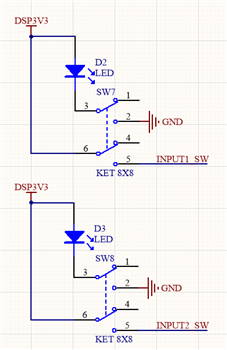
I want to use the button with self-locking function to realize the mute and open control of audio signal in sigmastudio. The button press the audio signal to open and pass, and the button flips the mute or cut-off of the audio signal.
External self-locking keys combined with internal GPIO real-time audio signal control.
adau1452
sigmastudio
SigmaDSP
adau1701
Hello,
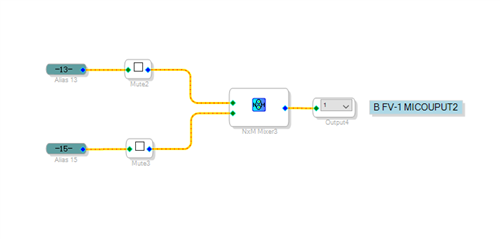
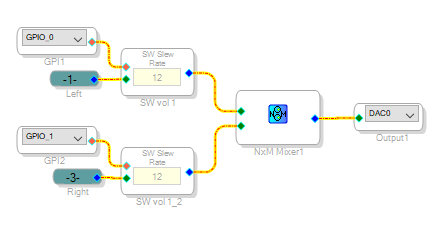
The Mute blocks have only a GUI control -- click a check-mark in their boxes to mute the sound. To control sound by GPIO, you need blocks with control input pins. The Slew External Volume Control blocks shown below will do the trick:
The number in the slew box determines the response time -- "12" provides a rather slow rise and fall of the sound, while "6" is quite fast. In addition to the schematic, you'll need to set up your MP pins for GPIO input -- this differs for each DSP model.
Best regards,
Bob
Hello James,
Which SigmaDSP chips support which functions depends on both the capability of the particular DSP, but also upon what the ADI programmers have spent time to implement. For example, the humble ADAU1701 lacks enough delay memory for a convincing reverb (unless you pull a trick like this). It does, however, feature a chorus effect. The far more capable ADAU1452 has reverb, yet no chorus. Thus, we'll need to make our own.
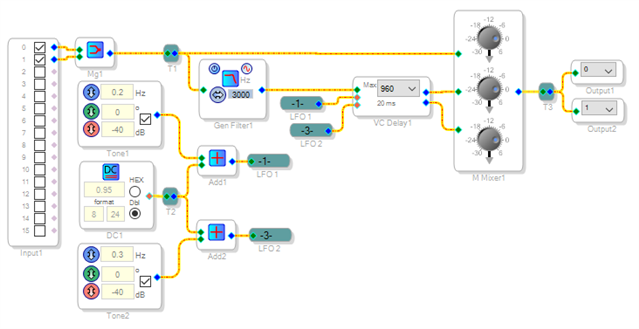
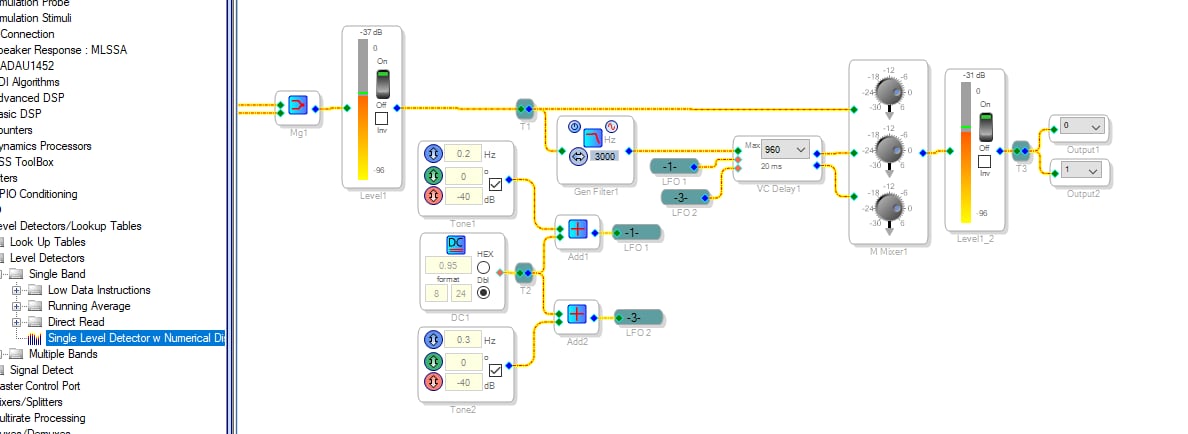
To get you started, this Wikipedia article describes how a chorus effect works. The circuit below is a simple implementation, upon which you're free to improve. Its heart is the voltage-variable delay. With a 1.0 input its delay is as shown, while proportionately less with smaller inputs. Two low-frequency oscillators add a small modulation to a DC source of 0.95. Feeding the delay's two control inputs, they result in two copies of the original signal with slightly and slowly varying pitches and delays. Mixing them together produces the chorus effect.
As the Wikipedia article describes, a flanger is similar except for longer delays, and with a fraction of the output signal fed back to the input. Have fun making your effects!
Best regards,
Bob
Chorus_1452.zip
THIS EXAMPLE DIDNT WORK IN MY EVAL aDAU1452 ...anY REASONS WHY ?????
Hello,
I've tried this project on my eval board and it works quite well for me. Can you tell us more about what the problem is? Do you get sound on the audio output and it doesn't sound good, or is there no sound at all?
If you insert a level meter on the input and output signals, do they show similar levels?
Joshua
Hello Annihilate_123,
Which eval board are you using? The MINIZ or the REvB?
Dave T
Hi JoshUA AND Dave I got it working i was using the REV BZ board..
However can someone detail why the VOltage contolled delay has modulated dc signal as input what effect does it have on the audio ...I tried doing the same without using sine tone and instead tried to input the same audio in the delay as well but it was futile ...
Can someone explain what modulated DC does when added to Voltage controlled delay as input??
and also why we need to filter the input before feeding it to the first input of the Voltage Controlled Delay block
Hello Annihilate_123,
The control input wants to see an integer that holds the number of samples. This number must be less than or equal to the max amount of delay that was setup when it was compiled. So sending in audio into this pin will certainly send numbers that are greater than the max delay and can cause erratic behavior. Some of the control pins on these cells are not range protected and they are often used as offset pointers to memory locations so if they have a huge number in there the program will be reading and writing to memory locations outside of its boundary. Hence, unpredictable erratic behavior.
So if you want to change the delay setting quickly using the audio then you must somehow scale it to an unsigned integer in the range of 0 to MAX samples of delay.
So you need to decide what in the audio will modulate the delay time. Will it be simply level? Then use an envelope generator and limit the output of it. The hard clip cell works as a great limiter for some uses. I have not used it for this exact use yet.
If it is frequency dependent then it will get a little trickier. If it is the level at a certain frequency then a notch filter feeding an envelope generator will work fine. If it is content based, like higher frequencies cause more or less delay then that will get tricky but can be done.
I am not sure why a filter is needed at the input of the delay. The output is a good idea because if you are changing the length of the delay quickly and constantly, then the output can have samples changing faster than the sample rate should allow a sample to change. When you change the length of a delay you are dropping or adding in samples that are in the buffer memory. This is usually quite audible. So limiting how fast the delay time can change will make that less noticeable.
Dave T
Please log in to reply.