4 group I2S in adau1451 , only SDATA_IN0 works
Hello,
I am using ADAU1451, there 4 audio sources, AUX/SPDIF/USB/ WIFI.
AUXIN -->ADC-->SDATA_IN3
USB (I2S)--> SDATA_IN2
WIFI(I2S)-->SDATA_IN0
SPDIF--> ASRC INPUT 0/1
Now , WIFI(I2S)-->SDATA_IN0 works,
SPDIF--> ASRC INPUT 0/1 works
but SDATA_IN2 / SDATA_IN3 no sound . which the BLCK/LRCK/DATA tested by AP , is fine. but even in sigma 4.4 , use the level monitor no signal in at all.
donot know why.
Thanks
Meican.
Audio Signal Processors
adau1451
SigmaDSP Audio Processors
ADAU1451 I2S2/3 no work
Hello Meican,
This will be a master clocking issue most likely.
You did not specify what was a master for clocks and what is a slave.
You have three sources where it will be impossible to have them synchronous to the same master clock, so you will have to use the ASRCs for all three of them.
SPDIF (you already are using the ASRC on this one)
WiFi
USB.
For the AUX in You have a choice. The ADC can be the master. If you are planning on using high sampling rates, like 192kHz or even 96kHz, you would be advised to have the ADC be the master. Then you can slave the entire DSP off of that clock rate.
Draw up a clocking diagram.
Also, attach your project. It will answer a lot of questions.
Dave T
Hi Dave
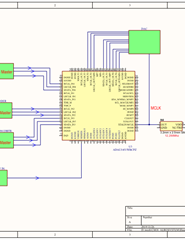
i attached the simple project and sch diagram.
1. wifi and spdif works
2. this project not update spdif setting
3. wifi/ usb / adc source , all are master , 1451 is slave in all 3 input mode .
now usb and adc no work.
my question is
A. why usb/ adc input no work?
B . for ASRC input( 16ch) , when we use i2s port2( ch32/33), can be use ASRC input ? then hw to connect? donot understand the relation ASRC 16 CH input and i2sport0-4 .
C which case has to be use ASRC input ? which case has to be use ASRC output ?
D . Our application , USB(I2S MASTER) to SDATA IN2, need ot not need ASRC input ? if need , how to connect ASRC input .?
Regards4_SOURCE.zipPDF
Meican.
Hello Meican,
According to your document. The master clock is only going to the DSP and the DAC. The USB has its own master clock and you do not show where the master clock is coming from for the ADC so I will assume it has its own source.
So with that said, I think it is best to have the DSP core and the DAC both synchronized off of the MCLK that is going to the DSP and the DAC. So you will not require an ASRC for the DAC at all.
So this means that you will need an ASRC for all the other inputs. That will be 8 channels so you have enough channels available.
So I will open up your project and make the changes and post them later.
Dave T
Hello Meican,
I have worked on this project. Thanks for sending it.
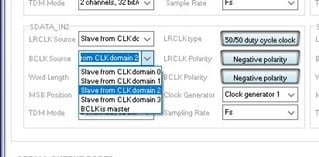
The problem you had with the ADC and USB is because the serial port was not setup to use the correct clocks. They were all set to slave to clock domain 0 which is the WiFi clocks. So each serial port has to slave to its own serial port clock pins since you ran the clocks to those pins.
For an example, The screenshot below shows serial port 2 being set to slave to clock domain 2. The LRCK and BCLK have to be set this way and serial port 3 will be set to clock domain 3.
Since they all have to go through the ASRC I made it simple. There are 8 stereo ASRCs. So I used them this way so they line up with the serial port numbers. Easier to remember.
ASRC0, Serial port 0, WiFi
ASRC1, not used
ASRC2, Serial port 2, USB
ASRC3, Serial Port 3, AUX
ASRC4, SPDIF
ASRC 5, 6 and 7 are not used.
I also added Aliases to be able to send the signals around the schematic without all the crossing wires.
I also setup a meter with a switch so you can see what is on any of the inputs. This can be deleted once this is all working. It is a good troubleshooting tool so you might want to leave it if you have leftover MIPS.
Dave T
4_SOURCE-DT-Edits.zip
THANKS DAVE.
You resolved my issue.
1. For i2s port0--3 input , that clock domain should related to clk0-3. this is the key.
2. if use ASRC, the related series port need be right.
Thanks!
Regards.
Meican.
Please log in to reply.