How to save volume / treble / bass into EEProm on self-boot mode of ADAU1701?
Hi everyone:
I am a newbie.I DIY a project using ADAU1701.
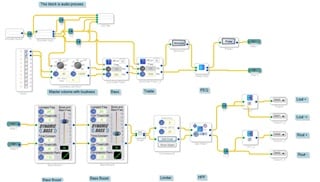
The specific UI is:
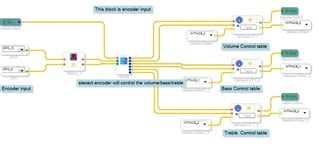
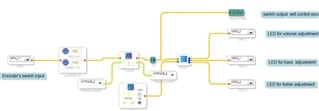
Use an encoder with buttons as input. 3 IOs will be used.
Use 3 LEDs as an indication that the current encoder should adjust volume / treble / bass
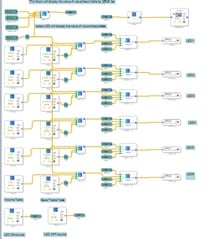
Use 6 LEDs to indicate volume / treble / bass levels.
All LEDs are low active (LED ON when IO = Low).
Currently I have implemented the following functions:
Press the button of the encoder to select the item to be adjusted (volume / treble / bass) and I can adjust the this item through the encoder.At the same time, 3 different LEDs indicate the item to be adjusted. 6 LEDs can indicate the level.
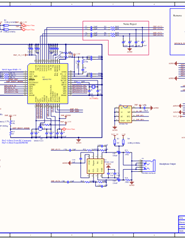
1. When I power on the ADAU1701 again, the volume / treble / bass will always become the default value. How do I make the ADAU1701 store the volume / treble / bass level? Do I need to change the C5 to 470uF?
2. Suppose I press the encoder's button so that I can adjust the treble. I hope that when I don't rotate the encoder in 5 seconds or press the encoder's button, wait 5 seconds, and I turn the encoder, it will adjust the volume direct instead of still adjusting the treble. How to achieve it?
Thanks.
Jaff.
control volume,treble,bass with rotary.zip
Hello Jaff,
There are things to do with the hardware and things in software. You are using the writeback cells properly so that is good and you have the software part taken care of.
There is a lot on the forum on this subject:
https://ez.analog.com/dsp/sigmadsp/f/q-a/66100/eval-adau1701-miniz-writeback-circuit
https://ez.analog.com/dsp/sigmadsp/f/q-a/64211/circuit-eval-adau1701miniz/197534#197534
Page 27 of the datasheet also has some information.
So you need to setup the hardware so that when power is going down the WB pin goes from low to high and the part is in Selfboot mode. When that happens the DSP will lower the WP pin which needs to be connected to the Write Protect pin of the EEPROM. This will allow the EEPROM to be written to.
Then the DSP will write the contents of the eight interface registers to the EEPROM. These values will be read when the DSP boots up the next time.
All this has to happen while there is still enough power to run the DSP and the EEPROM. The MINIZ eval board was not designed properly to do this. One of the posts in the links above shows one way to do it. It can also be done in other ways.
Dave T
Hi Dave:
Thanks for your reply.
I read AN-923 and the link you provided, I understand that to use the write-back function of ADAU1701,I need:
1.Detect the falling edge of the power supply quickly and trigger the rising edge of the WB pin.The input pin of the DSP 3.3V LDO should be detected, not the DSP 3.3V itself.
2.The 3.3V of the DSP needs a large enough capacitor to maintain the DSP write back to the EEPROM.
Thanks.
Jaff-Lee
Hello Jaff-Lee,
Your understanding is correct.
Dave T
Please log in to reply.