ADAU1451 - Failed to start a design
Hi,
I'm trying to execute my own SigmaDSP design on my board but nothing happened.
So i have done a very simple design to check what exactly goes wrong. The design has only a switch linked to MP1. It works perfectly on EVAL-ADAU1452MINIZ but not on my board.
On evaluation board and my board, I do not use SELFBOOT, I load the design with SPI interface. On my board I can write and read DMx areas or registers, I can change MP1 state via modification of MP1_WRITE register but I can't modify MP1 state via the design switch component.
All status seems OK.
I do not understand what is the problem.
Best,
Yannick
ADAU1451_BASIC_TEST.zip
Audio Signal Processors
adau1451
SigmaDSP Audio Processors
Hello Yannick,
Since you are able to read and write the state of the pin through the configuration register, your custom hardware is powering the DSP properly and the comms are OK.
Are you using the USBi to program your custom board, or loading the program through a microcontroller?
If you are using the USBi, can you insert a square wave source into your schematic, set it to 1 Hz, and read back the value? This will tell us if your program is running at all.
If you are loading your program in through a microcontroller, there are a few common issues people run into:
Control registers are 16 bits long, whereas data memory is 32 bits long. Addressing must reflect this (e.g. for a sequence write, increment the address once every 2 bytes for control registers and once every 4 bytes for program data)
The program and data memory sequences are very long, and on some microcontrollers these sequences must be split up into smaller block writes to avoid filling up the SPI/I2C TX buffer.
Joshua
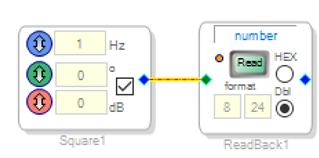
Thank you Joshua for your feedback.
I have added your blocks to the design and on evaluation board I read "1" or "-1". On my board I always read "0".
I use a microcontroller to load the design with SPI. I already checked SPI transactions and all is OK (5 times 8 bits for registers, and a burst of 3 + 4 x n data for memory areas).
I use a 12Mhz quartz, I directly input 1.2V to DVDD instead of use internal regulator and IOVDD is set to 1.8V instead of 3.3V.
These are differences between my board and evaluation board.
Best,
Yannick
Hi Yannick,
Were you using your microcontroller to program the DSP on both the evaluation board and your custom hardware?
If you have not tried using the microcontroller to program the evaluation board yet, I think that would be a good thing to try. That would narrow down whether it's a code problem or a hardware problem. Alternatively, you can try wiring the USBi to your custom hardware and program through there. (There is a slider on the back of the USBi to switch to 1.8V IOVDD.)
Joshua
Hello Yannick,
This is strange that you can write to the MP pin register but not to the control switch.
The register is 16 bits wide and all the parameters are 32 bit wide so are you writing all 32 bits?
I took your program and tested it on my evaluation board. It worked fine. I had to change the GPIO to #6 but it worked fine. So I thought it would be better if it were doing something so you can see that the program is working.
So I setup an oscillator and an AND function with the switch. So the LED ( the GPIO) will be going high and low at a 1 second rate. Then you can flip the switch and stop it. This will test your write to the switch. I left the project with the switch turned on so that once the program loads it will be flashing. I also switched it back to GPIO#1.
OH! one more thing, I had to change the communication interface from the Aardvark to the USBi. You will have to change that back. I just remembered it now.
So see if this will make the GPIO port waggle. It does on my eval board so this should help you figure out if it is software or hardware.
Dave T
ADAU1451_BASIC_TEST-DT-Edit.zip
Hi,
Sorry I found the problem. It was a stupid mistake in the value set to register 0xF050. It was set to 0x01FF instead of 0x1FFF.
Thank you for your help Joshua and Dave.
Best,
Yannick
Please log in to reply.