ADAU1787 EEPROM Memory Format
ADI and Friends,
I'm trying to figure out some system architecture for the boot process of the ADAU1787. My ideal solution is to have an external microcontroller emulate an I2C EEPROM and have the ADAU1787 perform a normal self boot as if it were talking to a standard EEPROM. To do this I have to get the EEPROM image into the flash of the microcontroller in the correct format.
I've searched through everything I can find it the datasheet and the forums and I'm still having trouble fully understanding the process.
"Export System Files" looks promising but it generates two files, one for each DSP. How does this information sit in the EEPROM? Does it look for the hex for each core at a fixed address? Or does this get concatenated together? If so which is first?
The selfboot section of the datasheet (as limited as it is...) mentions some commands. It looks to me like these need to be added around/inside the hex data in the TxBuffer*.dat files. Is that correct?
Is there any easy way to generate an EEPROM image? I tried following the steps here:
It gave me a file for the EEPROM and one for each core. I assume I just need the EEPROM file, correct?
The lack of information on this is more than a little embarrassing... Not to mention the "Create EEPROM image from sequence file button causes an error.
I get it resources are tight at semi-vendors. I used to work at TI, but this is basic support for your device. You gotta nail this for people to use it.
Best,
Trey
ADAU1787
Integrated/Special Purpose A/D Converters
sigmastudio
Audio CODECs

Trey,
Please refer to the EVAL-ADAU1787Z User Guide (https://www.analog.com/media/en/technical-documentation/user-guides/EVAL-ADAU1787Z-UG-1532.pdf). It has a "SELFBOOT" section that covers writing the EEPROM in SigmaStudio.
Galvinpjg,
No that doesn't really answer my question. The eval board guide covers how to do direct programming using the ADI tools on the eval board. The actual format of what resides in the EEPROM and how to generate for this device it is not discussed ANYWHERE that I have been able to find. Please read my question in full and reply with some actual information or do you want me to reverse engineer this and document it for you?!?
Best,
Trey
Hi TreyG, i have decoded eeprom content data, but for ADAU1401 and ADAU1701 ( i do not have other DSP boards ), maybe you can adapt it for you own purpose.
The folowing code has outdated, but generates an eeprom content, based on current DSP running ( Sent by USBi or TCP/IP, "Link compile download" button ), that way no need Sigma Studio "Export System Files", on my case, i save this data on ESP8266 filesystem, so DSP can request boot without eeprom ( ESP8266 act as slave I2C ).
This code generates eeprom content, in order that DSP needs to read to boot, this information is partially on page 29 datasheet https://www.analog.com/media/en/technical-documentation/data-sheets/ADAU1401.pdf
PS: Im a Pascal programer (Delphi), not an Arduino C++ programer, so my code may have wrong look or malformed, it will not compile directly, sorry for that, also large code!
C++ Source code attached!
source.zip
TreyG,
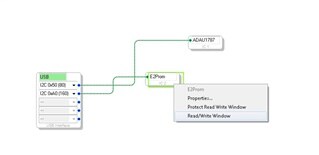
Once you have programmed the EEPROM, you should be able to see the values residing in the EEPROM by selecting the Hardware Configuration tab, right-clicking the E2Prom icon and clicking "Read/Write Window," as shown below.
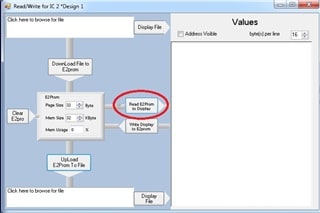
Next, select the "Read E2Prom to Display" button as shown below. This will take a small amount of time, but the values in the EEPROM should then be populated in the "Values" window to the right.
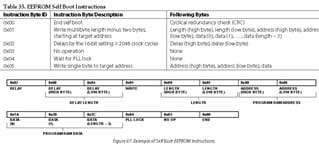
The values in the EEPROM are stored according to the programming instructions in Table 35 of the ADAU1787 datasheet.
For example, if the values read from the EEPROM are as shown below, then the first instruction is a single byte write where address 0xC081 = data 0x00. The next instruction is a multi-byte write of 2 bytes, where address 0x0C3C = data 0xFD and address 0x0C3D = data 0xFD.
Please let me know if this information helps.

Please log in to reply.