Internal Mute Control (ADAU1452)
Hi there, I have multiple outputs from my ADAU1452 that each have an individual mute. This is great. However, it would be nice to have one MUTE control in my design that would mute all of the outputs simultaneously so I don't have to click them all one by one. Is there a way I can configure this in SigmaStudio?
Kind regards,
Mark
Audio Signal Processors
adau1452
mute
sigmastudio
SigmaDSP Audio Processors
Hi Mark,
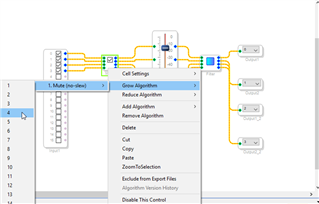
You achieve it by "growing" your algorithm, as follows:
More details on this, here: https://wiki.analog.com/resources/tools-software/sigmastudio/usingsigmastudio/buildingschematics/algorithms
I hope this helps.
Best regards,
Maikel
Hi Maikel,
Sorry, my question wasn't very clear. I have been able to grow the size of my mute button so now I have 8 x individual mutes. The problem I'm having is that I have to click through each of them one-by-one to mute the outputs. What I want to be able to do is click one button that concurrently mutes all 8 at the same time. Is this possible to achieve? Perhaps with some logic block or similar?
That's what my previous screencapture shows. I grew the mute block to take four inputs/outputs, so that I can mute/unmute ALL FOUR channels with a single click (please refer to the figure again).
Or have I misunderstood your question (again)?
Oh I'm so sorry Maikel! I didn't look closely enough. I just saw all the check boxes next to the first vertical column of check boxes and assumed you were demonstrating adding more mute boxes! I see now exactly what you were demonstrating, and that is exactly what I needed! Thank you!
Please log in to reply.