Master Control Port Runtime Sequential Write - Dynamic value
I am using an ADAU1462 and am having a hard time writing a value, decided on runtime, to I2C. Is it only possible to write hard-coded values, defined in the sequence file, to I2C?
I have been trying and trying without luck. Let's say I have a DC value block, with a value that can change at runtime. Is there any change to write that value to the control port instead of only hard-coded value from XML file?
My specific application is a GPIO expander, where each bit in a register controls the output state of a single pin. I have managed to create a function, where I can toggle eight switches, each representing a single GPIO bit, into a DC value block that updates as desired. I would then want to write this value to the GPIO expander. This way I can dynamically "build" the output pin combination I want instead of having 256 different sequence files and switches going into 256 different Master Control blocks, each writing a unique pin combination to the same chip.
This method of dynamically building the register in SigmaStudio is for development, debug and learning purpose. Obviously it wouldn't be done that way in a final product where there is no SigmaStudio GUI
[Edit] However, in the final product, the GPIO expander configs might be received over SPI input that would then be relayed down the I2C output. In this case I would also like to be able to relay the message directly instead of triggering big logic with number of hard-coded sequences behind.
Answers in this post (https://ez.analog.com/dsp/sigmadsp/f/q-a/64844/master-control-port-runtime-sequential-write-adau145x/164115#164115) seem to indicate that this is possible, but I have not managed to get it working. Unless I am misunderstanding the term parameter values.
Best regards
Edit Notes
Added small note on final product config and how that relates to the desired functionality.
[edited by: Trunta at 8:19 AM (GMT 0) on 13 May 2020]
Audio Signal Processors
sequence file
i2c
master control port
sigmastudio
SigmaDSP Audio Processors
SigmaDSP
adau1462
Show More
Bump
Hello Trunta,
I really do not understand what you are trying to do?
Can you break this down and perhaps use some block diagrams to show what you are doing both inside the DSP and outside the DSP?
I think you are using single bits in a word to control external things but I need more details. You can do a lot with SigmaStudio and SigmaDSPs so it most likely can be done. I just do not "see" what you are trying to accomplish.
Dave T
Hello Trunta,
The easiest way to do this is with the Parameter Update feature.
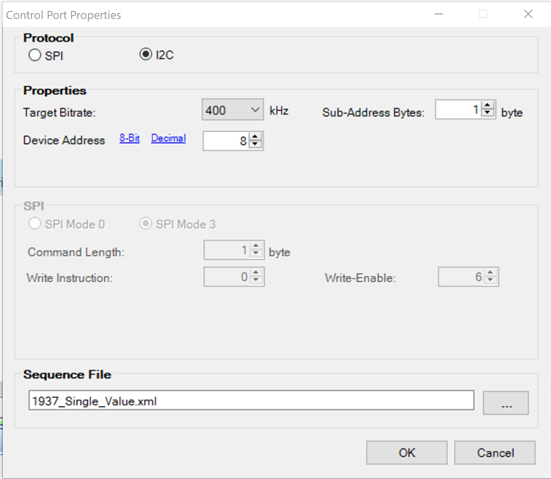
First you need to create a sequence file to place in the I2C Write block. Here is an example sequence file which specifies a one-byte I2C write to Address 1 in the slave. The value "19" would normally be the data packet but we will be overwriting it in a moment.
Next, load this one-write sequence file into an I2C Write block.
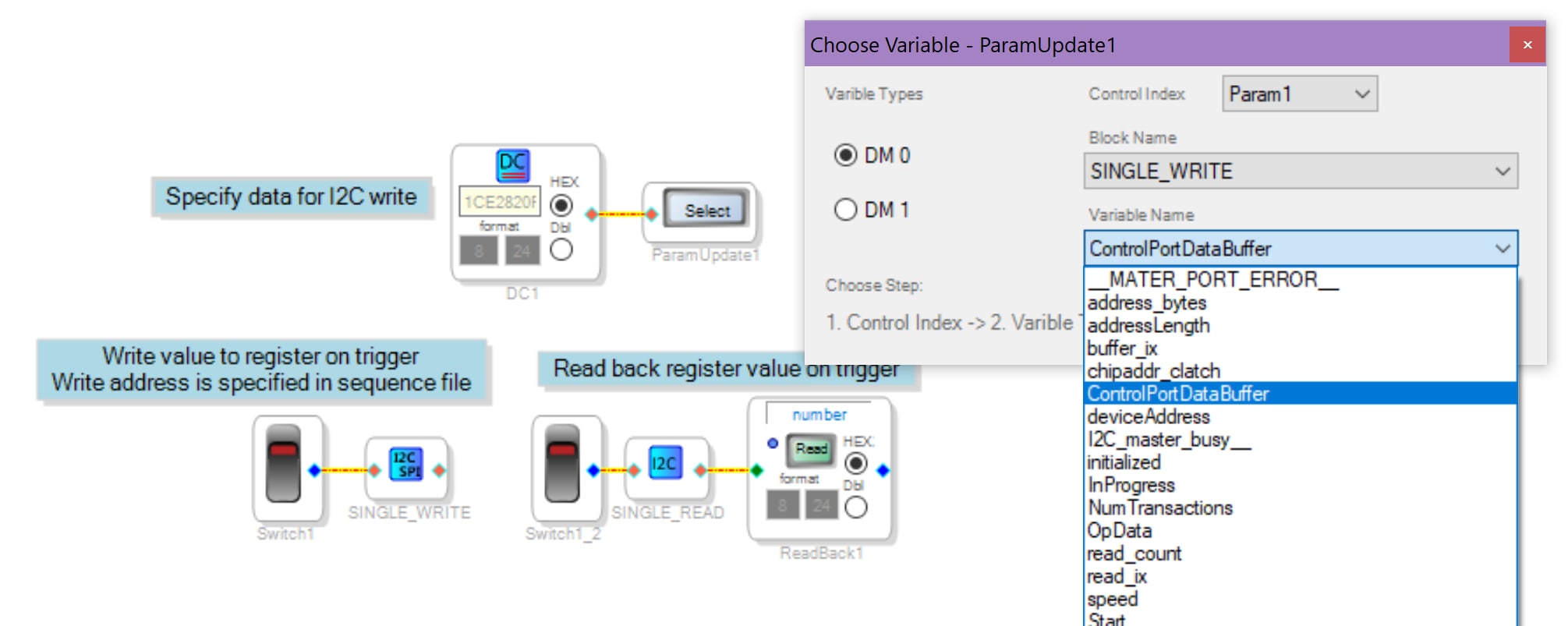
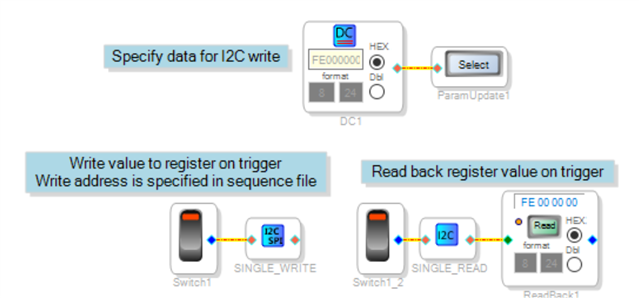
The Parameter Update block allows us to "forward" a word of data to another location and thereby change the data packet dynamically. For the Master Control Port, the variable to update is called "ControlPortDataBuffer". If you are only writing one byte, as I am doing here, it should be stored in the MSBs. So to write 0xFE to the slave, I must set the DC source to 0XFE000000.
Please note that the schematic must be compiled before you can select variables in the Param Update. Further documentation for Parameter Update is available at https://wiki.analog.com/resources/tools-software/sigmastudio/toolbox/BasicDSP/ParameterUpdate.
When I download this program to the DSP, I trigger the left switch high to initiate the I2C write. Then I trigger the right switch to trigger the I2C read, and check whether the values match.
If your application requires multiple registers to be written, you can simply repeat this process a few times. You will have multiple parameter update blocks sending parameters to multiple I2C blocks. If you are running low on memory, it is possible to use a single I2C Write block but this gets more complicated; let me know if the Parameter Update solution works for you.
Joshua

Hi JoshuaB
Your solution works! I was so close to it that it is very irritating
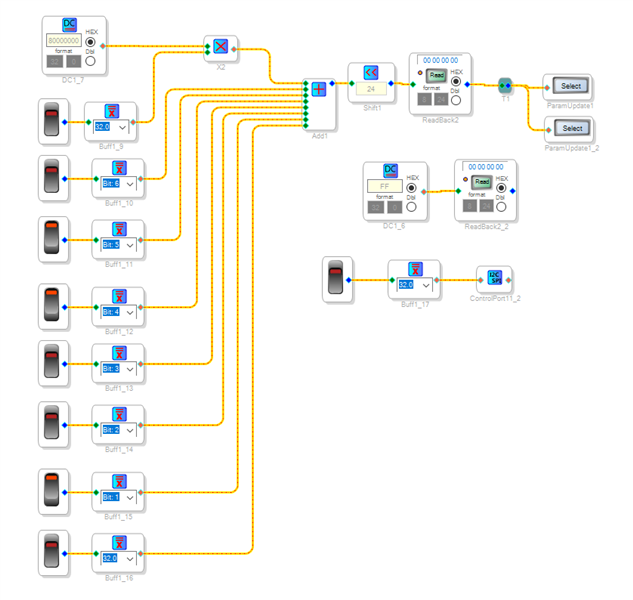
DaveThib. I hope the question becomes a bit more clear with the combination of Joshua’s answer and the screenshots in this post.
I had previously experienced with param update and managed to update DC source block with this method but could not find out which parameter to update to manipulate the master control sequential write block. Turns out my block had lost it’s name and therefore did not figure in the “Block name” dropdown list of the param update block. I don’t know how that has happened and the program throws and error if I try to change it.
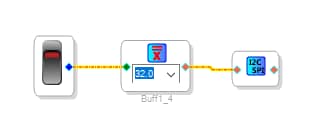
Anyways, after inserting a new (labelled) control port I am now able to find it in the dropdown list. The last bit was adding bit shift to manipulate the MSB bits (which I had not figured out was necessary) and everything works like a charm. I am now creating my GPIO expander byte with switches in the SigmaStudio GUI. Had to get creative to manipulate the MSB (signed) bit. Same param update method should work down the line where the message to be sent down the I2C port will be sent to the DSP through the SPI slave port.
Thanks a lot for your help.
Please log in to reply.