SigmaStudio 4.5 crash on launch - Win 10 64bit, .Net 4.8 installed
Hello,
A fresh install of SigmaStudio 4.5 on Windows 10 64 bit crashes on startup. I installed .Net framework 4.8 (latest) and rebooted. There doesn't seem to be any debug information available.
Any suggestions?
Thanks
--Louis
Louis Bertrand
Durham College
Oshawa, Ontario Canada
windows 10
sigmastudio bug_report
Hello Louis,
Sorry for the problems you are having. Are you using Windows 10 pro or home additions?
Dave T
Hi Dave,
Thanks for the reply. It's a college owned laptop, running Windows 10 Enterprise, managed by our IT folks.
Hello Louis,
Hmmm... There may be something missing. This is not my area of expertise so I will try to get one of the programming team members to help you. But, in the meantime, Since it seems that you installed SS4.5 and then updated the .NET files that maybe you should uninstall SS4.5 and reinstall it. Just a thought and something to try.
But I have a suspicion that there is something that your IT department disabled or left out of the system that we need to use. IT departments tend to think that everyone will only be running word processors, spreadsheets and browsers. Even here at ADI I had to get special permission to enable me to copy and install DLL files myself. The stock company computer setup will not give the user that permission. I had to make a case that I needed this to perform my daily job. :)
Thanks,
Dave T
Hi Dave,
I can relate. Thankfully, our IT department has finally come around to the fact that we're a diverse academic environment. It took a while...
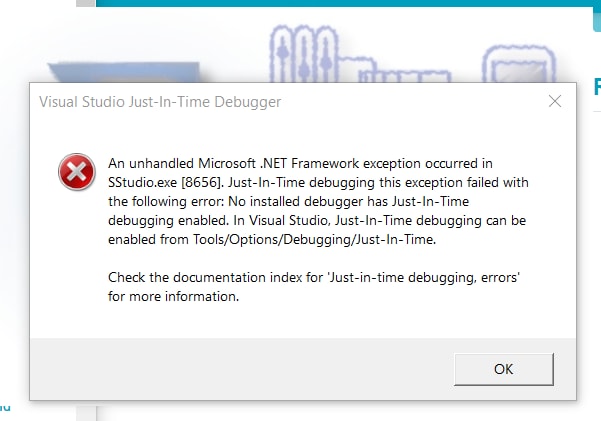
Anyway, nope. Didn't work. The only extra troubleshooting information beyond "The program stopped working" is what I get when I click "Troubleshoot". Unhandled Microsoft .NET Framework excepton in SStudio.exe [8656] (screen capture attached).
I also tried uninstalling SS 4.5 and installing SS4.4. Same error message but the number changed to [13540], although that's probably just a process ID or something like that.
Thanks
--Louis
Hi Louis,
Can you please uninstall Visual Studio software from your PC and then install Sigma Studio 4.5
Because we are not getting these kind of errors and it doesn't require .Net package. Please try and let us know how you gets on
Best Regards,
Santha kumari.K
Please log in to reply.