Dynamic loudness - Help me fine tune it and understand the log table
Hello everyone
I have a portable speaker that I'm working on and recently implemented on it the dynamic loudness algorithm by KJBob (awesome by the way, thanks for sharing that)
https://ez.analog.com/audio/f/q-a/3842/dynamic-loudness-in-1701
The problem is that I'm having a hard time adjusting the compensation for my system, first in my tests, the log table isn't working quite right, I changed it to 33 entries so each one is 3dB as explained here https://ez.analog.com/dsp/sigmadsp/f/q-a/65577/is-there-any-documentation-for-the-adau170x-s-log-lookup-table
For example, I have to add a 15dB gain on the high pass filter for it even go out of the index 1 of the table, if I don't do that the most aggressive filters stay in action even when the volume is increased quite a bit and it should have stepped to a less aggressive EQ, and also, by slowly increasing the volume, it doesn't apear that is following the 3dB by step that it should
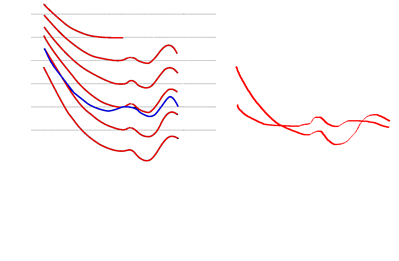
When you increase the volume, instead of increasing the bass and treble less than the overall volume, the bass and treble is actually being reduced. Pardon my crude drawing, but what I think it's happening is that the loudness contour on this implementation are actually crossing (to the right) while they should always increase at all frequencies (at the left), so the sound loses a lot of impact as you increase the volume
Should I just play around with the spread at the table, leaving the gain to compensate?
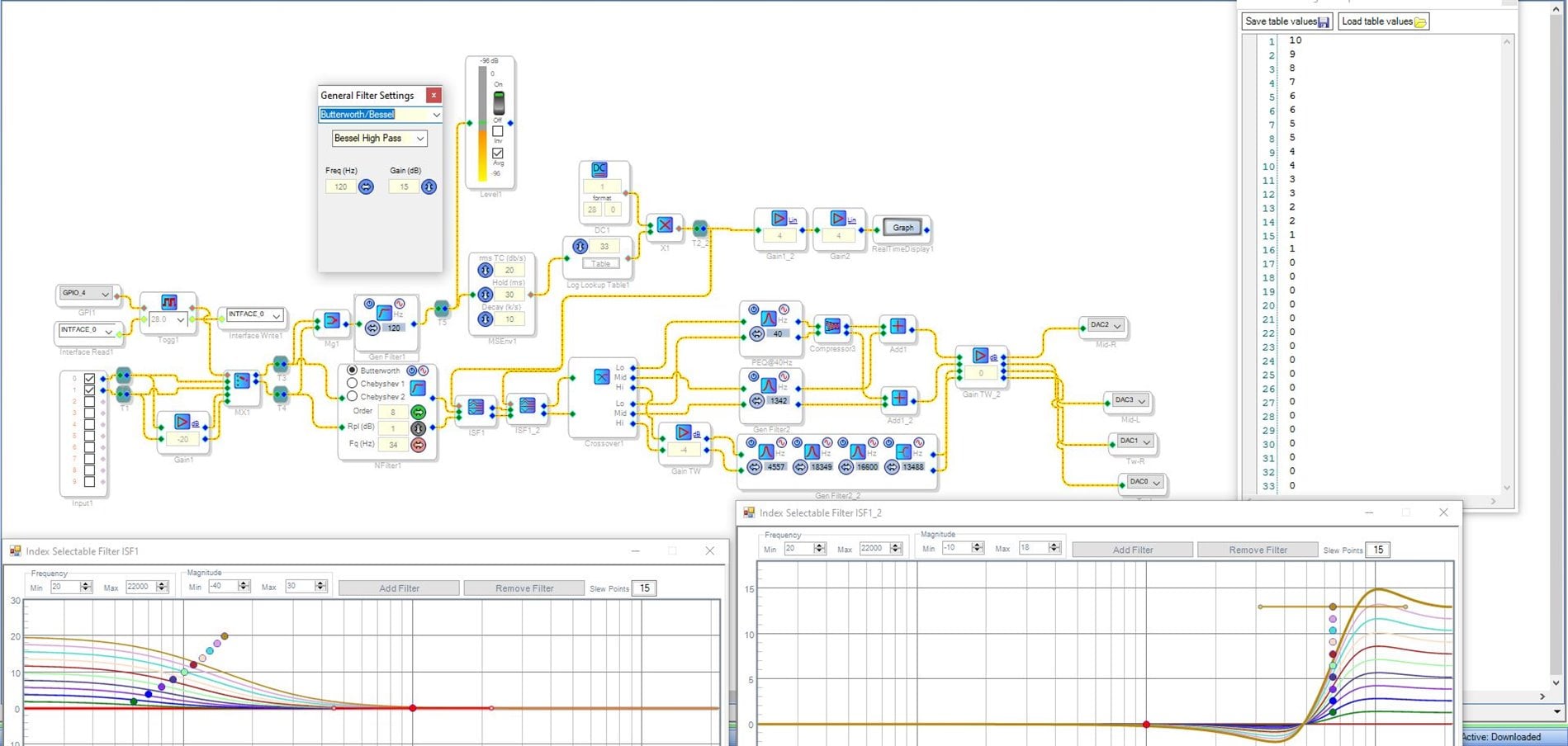
I thing there is something flawed in my understanding of how everything works and that is why I can't manage to make it sound right. Bellow is the whole algorithm and I also uploaded the file
Thanks a lot for any help
DSPBoomboxMini_V10_CrossOverOptimized.zip
Audio Signal Processors
dsp
sigmastudio
SigmaDSP Audio Processors
adau1701
Hello,
Though your loudness compensation is put together correctly, there's a few tweaks you could perform to make it work closer to your expectations. Proceeding from left to right in your schematic:
The mixer block Mg1 includes a 6 dB loss -- you might as well replace this with a Signal Add block. Then you can take 6 dB from the following filter's gain.
The RMS envelope block MSenv1 is presently set for an attack of 20 and a decay of 10. I've noticed that when these numbers are close together, it effectively reduces the block's output. It's as if the envelope follower is trying to go down nearly as fast as it goes up, so it goes nowhere. Make the attack (top number) something larger, such as 50. Then the envelope follower will be more responsive to its input.
With the two above changes, likely you'll find the Log LUT getting plenty of input with only about 6 dB gain inside your highpass filter.
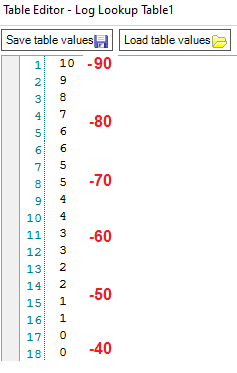
The Log Lookup Table's rows correspond to its input signal like this:
When adjusting your table rows, consider your system's power and typical usage. Presently your loudness comp vanishes (filter curve 0) at Table Row 17, or 42 dB below full scale. Does this correspond to a satisfyingly loud volume? Or is some loudness comp still needed there? Stretching out your table rows to place the first zero at about -20 dB would help with the perceived loss of bass at higher levels.
Best regards,
Bob
Thanks Bob, implemented both of them, changing the attack and decay really mades the filter more responsive, sometimes I had the impression it got stuck and took too long to react when changing the volume, I have to test more to see if this is really gone
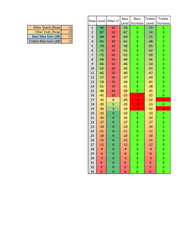
To make things easier to tune, I've made an spreadsheet to easily see how much boost I have in each filter and also make sure that I do not run into the problem I described that the eq curves cross each other
For example, here I have a nice spread for the filter and always a positive gain on bass and treble, but on the second image the interval is really narrow and the bass decreases faster than the volume increases
I will have to play quite a bit with it until I find a nice balance, that makes the sound full but not over top and bottom heavy, in my previous table, it was way way too bass heavy in most volumes. This may take a while, since this speaker is portable it has to sound good in various positions
I'm attaching the spreadsheet in case someone find it useful
Thanks again
XLSX
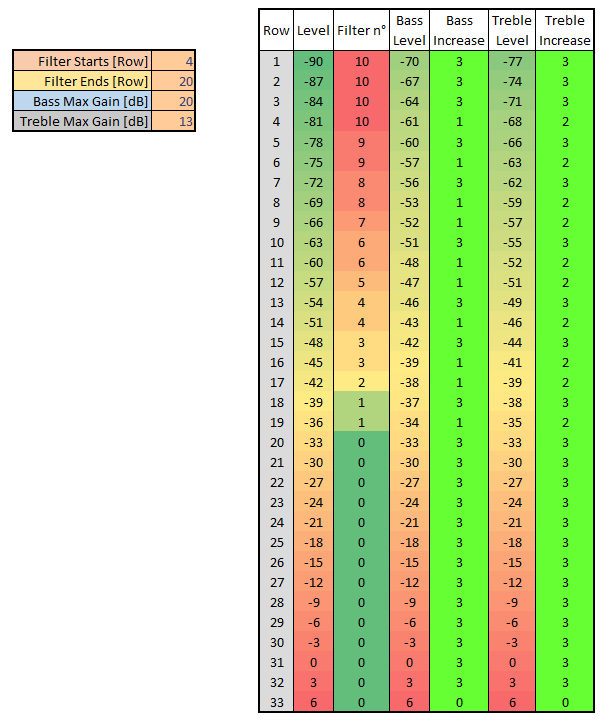
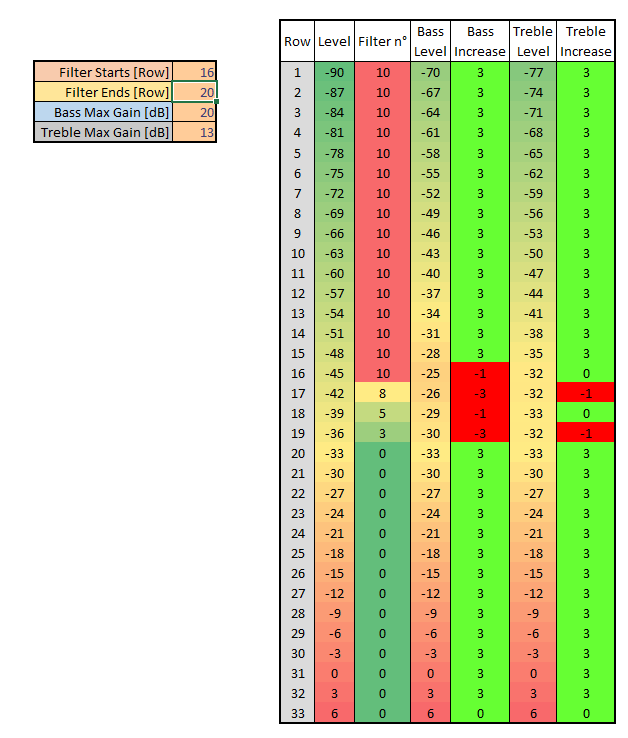
Thanks for sharing your spreadsheets -- they clearly show the advantage of spreading out the curves. Please keep us advised on how your portable speaker system turns out.
Best regards,
Bob
Hey Bob, after a week of trying curves and messing with parameters I'm still not satisfied
What is bothering m the most is that the change in eq is slow. For example, I'm listening at a high volume and lower it, in the real time display the drop detected by the envelope is imediate, nicely tracks the overall music level, but the eq itself takes a while to change filters, lets say one to two seconds
The only thing I could imagine is the number if slew points, I'm at the default 15. Are this number the number of steps between each filter of between all 10 filters? My rationale is that it takes it too much time to compute the intermediate eq between filters so it don't follow the envelope output exactly
Hello,
Actually I decided to take a well-earned break from the forum -- yet I'll go ahead and answer this for you. You're right, the slew number of 15 is quire slow. Try a number between 8 and 12. If you have exaggerated your table to try and make up for the slow slew, also restore its settings. The slew rate refers to the time "before" to "after" -- whether jumping one step or many.
If the Index Filter's slewing works the same as for volume controls -- and usually, that's the case with various blocks -- it follows the table shown here: Units In Slew-Volume. "15" works out to a time constant of around 0.68 seconds. An estimate of total slew time is three time constants, so you're looking at two seconds.
Best regards,
Bob
Hello Pedrodemio,
There is another block that is an index selectable filter that has no slew. It is a bit more difficult to setup since it is an older block so it does not have the cool visual interface.
If you have 33 different filters then it can be an issue with the size of the GUI.
Which processor are you using?
If it is a Sigma300 or 350 then the blend EQ might be useful for you.
Dave T
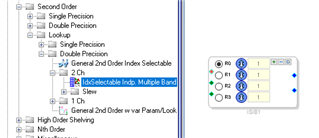
Hello Bob, for you to see when you get back, but a well deserved break indeed, a lot of minor problems I solved here from you answers
So It's finally solved, the culprit was having a too low decay, since it's linear and you can't have the decay higher than the attack, I ended up setting both to 200. don't know why the attack is in dB/s and the decay in k/s. Also a hold of just 10 ms
What would happen is on a highly dynamic song, it locked at the less eq for a few seconds until it decays enough to jump to a lower table entry. If I was playing at full volume and paused the song, it took around 10 seconds to go from the filter 0 to the filter 10, way too long
And furthermore I spread out the table and decreased the maximum gain of both high and low filters to 10dB, sound very natural on all volumes, I may tweak it further as time go by, but for now it's really usable without weird things happening in the middle of a song
Better than that would be to interface the DSP with the Bluetooth module so it would know exactly the current volume step, I will leave that for a future upgrade, lots to learn before trying to do that
Again thanks a lot for the help and enjoy your break
Hi Dave
I will also take a look on that, see if at least it takes less instructions, with the current program I'm almost maxed out and still there is a few other things I would like to implement
I'm using an ADAU1701
Please log in to reply.