ADAU1761 Frequency Response and Missing Items in SigmaStudio Toolbox
Hi, all.
Two questions:
1) We have been testing the ADAU1761 in a new product. We have a mystery in that if we set up the SigmaStudio white noise generator and connect it straight to one (or both) of the outputs, the observed spectrum at the output is not quite flat. The output level at 100Hz rises steadily by about 3dB to 3KHz. Above 3KHz it is flat.
But if we use a SigmaStudio sine generator and check spot frequencies, the level at the output is pretty much flat across the spectrum. Is this a feature of the white noise source or am I missing something? I have tried the same dsproj on the ADAU1761Z demo board and it behaves the same way. In neither case am I loading anything in a way that would cause coupling caps to create L.F. roll-off.
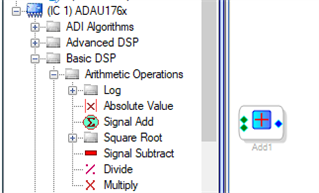
2) Silly question, but SigmaStudio 4.5 no longer appears to have "Add" available in the "Basic DSP" tools. We occasionally use this, for example to add an offset to the sawtooth generator, to create a swept sine wave with the VCO. There are obviously ways around it, but they just seem a little messy.
Thanks in advance,
Alex
Audio Signal Processors
SigmaDSP Audio Processors
adau1761
Hello Alex,
If you're not seeing the Add block under Arithmetic Operations, perhaps re-installing SigmaStudio may fix it:
If I'm not mistaken, white noise has equal power per linear frequency, so on the log scale of an analyzer it should rise 3 dB per octave. Pink noise is supposed to be flat. Your sine wave measurements show that both the -1761 pcb and the analyzer are working correctly. Since the white noise is not measuring as expected, something seems wrong with the noise source itself. Unfortunately I'm not equipped to duplicate your measurement.
Best regards
Bob
Please log in to reply.