Adau 1701 hold parameter
Hello everyone.
It's my first time here, i'm using a custom board with the adau 1701 and eeprom, self boot mode.
I'm trying to use 1 single potentiometer connected to the aux adc and 2/3 buttons to set and store multiple parameters. (Ex. 3 band eq where i can set 1 band at the time)
I'm not familiar with the logic block of sigma studio and i'm asking if someone can show me a simple way to to this.
I need to hold a value when setting other parameters
Thank you
Audio Signal Processors
filter
sigmastudio
SigmaDSP Audio Processors
adau1701
Hello,
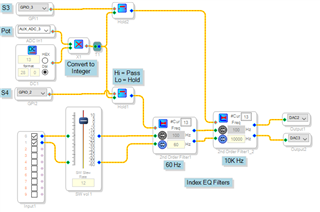
The Value Hold Block is described in the wiki at Value Hold [Analog Devices Wiki] It passes the signal at its blue input pin when its red input pin is nonzero. A zero on the red pin freezes the block's output. Here's a typical application. Please download the project to see details hidden in the screenshot.
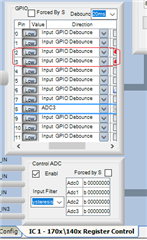
Depending upon how your pushbuttons are wired on your custom board, they will present either 3.3V or zero V at the GP inputs when pressed. The 1701/1401 Register Control window under HW Configuration in SigmaStudio allows you to adapt to either setup by checking the Invert box at the far right of each MP entry in the chart. When you push a button, its Value Hold gets a logic High which gates through the pot signal.
The Index Filters accept an integer (28.0 format) number from zero to the number of curves -- for example, with 13 curves the input range is 0 -- 12. The ADAU1701's Aux ADC outputs a decimal number from 0 to just below 1.0 Multiplying the Aux ADC output by integer 13 provides the needed integer 0 -- 12 range. For more info on number formats, see
What are the number formats for SigmaDSP? - Documents - SigmaDSP Processors and SigmaStudio Development Tool - EngineerZone (analog.com)
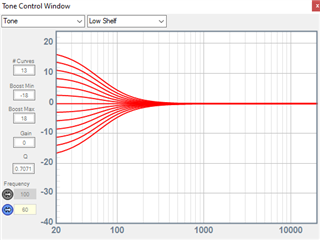
The Index Filters allow you to set up a series of responses ahead of time. Click the blue box at the block's upper-left corner to see the stored curves. You can easily change the curves with the dialog to the left of the graph. Since my project only has two filters I made them like tone controls; however you can change to parametric EQ by choosing "peaking" instead of "Tone" in the drop-down box.
The DSP selects a curve according to the value input at its red pin. What actually happens is when you compile your project, SigmaStudio pre-calculates a set of five coefficients for each of the curves, storing them as a lookup table in parameter memory. At runtime, the DSP merely looks up the needed coefficients, copying these to the filter. It's done this way because the coefficient formulas are too complex for the ADAU1701 to figure them at runtime.
Aux-ADC-EQ.zip
Best regards,
Bob
thank you bob, really appreciate this reply
Please log in to reply.