[BUG REPORT] After dragging and dropping a node onto the schematic, clicking anywhere before waiting for a few moments adds duplicate nodes
I'm using SigmaStudio 4.6 and have noticed a consistent issue that occurs when dragging and dropping nodes from the ToolBox onto the schematic. After dropping the new node onto my schematic, if I click anywhere before waiting 3-5 seconds, it creates another instance of the dropped node. Repeated clicking creates additional duplicate instances.
While this can be easily worked around by simply waiting several seconds after dropping each new node, it does make rapid prototyping more error-prone and difficult. I find myself often dropping a new node and immediately going to drag a connection off of it, which ends up creating several new instances of the dropped node.
This behavior happens for every node type, and happens consistently.
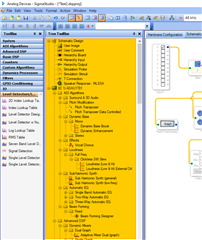
Please note that my mention of "ToolBox" should have been "Tree ToolBox" - when dragging nodes from the regular ToolBox it does NOT have the duplicate node behavior. The Tree ToolBox I am talking about is highlighted in orange in the attached screenshot.
Hello Dylan,
I have the same exact problem. I have showed it to one of the programmers and he scratched his head and had no idea why. He does not have the issue with his system also running Windows 10.
I know how frustrating it is. I will actually use it to drop in multiple instances when I need it so I take advantage of it. But, there is a way to solve it temporarily. If you save the file and exit the program. Then open the program up again and open the file it will behave normal for a while. Then it will slowly get slower and slower. To me this is most likely a memory leak but that is my guess. I often have many projects open and leave SigmaStudio up and running for many days if not weeks so closing it and reopening it fixes it for me. It is probably not a bad idea anyway to be saving the project from time to time. Perhaps increment the file name in case something becomes corrupted you have an earlier version to fall back on.
I have reported the issue but I am not certain when it might be fixed.
Dave T
Hey Dave, ah, yep! I've been leaving SigmaStudio open. Restarting it does make the behavior go back to what's expected.
Good to know there's at least a workaround, and saving more often is always a good best practice.
Thanks!
Ah yes, this is one I have got used to. Thanks for the report.
I also noticed that the bigger your schematic gets, the longer your have to wait.
I think Sigma is parsing the project when placing new module and it is blocked during this parse, but Windows is sill registering the mouse clicks and sigma will interpret them as 'place module' right after it finished to parse. You can't really notice it on small projects. Nasty bug. ;)
Please log in to reply.