ADAU1977Z USB communication failure has occurred
Hi,
We are trying to evaluate the results using ADAU1977Z.
I followed the Evaluation Board User Guide UG-600 to set up the board.
<www.analog.com/.../adau1977.html
I am currently stuck at "STANDALONE GUI I2C CONTROL" on page 7 of the User Guide.
I cannot open ADAU1977 Rev C, so I am using SigmaStudio 4.6.
"In the section "STANDALONE GUI I2C CONTROL", it says "5: Click Power Up. The Communication Established message will appear at the top of the window (see Figure 3). The Communication Established message will appear at the top of the window (see Figure 3). The Communication Established message will appear at the top of the window (see Figure 3)." However, when I click Power UP, "The Communication Established" does not appear.
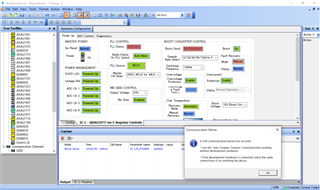
Also, the following message is displayed.
"A USB communication failure has occurred."
Integrated/Special Purpose A/D Converters
usbi
sigmastudio
adau1977
Audio A/D Converters
Hello yam-ele,
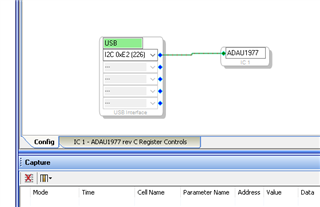
Usually this error happens when SigmaStudio does not receive an ACK from the part. Make certain that the address setting in SigmaStudio USBi GUI is the same address that you have the eval board set up to.
Then I would make certain that the eval board is powered up and all the power jumpers are properly configured. I have done this enough times where I get a comms failure and the eval board is not powered.
One other thing to try is to unplug the USBi from the eval board then unplug it from the computer. Then plug it back into the computer and connect it to the board and try again. I have seen the USBi lockup from time to time.
Dave T
Please log in to reply.