ADAU1787 SigmaStudio stream and record data
Hi!
I work on the ADAU1787 EVAL board. I downloaded a sigma studio schematic which contain inputs, outputs and filters.
I want to stream samples I have generated from matlab into the processor and record the output to a file or something so I can review it later on matlab.
Is it possible? If so how?
Is it possible to use the the sigma studio built in sources (white noise for example) and save its samples?
Thanks,
Sagi
c
samples
ADAU1787
Integrated/Special Purpose A/D Converters
sigmastudio
data import
import
SigmaDSP
Audio CODECs
Show More
Hello Sagi,
You will need to purchase a device like this:
USB Audio Streaming: USBStreamer Kit (minidsp.com)
Which will stream I2S/TDM data up and down a USB connection.
Then you need to send and receive the data using the serial ports on the ADAU1787.
Dave T
Hi Dave,
Thank you for the quick reply.
Do you know which formats I can stream to USBStreamer down to the ADAU1787? and which format the output of this device?
Thanks,
Sagi
Hello Sagi,
It is probably best to ask them that question. I am not certain if it will do TDM or just I2S. If it is just I2S then the most SDATA input or output on the 1787 is two. So that would be four channels in and out. If the USBStreamer can do TDM then you could do up to 16 channels in and out.
Dave T
Hi Dave.
Is it possible to route the data after the 4 ADCs to a serial data port? so I can then sample it with an external device before it enters the FastDSP.
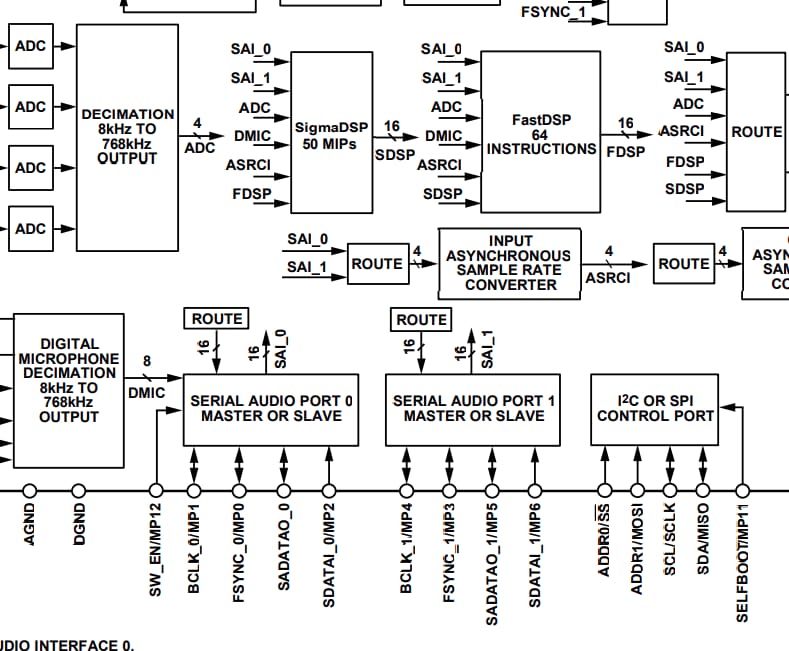
According to the functional diagram of the ADAU1787 the ADCs data go to the ROUTE block which can be an input to the Serial Audio Ports.
I couldn't find a way to route the 4 adc channels data to the serial audio ports though.
Thanks,
Sagi
Hi Sagi,
It is possible to route the data from all 4 ADCs to the Serial Data Port.
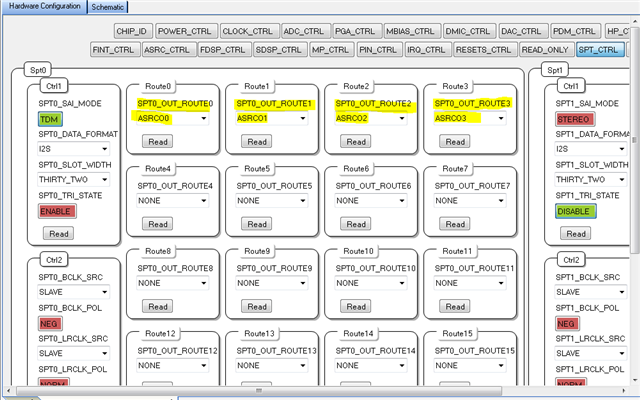
In order to help with the routing of data from ADC0-3 to Serial Port 0 we created a sample project in Sigma Studio which you can see that the data goes from the ADC to ASRC and is then routed to the Serial Port 0, which our project configures for slave mode.
Note that the ASRC0 is only needed if MCLK is not synchronous to LRCLK/BCLK. Otherwise ADC0-3 data can be routed directly to the Serial Port 0 output.
The ADAU1787 has flexible routing which can be configured in SigmaStudio. To configure the input routing source for the ASRCO Channels 1-4, set the ASRCO_ROUTEx registers as shown in the first attached screen shot below. To configure the input routing source for the Serial Port 0 Output, set the SPT0_ROUTEx registers as shown in the second screen shot attached below.
ASRC0 Register Settings:
Serial Port 0 Register Settings:
Below is the attached Sigma Studio Project.
ADC_to_Serial.zip

Thank you for the answer.
I managed to get the signals in serial port 0.
I try to connect an external master clock to the chip and did all the jumpers settings according to the datasheet but I don't understand where should I physically connect the External master clock to.
Thank you,
Sagi
Hello Sagi,
Since you are using the sample rate converters you will not need to bring in a different master clock. The ADAU1787 board can use its own on-board master clock source. The only question is if the USB Streamer requires an external master clock? If that is true then you need to pick up the clock from the ADAU1787 eval board. Check the schematic for details on that.
Dave T
Hello Dave,
Thank you for the reply.
The USB Streamer doesn't require master clock (it is always the master device which provide the BCLK and LRCLK and if needed the MCLK).
The ADAU1787 get its BCLK and LRCLK from the USB Streamer and output the I2S/TDM data to the USB Streamer.
The USB Streamer use 3.3V logic level and this cannot be changed, the ADAU1787 serial ports seem to use 1.8V logic level, can It be configured to 3.3V?
Thanks,
Sagi
Hello Sagi,
No, the max IOVDD level is the 1.8V standard. ( Actual max is a bit higher )
So you have to use a level translator.
Dave T
Please log in to reply.