Connect microphone and headphones to ADUA1467Z
Hi!
I'm having some problems with connecting my microphone and headphones to an ADAU1467Z.
I'm trying to connect the microphone through input jack 1, IN1, with a TRS 3.5 mm and then the headphones are connected through OUT1.
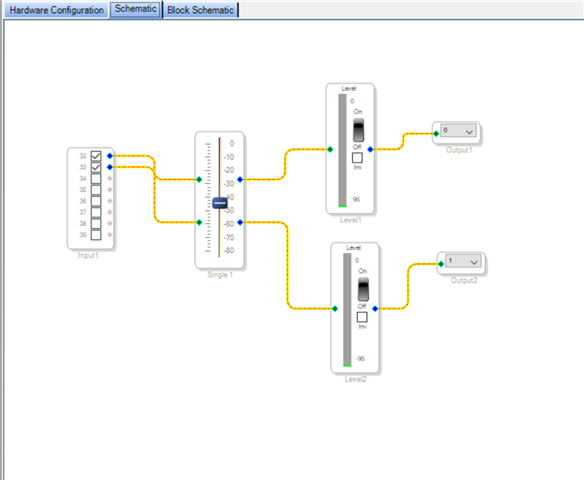
The parts that I've added are these:
When I run "Link compile download" it doesn't show any errors or messages but nothing happens either. The usbi is connected and green.
Does anyone know what is wrong? This is my first project with ADAU1467 so there might be a lot of things that I haven't thought about.
Thank you!!
Audio Signal Processors
headphones
microphone
adau1467
adau1467z
sigmastudio
SigmaDSP Audio Processors
Show More
Hello,
The schematic looks OK; the input and output selection is correct for the ADAU1467 eval board.
Can you tell me what type of microphone you are using, and describe the signal path from the microphone to the DSP? The AD1937 CODEC on this eval board is designed for line-level inputs, and it does not supply mic bias for electret mics, so you will likely need a preamp between your mic and the eval board.
Also, please verify that the CODEC boot mode switch (next to the large yellow connector) is set to the Standalone option.
By the way, it looks like the level detector is disabled; after downloading the SigmaStudio program to the DSP, you will need to toggle the switch on the right side of the level meter to see a readback.
Best regards,
Joshua
Hi Joshua!
Thanks a lot for your reply!
I had no idea what could be wrong but you really helped, when I switched the CODEC boot mode switch on the DSP it started working. Really happy it was solved so easily.
Which you all the best!
Best regards,
Amanda
Please log in to reply.