SigmaStudio ADAU1787 register window - be nice to see register hex values as you change settings
As I change bit fields graphically in the register window, it would be useful to see the resultant hex values. Does that exist? Can it be added in a future version?
In my case, I am porting code into SigmaStudio and want to make sure my settings match.
I can build the design and export to .dat files and verify there, so not all lost, but the ability to inspect in the register windows would be better..
Thanks,
Dan
ADAU1787
Integrated/Special Purpose A/D Converters
sigmastudio
Audio CODECs
Hello Dan,
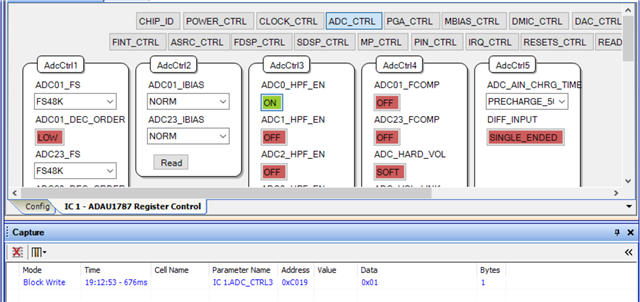
If you keep an eye on the Capture Window while changing parameters in the GUI, you can see register addresses and values in hex change in real time with your settings. The latest changes are at the bottom of the list.
Are you able to see this in your installation?
Also keep in mind, if you can program the ADAU1787 with your older settings, then switch over to the new project in SigmaStudio without downloading it, you can read each register page back from the DSP to import the settings.
Best regards,
Joshua
Joshua,
I think i have to be connected to a board to see the capture data. I am using the tool with no connection. I have hardcoded settings (that work) I am porting to the environment.
For now, I am comparing the export .dat settings to my hardcoded settings.
Thanks,
Dan
Hi Dan,
Try doing a link-compile-download, even if there is no board connection. That should activate the capture window.
Joshua
Joshua,
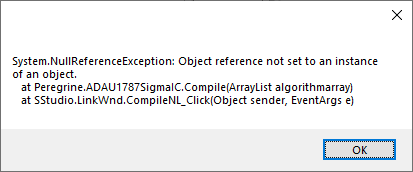
I tried that and get the following error.
I saw this before, but I just ignored it and went straight to export.
Dan
Hi Dan,
I think this can happen if the Schematic Window is completely empty. Try dragging in any one cell (without inputs), maybe a DC input or sine wave generator, then try again.
Joshua
I tried adding white noise generator and compile/link then the IC 1-Sigma: Params filled, but with
Param Address: 8192
Param Name: NonModRamAlloc
Cell Name: Beginning
Param Data:
0x00, 0x00, 0x00, 0x00
Data 5.32:
0
Data 28.0:
0
TO
Param Address: 16384
Param Data:
0x00, 0x00, 0x00, 0x00
Data 5.32:
0
Data 28.0:
0
Hi Dan,
I'm a little bit confused. I thought you just want to see real-time hex values, as you change register settings? This is not part of the Params file.
I suggested the link-compile-download to force the Capture window to follow changes, although it shouldn't be needed.
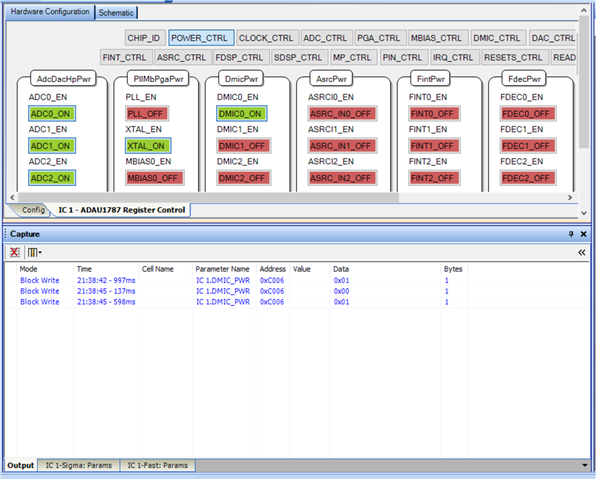
Try to open the Capture Window with Ctrl+5, make sure it is set to the "Output" tab at the bottom of the screen, and start to change settings in the Register WIndow. You should see new I2C/SPI transactions appear at the bottom of the Capture Window. These contain the hex values for the corresponding register in the 7th column.
Joshua
Joshua,
"You should see new I2C/SPI transactions"
I am not connected to hardware and realize the tool is designed to be connected.
I got everything working comparing the exported .dat files with my hardcoded settings. That turned out to be efficient enough. I am able now to read the settings from a file on an SD card. I needed this so developers could modify SigmaStudio designs without having to recompile the MCU code.
I have other questions, but I will make a new post.
Thanks for your help.
Dan
Please log in to reply.