EVAL-ADAU1787Z USB Communication Failure Error
Hi, Dear ADI Team
I am currently developing using EVAL-ADAU1787Z evaluation board.
I was following the User Guide to make a simple route for testing.
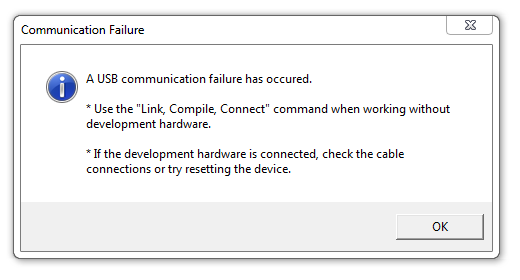
The problem is that when I press Link Compile Download, it gives me the communication failure prompt as attached figure.
Environment:
- Windows 7 with SigmaStudio 4.6
- Desktop: Dell XPS 8100 USB2.0 ports only.
USBi :
- USBi can be seen in Device Management list as "Analog Devices USBi (programmed)"
- In Hardware Configuration of SigmaStudio, USBi module turns green when plugged in.
- Yellow and Red lights are on at USBi PCB.
Steps:
- Checked all jumpers and switches as EVAL-ADAU1787Z default settings on Figure 2 in User Guide.
- Switched USBi IOVDD to 1.8V
- on the EVAL board S7 is on left to be on , and S2 is left to be OFF, S3 is up to be I2C
- MCLK is using 24M ext, as setting J30 to EXT, J33 to OSC, and J32 and J4 Open.
- Followed steps in EVAL-ADAU1787Z User Guide (UG-1532) page 7 to page 8, made simple ADC->DAC route.
- Finally pressing Link Compile Download in SigmaStudio, it gives the Communication failure Error.
I have tried to search around for solution, all the related posts can not solve my issue.
I can see that someone may have a similar issue with a different EVAL board using USB 3.0 port, but I am keeping it on USB2.0.
Things I tried:
- tried to disconnect and re-plug USBi, same issue,
- tried to use different USB ports on a same machine, same issue
- tired to re-install USBi driver and Sigma studio, same issue.
- tried to use SigmaStudio 4.5 and 4.5 beta, same issue
- tried to setup on another win7 machine, same issue
- tried to setup on Windows 10, same issue.
Many Greetings.
Adam
Adam,
Can you send a photo of the EVB with all jumper settings and attach the SigmaStudio project? Reading through your description, it seems this setup should work.
Hi, Dear ADI Team,
Thank you for your response.
It finally turns out that that specific usbi board we received had a hardware issue.
We just got a new one and it works.
Many Thanks,
Adam
Please log in to reply.