SigmaStudio for ADAU1452 "Mute" cell of Volume Controls category vs. "Parameter Update" cell of Basic DSP category
Hi Team,
Is there a way to update the parameter(s) in a specific cell, like those check box (on/off ?) in "Mute" cell and "Sine Tone" cell?
Are these updates done by the "Parameter Update" cell of Basic DSP category? Are these updates also available to an external MCU via SPI interface control? Please let me know where I can find more information.
regards,
ping
Audio Signal Processors
adau1452
sigmastudio
SigmaDSP Audio Processors
Hello Ping,
Someone will be posting an answer for you soon.
Dave T
Hello ping,
Before answer your question let me tell you about the params tab where the values and addresses of the objects are listed.
Most parameters in a cell are exposed in parameter RAM. you can change the values in run time.
These are also shown in the Exported System files for microcontrollers to use.you can see these in action by using the Params tab in the Capture window.
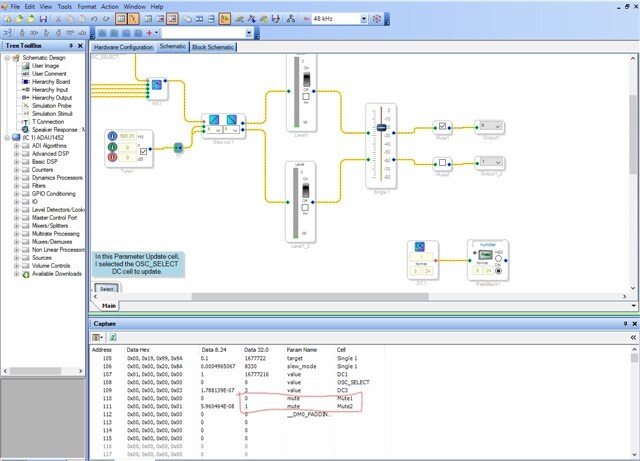
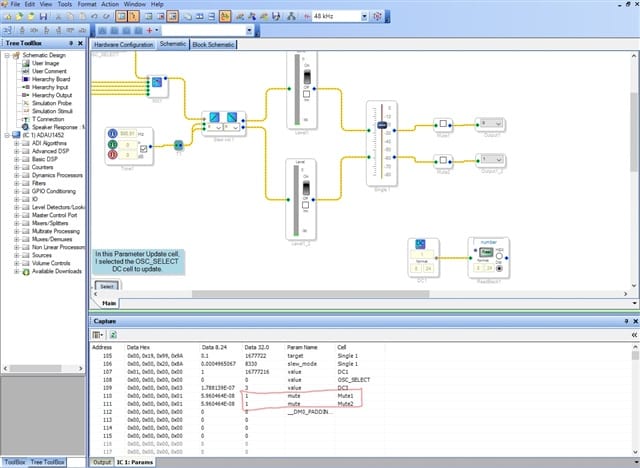
(path : view-> Capture window ->params tab. I also attached some screenshots please refer that).
you can enter in values directly into the window. And that the data in the RAM is shown in three different number formats.
Be aware of that entering in data directly into the window will change it in the DSP but not in SigmaStudio GUI.
This is the same exact way an MCU will change the settings.
For answering your question on Parameter update :
In the screenshots, I made changes in the mute cell values with 0,1 alternatively that mutes the respective channel.
One channel Muted
Both are unmuted
And I also did the same with the oscillator(Tone1).Literally I wrote the values.By changing the values in the params tab, you can somehow control the way.
the mute and Tone screenshots are just a reference for how to change/write the values.
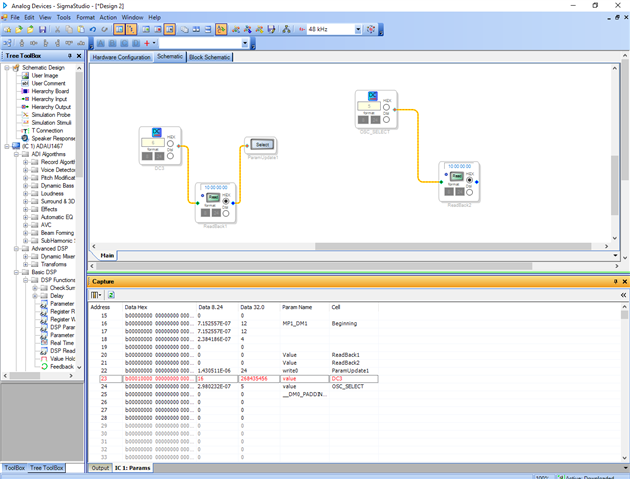
The same thing with the parameter update.I also attached a screenshot with this as well.
But here is something that you should be aware of.
This is useful when either using a GPIO or a register to update a parameter.
It can also be used with some logic cells to decide on a value depending on calculations but this gets a bit more complicated.
One thing to say about using the Parameter Update cell, if you use it write to an object like a Mute or Sine Tone source, you will not be able to write to the Mute or oscillator using SigmaStudio or an MCU.
Well,probably you can write to it but it will only hold that setting for a max of one sample period. The next sample period the Parameter Update cell will update the cell and overwrite what you just wrote.
So if you need to have MCU control AND use a Parameter Update cell you have to solve the problem in a different way.
The optimum solution will depend on the problem that needs to be solved.
Thanks Dave for your support.
Regards,
Harish

Hi Harish,
Thanks for your supports.
Could it be possible that you post these project files? Because these screen shots are not clear enough for me to read.
regards,
ping
Hello ping,
In those Sreenshots, I was just trying to explain that how you can change the values in the params tab. You can update it in the run time.
I mean you can mute/unmute signals and As you asked ,you can turn ON/turn OFF Sine tone Cell by writing the values in the params tab.
For an instance,if you are taking the sine Tone cell means you will get all the controls of the cell in the params tab as you see in the GUI.
For an example,You will Turn ON/OFF,adjusting gain,etc.
Here I have attached a project, Please follow the below steps to see how writing values will change the function.
1) Link compile download the project.
2)Go to view in the left top,then capture window,then Params tab.
3)In that please scroll down and find mute in the param Name and cell.
4)Please change the values as 0,1 alternatively in 32.0 format.(if unmuted then both mute values are set as 1)
5)Likewise please find Tone1 in the cell column and gain in param Name then Change 0,1 alternatively in 8.24 format to turn ON/OFF the Tone Cell.
(If turned OFF then the value is set as 0).Likewise you can try others.
Coming to the parameter update:
You can also do the same with that.I mean writing values into it.But please be aware of those previously mentioned cases.
Kindly revert us for any clarification.
ADAU1467 Mute and Tone Example with params tab.dspproj
Regards,
Harish
Hi Harish,
Thanks for your detail explanations and the posted projects.
As you described, the results of the "Parameter Update" cell usage will be affected by the sampling rate. If I use an external MCU to issue and a SPI command to change the "MuteNoSlewADAU145XAlg1mute" parameter of the "Mute1" cell name. Does the changed results will also be affected by the sampling rate?
Please also let me know which parameter denotes the dB value of the Level1, Level2, and Level3 cells if an external MCU is used to read back the dB values.
regards,
ping
Hello Ping,
Parameter Update Cell Functionality:
This cell takes a value and writes it to the parameter EVERY sample period. How it gets its value can be many ways but it writes to the memory location of the parameter EVERY sample period.
MCU can write to the parameter whenever it wants to. It is asynchronous to the sample rate, it just sends a SPI/I2C message to write to the memory location of the parameter cell.
Result:
If the MCU writes to the parameter memory and changes the value to X, it will be changed to X. Then on the very next sample or perhaps even during the current sample period, the Update Parameter cell will also write to the parameter with a value of "Y" thereby overwriting the value "X" that the MCU just wrote.
So the parameter update cell has nothing to do with the sample rate with the exception of the fact that the code is executed every sample period.
Regarding the meters, have a look at this post and the others that it links to:
(+) Reading meters with a controller on the ADAU1452 - Q&A - SigmaDSP Processors and SigmaStudio Development Tool - EngineerZone (analog.com)
I found this by searching the forum for "reading meters with MCU" You can try other search terms to find other posts that might have further explanations.
Thanks,
Dave T
Please log in to reply.