SC589 reports an error when running adi_rom_boot()
Hello
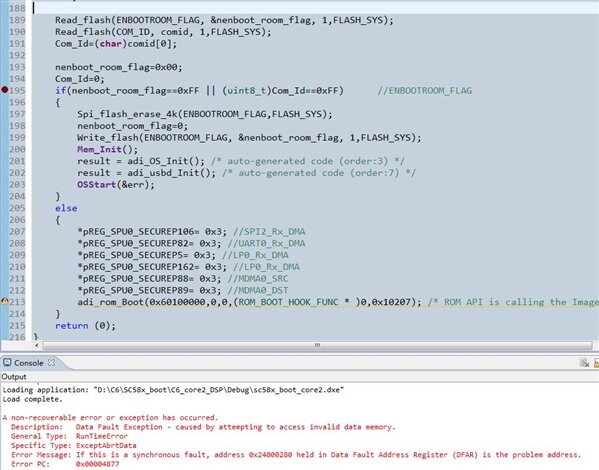
Because I need to update my application code with USB function, so I add adi_rom_boot() function in USB Vendor Demo for ADSP-SC589 project, boot the application code I put in spi2 flash (address 0x100000), but run adi_rom_boot( ), the error shown in the figure below will be reported.
According to the project files and instructions provided by EE384, adi_rom_Boot() should run in L2_SRAM, obviously my adi_rom_Boot() runs in external DDR. As shown below
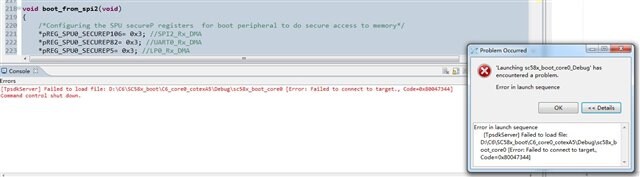
I reduced the code size and tried to make the code run in L2_SRAM by linking the adsp-sc589.ld file provided by EE384 in the settings. The compilation is passed, but the "Failed to connect to target" error is displayed when uploading the program using JTAG.
This problem has been bothering me for a few days, what should I do?
thanks!
VendorDemo.rar
cces
Audio Signal Processors
sc589
adsp-sc589
Processors & Microcontrollers
Processors and Microcontrollers
evaluation_board
SHARC Audio Processors/SoCs
Heterogeneous Multicore Processors
Show More

Hi,
After flashing SSL code, you are not able to debug the project. While debugging "Failed to load file" error occurs. please confirm our understanding.
To assist you better, can you get back on the below points
1. Are you using EZ-kit or Custom board.
2. Are you able to boot simple SSL application in EE-384.
3. Please change the boot mode to 0 and try to debug the project
4. Are you able to debug after removing adi_rom_Boot()?
Please Let us know for further assistance.
Regards,
Anand Selvaraj
Hi Anand Selvaraj
Thank you very much for your reply!
1.I am using ADZS-SC589-EZLITE and ICE-1000
2.I have tested that "SPIMASTER_Single_SSL_Core0.ldr"can boot “SPIMASTER_Single_Multicore_Led_Blink_Core0.ldr”,but my project (VendorDemo.rar)can not boot "SPIMASTER_Single_Multicore_Led_Blink_Core0.ldr”
3.BMODE is set to mode0 and still have the same error message
4.I am able to debug after removing adi_rom_Boot().
Best Regards
5531.my boot and app project.rar
This are my boot and app .The version of cces is V2.6.0
Hi,
Can you please try to add the below function ( just the definition, no need to call the function or anything) in arm ssl project and try
void adi_mmu_Init()
{
asm("nop;");
}
After the SSL project is booted, are you able to connect to CCES via do not disturb method (in the debug configuration, disable the Reset option)? If you are able to debug, can you please send screenshot of the disassembly when it hangs?
Also, please note that Micrium products for CCES are no longer available. Please refer the below FAQ.
ez.analog.com/.../faq-end-of-availability-for-micrium-add-ins-for-crosscore-embedded-studio
Regards,
Anand Selvaraj.
Please log in to reply.