Help with Modified FxLMS/FxNLMS in an ANC application
Hello,
I am currently working on my senior design project for my bachelors in electrical engineering. The project is an ANC device for use on rigid barriers.
The idea is to use a tactile transducer as the anti-noise source, effectively turning the barrier surface itself into an anti-noise driver.
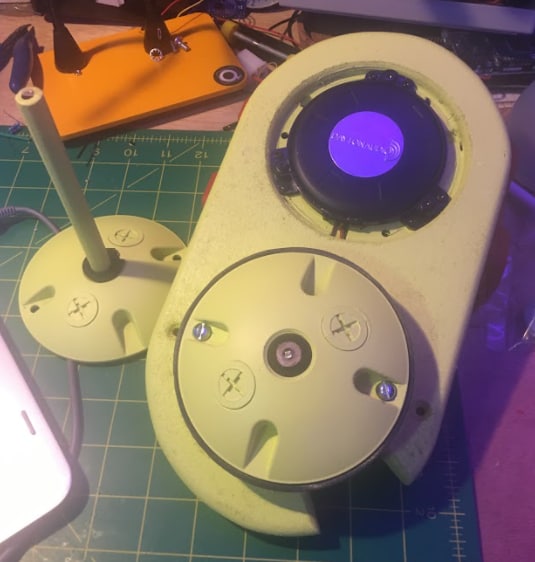
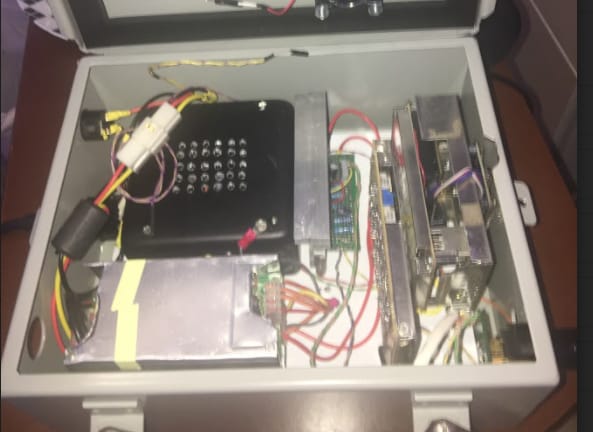
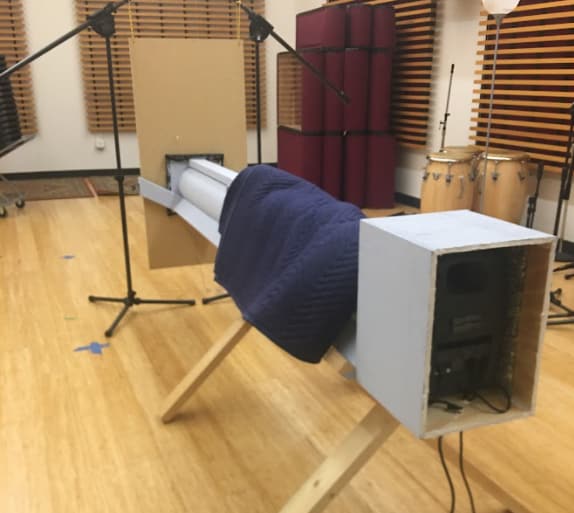
Here are some photos of the device.
Reference mic (the tube), transducer and error mic
power supply, analog and digital subsystems
I am using a ADAU1466 equipped eval board from alibaba and a cirrus cs4271 ADC/DAC. Both are running at 192kHz.
I have verified analog-to-analog throughput using some simple sigma studio projects so I am fairly confident everything is entering and exiting the dsp as it should.
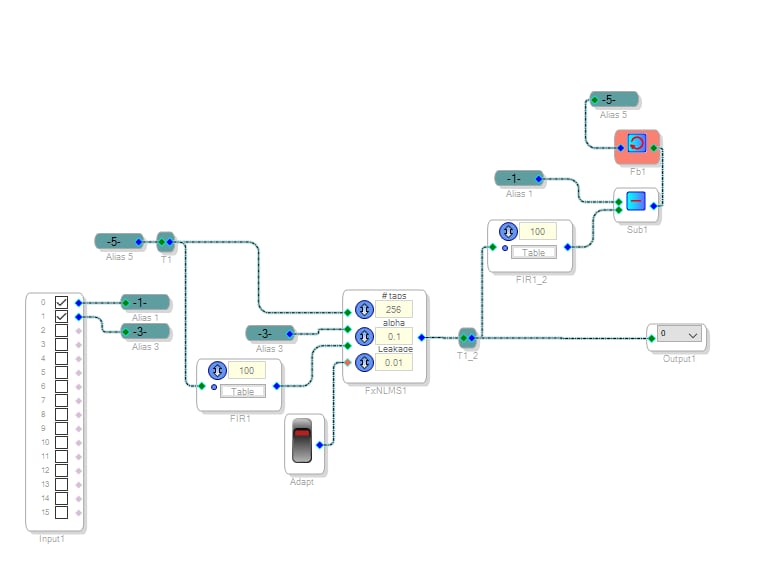
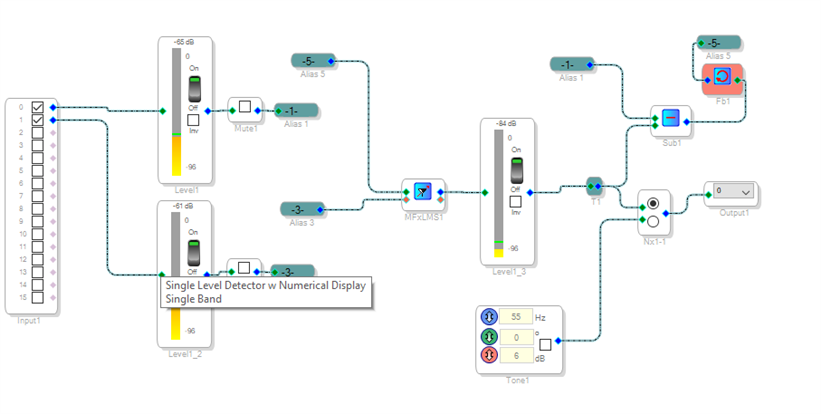
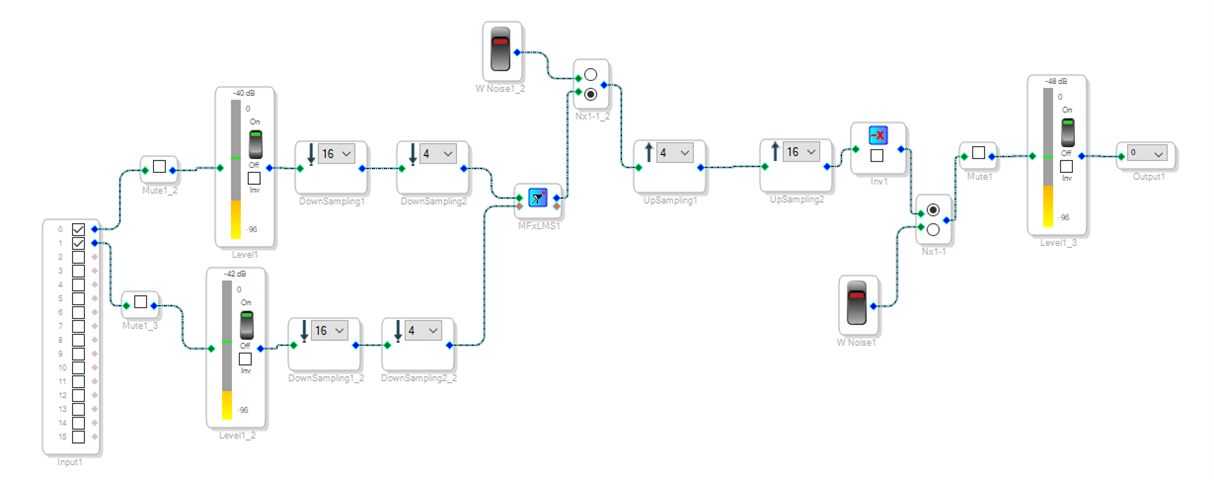
However, when I try to run the program below, I do not hear or measure any output from the transducer even with the noise-to-be-canceled placed directly up to each mic.
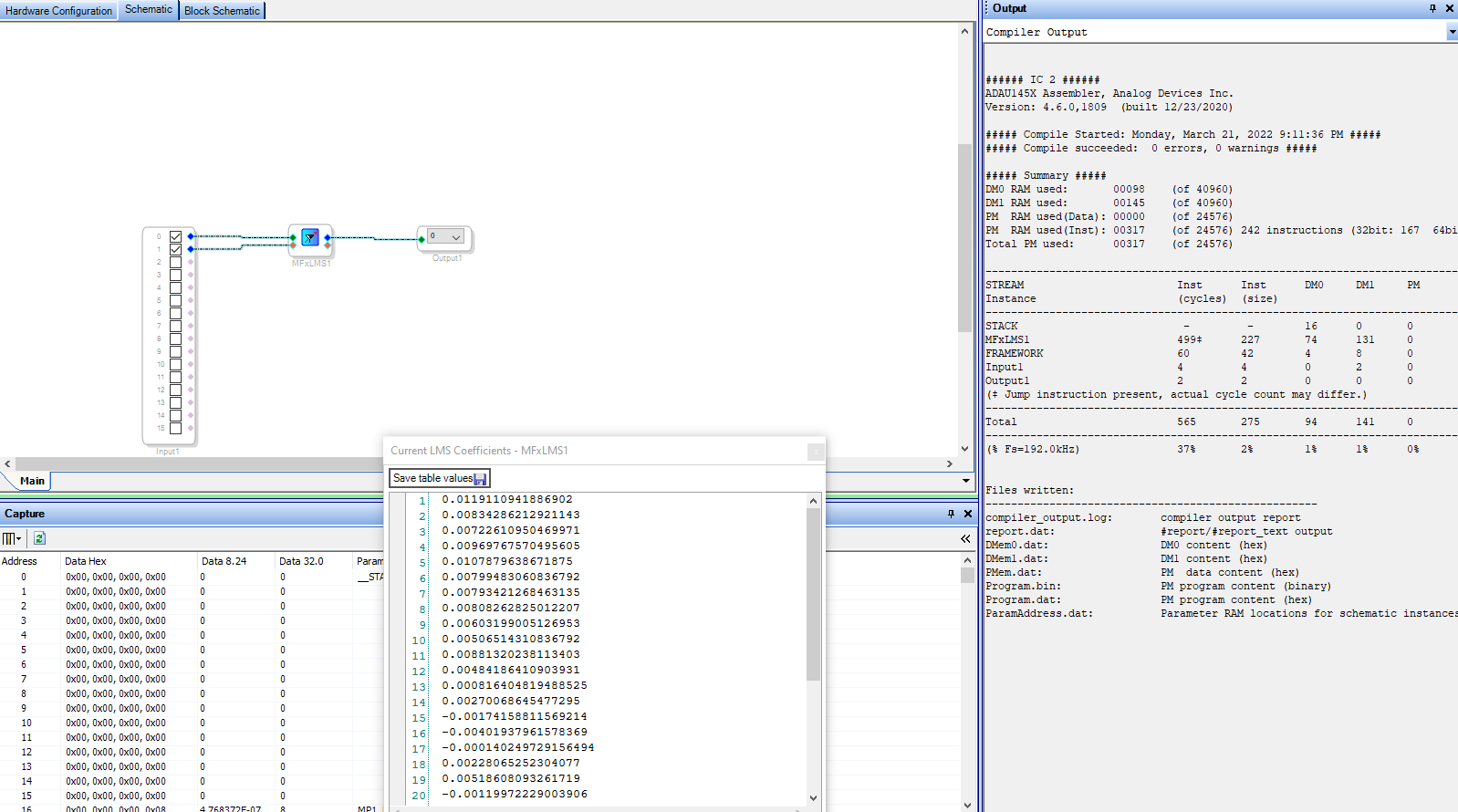
I also tried running a simpler project using the MFxLMS block. The learning mode seems to work fine, I get white noise on the output and secondary path coeffs are generated. I can switch to runtime, recompile and upload the second path coeffs but I still do not hear or measure any anti-noise output from the dsp regardless of how loud the noise source into the system is.
If anyone can help me understand what I can do to solve this issue I would greatly appreciate it!
Waters
Edit Notes
[locked by: emassa at 12:35 PM (GMT -4) on 29 Apr 2022]
Audio Signal Processors
anc
software
Active Noise Cancelation
output
noise
sigmastudio
SigmaDSP Audio Processors
active noise control
noise_reduction
MFXLMS
SigmaDSP
FxLMS
adau1466
anc projects
Show More
Hello,
What is the source of the noise? Vibration of the device? Are you getting good signal level from the ref mic? Is the ref mic close to the noise source and the error mic close to the anti noise transducer? There may be an issue with causality. Also you may need to account for crosstalk from anti noise transducer to ref mic.
Thanks for the reply! So right now I just have the device on my bench (like I show in the initial post) to attempt some initial setup using a function generator on my phone. So the reference signal is perhaps a bit low. I was able to get some anti-noise production with this setup but I stepped away for a minute and could not replicate the results when I returned.
I will, however, be doing more thorough tests using this testbed which is a plane-wave tube
this speaker will be enclosed
The noise source will be a few discrete sinusoidal tones from 50 to 300 Hz as well as some looped recordings of a lawnmower, ac unit, and air compressor.
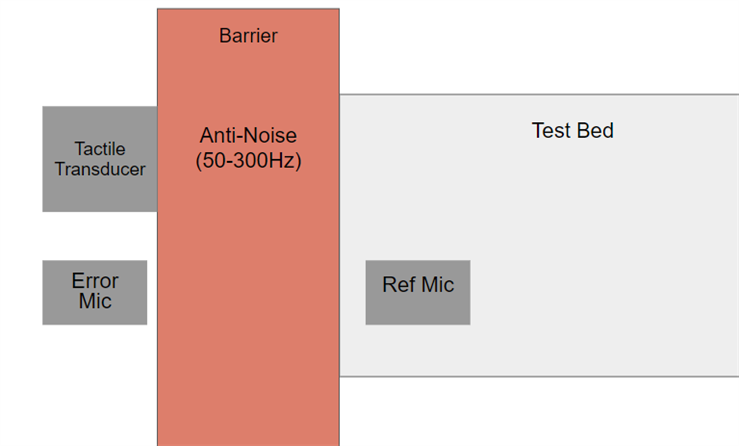
Reference mic will be placed on the surface of the barrier that faces the incoming noise (inside the testbed). Error mic and transducer are placed on the opposite side like this.
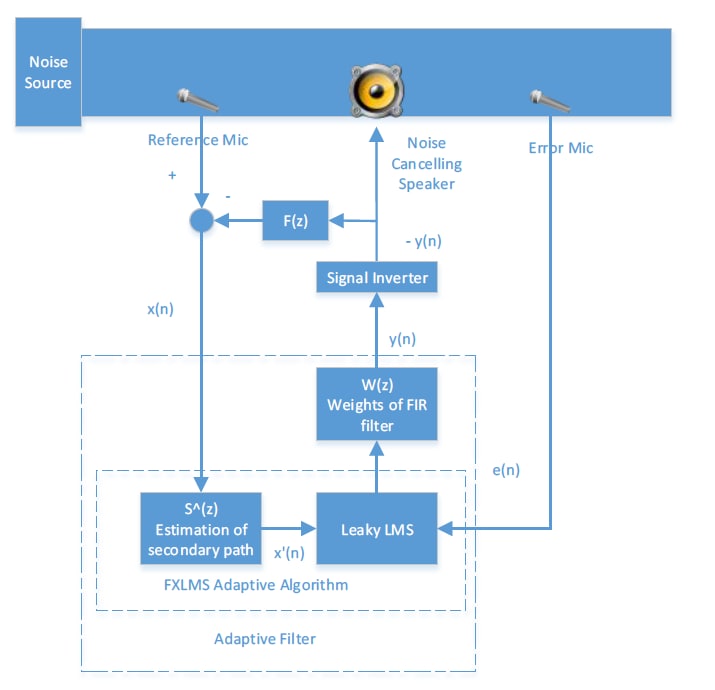
I based my approach to the first algorithm (using the FxNLMS block) off of this image from "Implementation of ANC in a Duct" by Simranjit Sidhu. He calls it a "Feedback-Neutralization feed forward leaky FxLMS topology"
I also followed instructions from this forum post https://ez.analog.com/dsp/sigmadsp/f/q-a/65022/filtered-nlms-filter/152909#152909

Hello Waters,
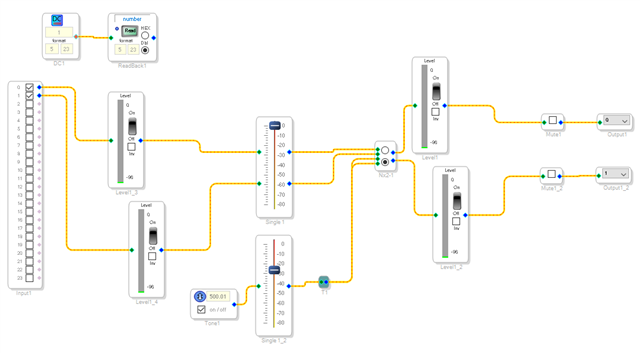
I want to add to what bitmechanic said by making a suggestion. You are not using SigmaStudio tools to help you troubleshoot. You are running blind. Add some meters to the inputs and a meter on the output so you can "see" the signal levels present in different points in the DSP program. You can also add a switch with an oscillator to drive the output at a known level to test your setup.
I do things like this in almost all my projects so I can test the levels in different places. Here is an example:
One other thing. It really helps us if you include your project in the post. Then we can download it and test it without taking time to recreate your project and we can also check things like the register settings. Make it easier for us, or anyone else, to help you.
Also, thanks for letting us know you are a student. That usually helps us to craft a answer that would be more helpful. This is a great project and we certainly would like to see you succeed!
Dave T
Hello Dave,
Thank you for the reply! I am a bit of a green horn when it comes to sigma studio so I really appreciate you pointing me to simple things like meter levels.
I am attaching both of the projects here.
ANC_RigidBarriers_FxNLMS.dspproj
ANC_RigidBarriers_MFxLMS.dspproj
As for project settings and interconnections between the codec and dsp:
I am running my codec in slave mode and it is clocking off of the mclk from the 1466. I have this set to 12.288 MHz as per the cirrus codec datasheet.
LRCLK is 192KHz and BCLK is set to 16 bits per channel. The 1466 is sending these to the codec as well.
I am using the I2S serial data protocol
Thus far I have been checking clocking/signal throughput with my usb scope from velleman to verify the correct frequencies and such.
I really appreciate you taking the time to help me out.
Waters
Update:
Hello,
Following the initial advice I received from both bitmechanic and DaveThib I have made some progress with the program. I am now able to "see" output from the MFxLMS Block.
0523.ANC_RigidBarriers_MFxLMS.dspproj
I added the subtraction and feedback because it seems adding the mono mux to the output causes the MFxLMS to become unstable.
Here is a version without the feedback and mux that also appears stable.
ANC_RigidBarriers_MFxLMS_v2.dspproj
One weird thing I noticed is the tone gen output is 4 octaves higher than the nominal value. FS for the block is set to 192kHz. I can make it output the correct frequency by upping the block fs to 768kHz but I suspect something is amiss.
I tried working with the FxNLMS block to make a working system but could not establish any output from the lms block, even with internal sigmastudio sources feeding directly into the block. Here is were I left off with that project. When I compile this, the white noise will not even play through to the output when it is selected on the mono mux.
.8688.ANC_RigidBarriers_FxNLMS.dspproj
If anyone could take a look at these projects and tell me if I'm on the right track, missing something, have my settings correct, I would greatly appreciate the help.
Thanks again,
Waters
P.S. Here is the device attached to a sample. This is meant to simulate the construction of a solid door.

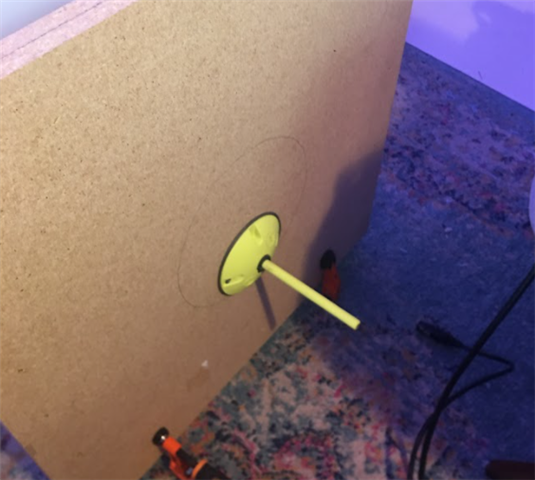
Hello,
Very interesting, thanks for photos, diagrams, and info. Just some thoughts:
1. Instead of a barrier, why not locate/attach an antinoise speaker near the end of the duct, with the error mic at the end of the duct and the ref mic closer to the noise speaker at the other end ? What is the purpose of the barrier ?
2. Initially you could eliminate the ref mic and use the signal you are sending to the noise speaker as the reference. Then you dont need the F(z) since there is no crosstalk from antinoise to ref mic. In this case you use an electrical ref instead of an acoustic ref which should be easier to check if things are working.
3. I *think* the SigmaStudio MFxLMS already inverts the antinoise output, so I think you dont need the extra inverter. Not 100% sure about this though, you could try it.
4. Have you plotted the secondary coeffs ? also you could measure the response from the primary path (noise speaker to error mic) and plot it, just a sanity check of the setup.
5. What frequency range are you hoping to cancel ? There may be some latencies in your setup that would prevent getting good cancellation at higher frequencies.
6. What are the characteristics of the anti-noise transducer? Can you give the part number ?
Hello,
Oops, saw this after I sent my thoughts above. So the first photo is the barrier with antinoise speaker and error mic attached to one end of the duct ? What is the second photo ?
The photos above in my latest post are of the device attached to a sample. The second photo is if the reference mic on the opposite side of the same sample.
I have not conducted any tests with the plane wave duct yet.
The aim of this device to use the tactile transducer to drive the barrier itself with anti-noise. For instance:
The noise from your outdoor AC condenser comes through your living room wall. This device would be placed so that the reference mic sits on the outside of the wall and the error/transducer are placed on the inside face of the wall. Ideally, the device would drive the barrier in order to cancel the sound that would otherwise be transmitted through it. The anti-noise should effectively push against the barrier vibrations caused by the impinging noise such that these vibrations are minimized.
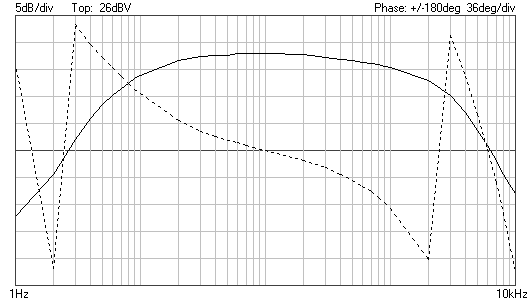
Here is a Bode plot from 1Hz - 10kHz with phase from the mic preamp input to output measured across the transducer terminals. The target range of operation is 50-300Hz.
Hello Waters,
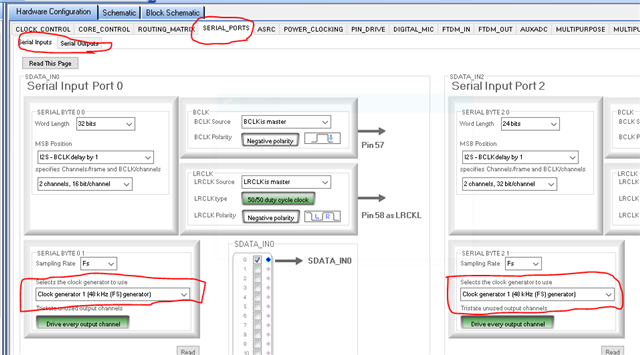
The reason the oscillator is running 4 octaves lower than what is set in the project, is because you are running the serial ports at 48kHz not 192kHz. Here is where the settings are located:
Now the problem is a bit more complicated than just changing the settings. You will have to make sure the codec is set properly. I think it might be and it might just follow the rate that is being sent to it. I do not know the Cirrus part that well.
Then the other thing you might run into is that the high bitclock frequency is difficult to run over fly-wires over to another board without getting into signal integrity issues. If you find there are a lot of clicks and pops or no signal at all this may be the issue. You can increase the drive strength on the clock and serial data outputs of the DSP. There is a tab called Pin_Drive is where you find those settings.
Do you really need to run with the bandwidth this high? I guess you are running it this fast for the lower latency. I just answered my own question.
Anyhow, this should solve the sampling rate problem.
Dave T
Hello,
Thanks for the detailed description, very interesting project. So the ref mic will be on the outside wall and inside the duct correct? Will the transducer have sufficient output up to 300Hz ? Have you investigated a coherence calculation between the ref mic and the error mic ? Could you provide a recording of the noise speaker playing white noise and record the signals at the ref and error mics ?
You are correct about the mic placement. The transducer is being powered by an lm1875 power amp with +-24V rails. My preliminary testing leads me to believe it has enough power to drive the types of barriers we will be testing within 50-300Hz range.
Unfortunately, I would not know where to start with such a calculation.
I can definitely make recordings though! So you are saying play white noise through the transducer and record the reference and error signals received?
Hello,
I am saying play white noise from the noise source, without any output from the antinoise transducer. A coherence calculation gives an indication how much cancellation you can expect vs. frequency given recordings from the ref and error mics. If you are able to make the recording I can make the coherence calculation.
Hey Dave,
I figured there was an issue somewhere in my clock settings!
Also, you are correct about the choice of sample rate. At 192kHz the cirrus throughput group delay is somewhere around 50uS and the idea was to reduce latency by cranking up the sample rate.
The cirrus part is hard wired in standalone mode for 192kHz. This is done by setting the 2 mode pins high or low (1 1 in the case of 192kHz) so that should be ready to go.
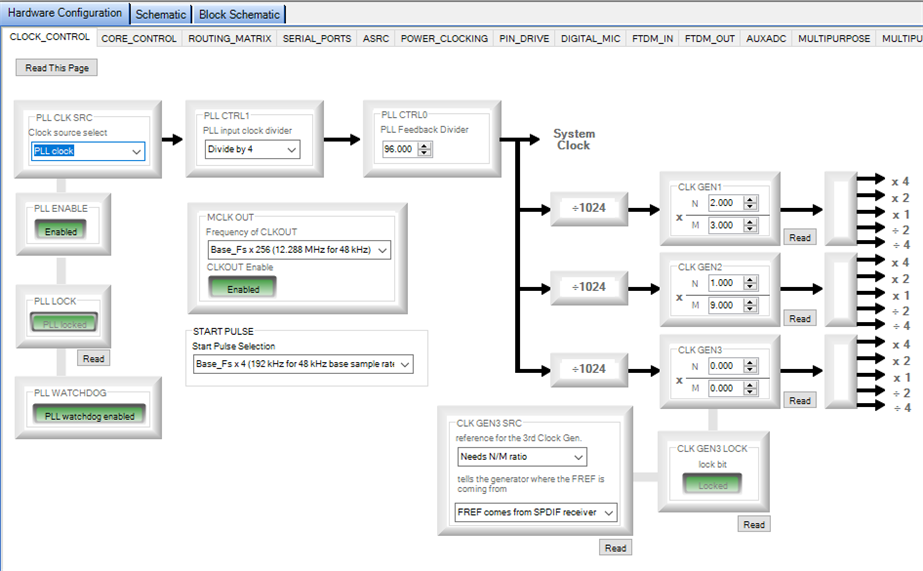
I had initially changed the N/M ratio of clkgen1 under the clock_control tab to get my 192 kHz clock like this
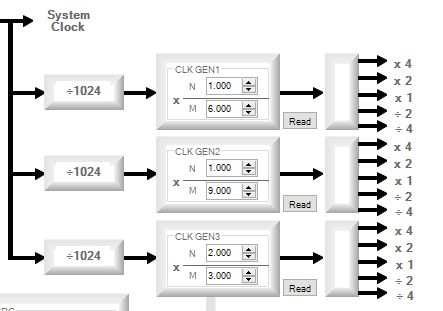
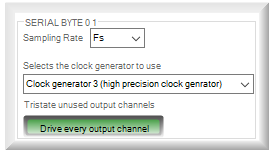
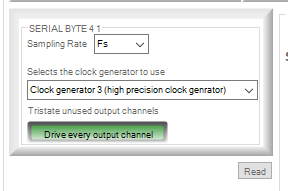
I have since followed your suggestion and set the serial ports to clock from clkgen3. I also reverted clkgen1 to 48kHz
If I understand correctly from the adau1466 documentation on clock generators (page 31 of the datasheet) calculation for my frame clock works like so:
(((12.288MHz / 4) * 96) / 1024) * (N / M) → 288 kHz * (2 / 3) = 192 kHz
New Clock parameters
SData Input 0
SData Output 0
My tone generator is now playing the right frequency
I have changed the pin drive levels for my lrclk and bclk to a higher level as well
Another sample rate related question I have is in regards to the downsampling/upsampling shown in the MFxLMS documentation.
Is this the recommended method for ANC implementation? If I understand correctly, down sampling the MFxLMS will effectively increase the frequency resolution of the MFxLMS block yes?
Thanks again for pointing me in the right direction!
Waters
Update 2:
Hey Y'all
I'm writing this update after a preliminary test of the device using the test-bed. This test was done to try and get an idea of how things will go during the main round of testing this sunday.
I am still experiencing issues with intermittent output from the DSP. Following DaveThib 's advice, I have been monitoring internal levels with meters and also using internal sources to artificially excite the dsp output as a sanity check.
I took a look at all of my clock signals with a scope today and made some adjustments to the pin_drive register to try and optimize these signals.
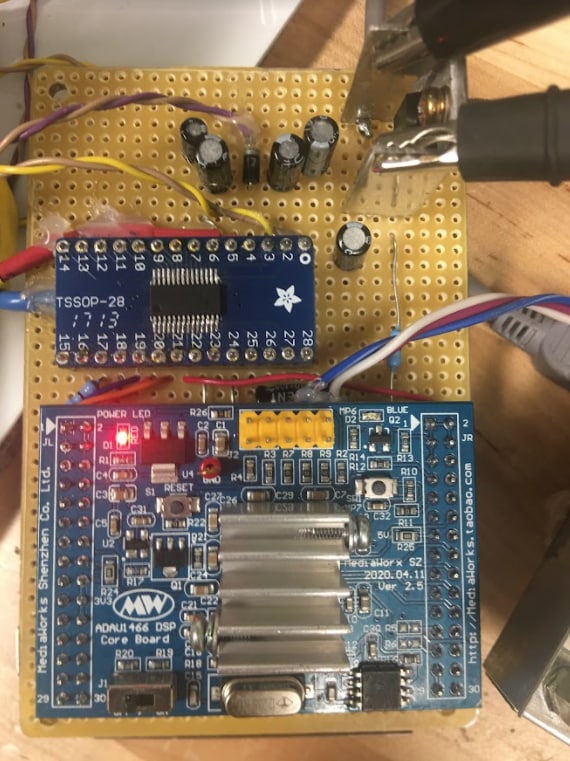
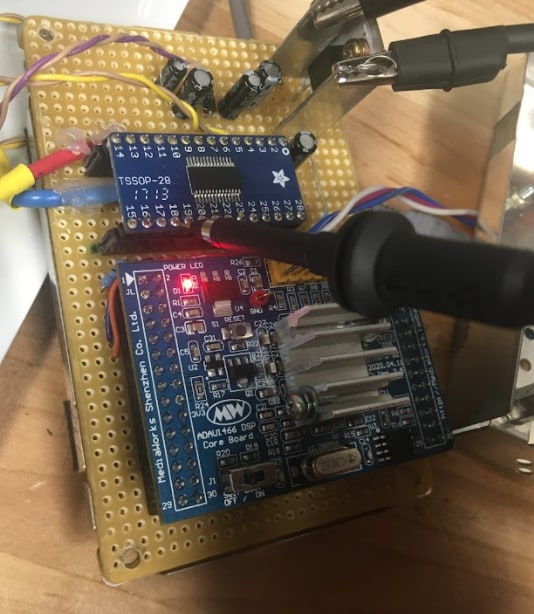
Here is the board layout. Before you say anything, yes I'm aware that my codec ic is on the breakout board backwards.
The 1466 chip is on the larger board under the heatsink. not really sure it needs the heatsink but I found it in an old projection screen tv and thought it wouldn't hurt
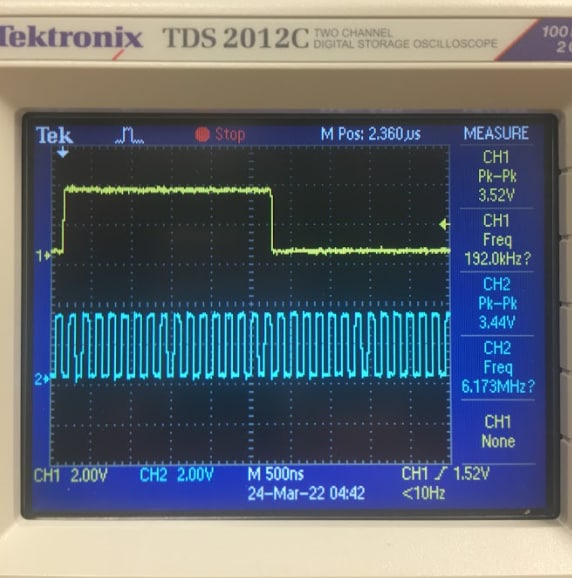
Here is my scope readout with the lrclk and bclk I count 16 bclk cycles per lrclk half cycle
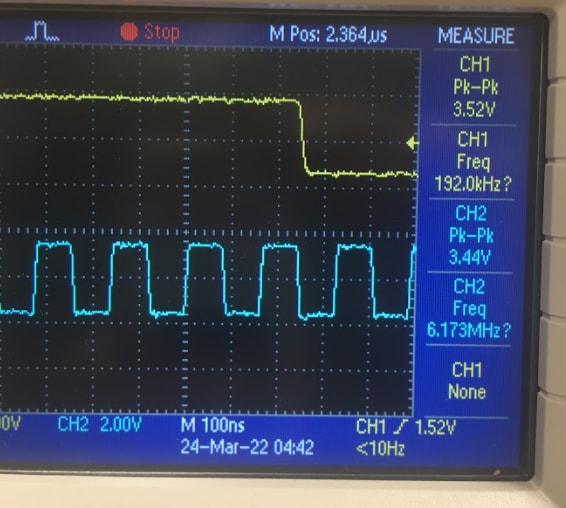
Here is a closeup view
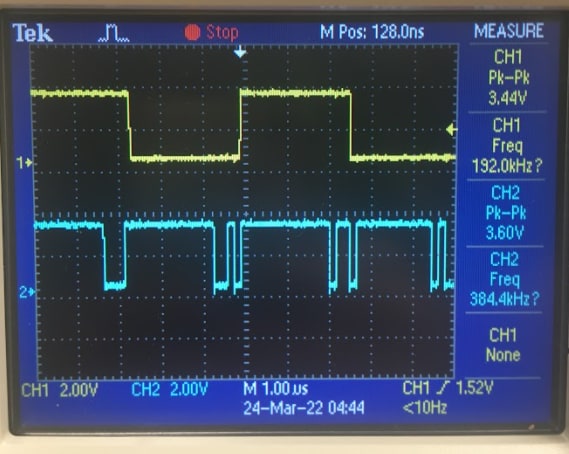
Here is the lrclk and sdata from the dsp into the codec
This is how I measured everything, with the probe directly on the breakout board pin and grounded to the linear regulator heat sink.
I believe these clock signals are all looking as they should. Perhaps a bit noisy but there is minimal overshoot or bouncing. That being said, by bclk and lrclk are set to lowest and low pin_drive respecetively. The higher drive values result in excessive overshoot and bouncing.
Should I set these signals to the higher drive settings and tame the ringing with some additional bypass caps. I already have some on each pin but it would be little trouble to add more if that would make things more reliable.
These measurements were taken when running this program on the board.
5732.ANC_RigidBarriers_MFxLMS_v2.dspproj
I was able to get this program up and running with healthy signal outputs to my transducer for about an hour or two.
However, it took some coaxing to get to that point. A few reboots of the board, recompiles, toggling serial output back and forth until the white noise training signal came out of the transducer. After that point I was able to keep it running and even had it spitting out anti-noise. That is, until I made the mistake of adding the inverter to my signal path. I pretty much had to call it quits after that because the output would not budge no matter what I tried.
What I don't understand is that the output level indicator would always show a nice output signal on each compile. This would often not be reflected on the physical output though. Could it be the pin_drives need to be set higher and tamed with bypass caps in order to increase the reliability of my output? Or is there something else I'm missing?
Regards
Waters
Hello Waters,
Sorry I did not notice your response until now.
The signals do look clean. If you increase the drive strength the ringing does often increase, you are correct. But do not damp them down with capacitors to ground. That will just cause other issues. What is better is to use series damping resistors.
You might have an issue with the serial input port side since the DSP is the master for both the serial input and the output. But, you did good to use an internal source for testing.
I could not see your jumpers for the clocks but the waveforms look good so I do not think this is the issue.
However, looking at your project I see some things that are inconsistent and do not make sense to me.
Your sample rate in SigmaStudio is 192kHz. The DSP core is set for 192kHz.
The serial input and output ports are set to 48kHz so that is a problem. You will have lots of aliasing especially with the wide-band noise source. You are not using the sample rate converters.
The schematic has almost no processing done at 192kHz. Almost everything is done at 3kHz sampling rate. So why are you running at 192kHz?
Then the serial input and output ports are set to 32 bit word length yet you are using a 16 bit TDM format and the data format you are using into and out of the DSP core is 24 bit. So I suggest you change the word length in the serial ports to 16 bit. Leave the core set to 24 bits and it will truncate the LSBs and will work fine.
I think you should run the core at a lower sampling rate. I have not tried to set it up for a 3kHz fs but it may be possible to do but SigmaStudio will not support it for the code generation. So I suggest you run the core at 48kHz and divide it down by 16 to get to 3kHz fs if you really need to operate at that rate.
Let me know where you stand on this project.
Dave T
I have also made this filter for ANC
Here is my project
FxLMS Filter.dspproj
Such a big Platform but no one is here to help begginers, It is a big shame to you guys
Rajbir,
I have read through the responses and the ADI team has been diligent in their reply. The post is not citing a specific question and does not contain an action to be taken. I understand that you may be frustrated about your project, however, as our Analog Devices EngineerZone Code of Conduct states we do not allow inflammatory posts in our community.
Please log in to reply.