How to map Indirect Parameter Access parameters to GUI controls?
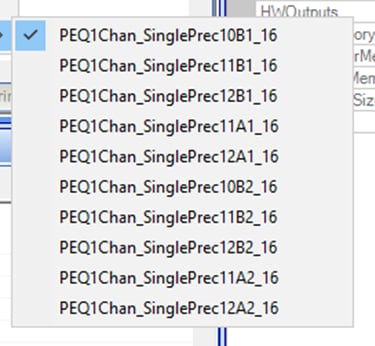
I am learning about the Indirect Parameter Access and can't locate any documents that correlate the gui controls on schematic components to the parameters listed for indirect access. Some are obvious like "Gain1940AlgNS10_17" for the gain of a "Single Volume Gain (no slew)" control. Some are not, like the image below for a "Parametric EQ - Single Precision" with two filters active.
How do I figure out the mapping between the parameter names and the GUI controls? I have tried looking through the help (F1) for the components and some have limited documentation but most do not.
indirect parameter access table
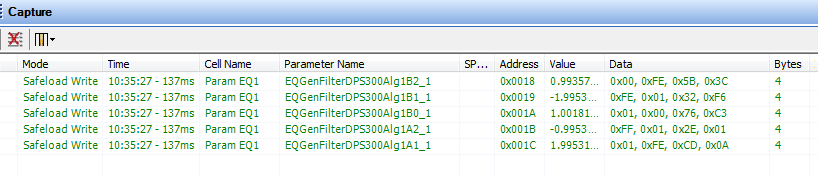
You can find the parameter name in the capture window when you change the GUI controls:
Hello bservis,
The GUI object in SigmaStudio will sometimes take in information in a user friendly way and then calculate the parameters to download to the object running in the DSP.
For an EQ, SigmaStudio will calculate the filter coefficients and that is what it sends to the filter object in the DSP. A BiQuad filter will have five coefficients and since you grew the filter to make it two sections you have ten coefficients. The filters coefficients are A1, A2, B0, B1 and B2. I am not sure exactly what filter you actually used.
If you change the filter and watch the Capture window you will see the coefficients being downloaded.
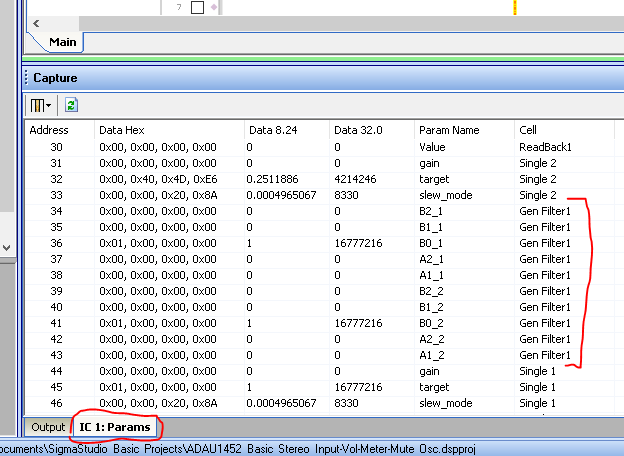
Then if you look at the PARAMS tab you can see the parameters for each object in your program.
Here is an example.
You can see the filter in my project that I grew to two sections.
So you can do this a couple of ways.
1) You can add all of the filter parameters into the table. Then make sure you update the five coefficients for each section all at the same time. The Indirect Parameter Access Table (IPAT), can handle five memory locations to write at one time. So you update them one section at a time. So store the new coefficients into the address given in the table. Then load in the target address, then the number of words and then trigger the write.
2) You can store only the first coefficient of the EQ into the table. Then you can pick up the actual address of the first filter coefficient from the table. Then your system controller will know that the rest of the coefficients are reached by indexing the address of the first. This is good if you have a lot of objects to put in the table, the table will get very large.
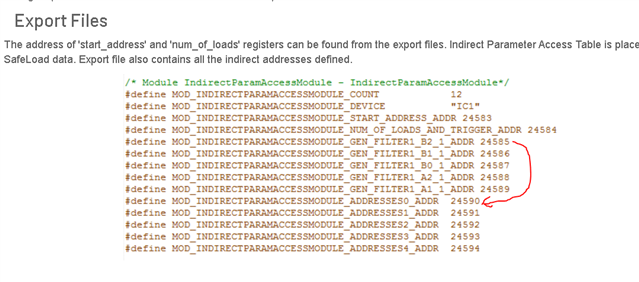
The information to find how to get the actual address of the filter object is actually in the export files but this is not really explained in the help files. Here is a screenshot:
This table is only five items. Five filter coefficients.
So the table has 12 items. The "Count" variable holds this info. Here are the 12 items in this example:
1) the target address you would put in here for the location of the data you would want to transfer. In this case it would only be one address you would put in here. That would be 24585
2) The number of words you want to transfer. In this case you would put in a 5, This will trigger the transfer so do no do this until you have placed the data.
3,4,5,6,7), are the five coefficients. This is where you deposit the data that you want to transfer to the location of the actual filter object.
8,9,10,11,12), These are used by the compiler to store the actual address of the filter objects. So if you know the length of the table, in this case it is five items, the addresses are stored in order after the memory location you are supposed to use.
So in the export files you can figure out where the actual addresses of the objects. I would just load all this into the controller and then not use the IPAT system at all but just use the standard SafeLoad process to load in directly into the objects.
This is even more important for read functions. In the Table, the read function will read the data from where ever the compile put it, to the table location that is constant where you can read it. So EVERY sample period this transfer happens wasting MIPS. I personally would setup the location as a write then pick off the address of the actual object and then read it directly. No MIPS needed. So again, you would not use the IPAT functionality, only use the table to obtain the location of the object. Still a great feature.
I hope this makes sense to you.
Dave T
Please log in to reply.