EVAL - ADAU1788Z issues
I have received the eval board and am currently testing it. Channel 0 works ok but channel 1 gives no output at all. The second problem is that the fast processor does not appear to be supported at all on the software. I can only use the ADAU1788S, the 1788F appears but does not give any output when I use it from either channel. In the Hardware config I have connected ADAU1788 to I2C I^2C. In the tree toolbox there is only ADAU1788 as an option. But the main thing is how to get two channels and not just channel 0?
The other thing is, is there another way to program this DSP other than graphically? I like graphical programming but there seems very little info available. How for example do I program a vector update like
W(k+1)=W(k)+mu*error(k) where W is a vector of weights? Yes there are library functions for adaptive filters but they are not editable.
regards
hardware
sigma studio 4.7
Integrated/Special Purpose A/D Converters
sigmastudio
adau1788F
adau1788
Audio CODECs
ADAU1788S
Show More
Hello sorova,
sorova said:
Channel 0 works ok but channel 1 gives no output at all.
Can you attach your project? There are many places where the audio may not be routed or something not enabled.
sorova said:
The second problem is that the fast processor does not appear to be supported at all on the software.
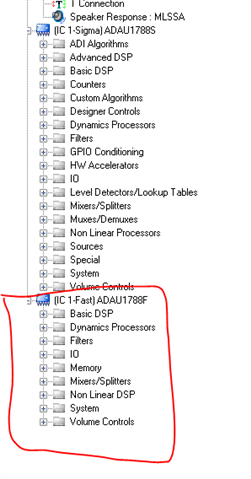
In the tree toolbox when you are in the Schematic tab will show the library of blocks for each DSP processor. The SigmaDSP and the Fast DSP. So take the blocks out of the Fast DSP section and connect them together. You can only connect blocks together that are for the correct processor and not the other.
sorova said:
I can only use the ADAU1788S, the 1788F appears but does not give any output when I use it from either channel. In the Hardware config I have connected ADAU1788 to I2C I^2C. In the tree toolbox there is only ADAU1788 as an option. But the main thing is how to get two channels and not just channel 0?
Again, send over your project. There are so many ways to configure the signal path. For us to help we will need to know what is your intended audio signal path? At what sampling rates do you want to operate each core?
Where is the source(s) of the audio?
sorova said:
The other thing is, is there another way to program this DSP other than graphically? I like graphical programming but there seems very little info available. How for example do I program a vector update like
W(k+1)=W(k)+mu*error(k) where W is a vector of weights? Yes there are library functions for adaptive filters but they are not editable.
You have to use the graphical tool. It seems like you want to take the error output from an adaptive filter and process that? It will be good to see what you are trying to do in your program and which filters you are using.
Dave T
Please log in to reply.