If channging the samping frequency all fiter values are wrong. Did I miss a parameter ?
Hi
I have the problem that if I change the samling frequency for example to 384kHz, I have to manually calculate all filter values 8X and enter them like this. So a high shelving filter of 4000Hz would have a value of 32000.
What do I do wrong ? or is there a parameter to set ?
Thnks a lot
Christoph
Hello cgraf,
Sorry for the delay.
Could you please tell us which processor you are using? If possible could you please send us your project that would be easy for us to debug quickly without getting into multiple assumption.
Regards,
Harish
Hello Christoph,
There are three places where the sample rate is determined. One is with software and two are with hardware.
Software:
SigmaStudio does not know what is going on with the hardware. So you must tell it what sampling rate to use when compiling the program. It will calculate the correct coefficients and correct timing for things like oscillators and compressors but you must tell it the correct frequency to use.
This is done at the top of the SigmaStudio window.
Hardware 1:
You must have the serial ports set to the correct sampling rate. You also have to have any codecs or other converters set to the correct sampling rate. If the serial ports are being operated as a slave then the sending device needs to be changed.
Hardware 2:
You must send the DSP clocks that are at the correct frequency. Specifically, I am talking about the master clock. If you send it 24.576MHZ but the PLL is setup for 12.288MHz then you will be running at twice the sampling rate. Although, the DSP system clock will not go that high so I should show this the other way around. You set it up for 24MHz and send it 12MHz then it will run at half speed.
So all three must be correct for you to produce the correct results.
Dave T
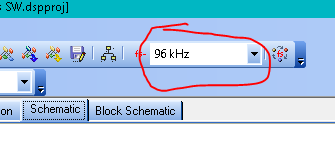
Hi Dave. Thank you for the answer. Now I have to find out where to change the hardware part. If I change in by chosing ror example 192kHz I have to recalculate all filter values by hand... for the moment. Hope to find it out as the documentation of my boards (2 manufacturers) are not really great.
Best regards
Christoph
Hello cgraf,
For the hardware parts, the given picture shows the corresponding registers.
The Fs in the picture has a relation with the CGs. This is the set up for serial port rate.
The red marked area is for the PLL and the Blue is for the CG.
If you are yet to solve your problem then kindly refer the below post where Dave explained about the different sub systems which all together makes sense to your system. This would really help you to understand all the different settings and Fs.
RE: Different sample rates
Regarding a brief about PLL and CG you may refer the recent post
Clock Setting - Q&A - SigmaDSP Processors and SigmaStudio Development Tool - EngineerZone (analog.com)
Regards,
Harish
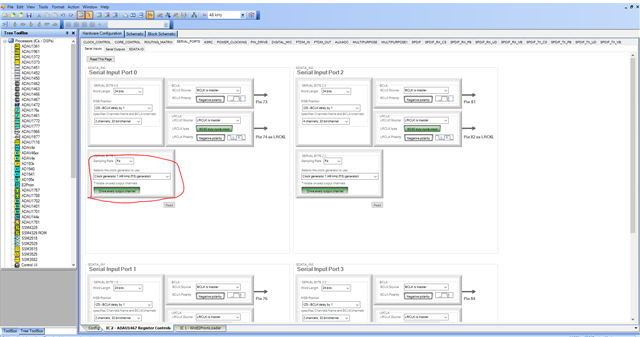
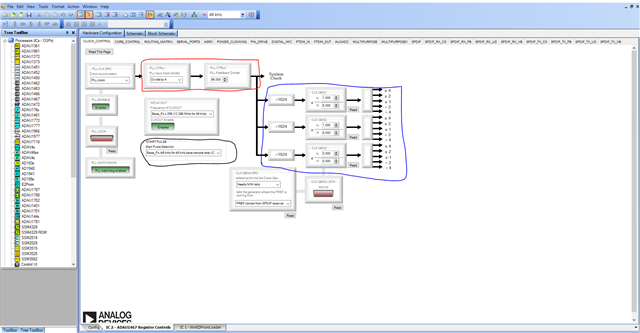
Hi Harish. Thanks A LOT for your explanations! It really helped.I know how to define filters and create active/passive filters but still learning with the Sigmastudio tool.
All the best
Christoph
Please log in to reply.