ADAU1787 test: adc2/3 to fdsp to dac
I just got an adau1787 eval kit and am trying a simple test to run audio from adc input through the fdsp to the dac output. See the attached dspproj. I get audio out if I route the adc2 input directly to the dac0 output in the DAC_CNTRL tab of the register control, but I do not get any audio if I route the adc3 input trough the fdsp to the fdsp output (FDSP1), What am I doing wrong? I'm running everything at 192 kHz.Test_Adau1787_adc_fdsp_dac.dspproj
Davis
Edit Notes
grammar correction
[edited by: Dpan at 4:43 PM (GMT -4) on 17 Aug 2022]
dsp
ADAU1787
evaluation board
Rev 1831
Integrated/Special Purpose A/D Converters
sigmastudio
Choose a category
SigmaStudio version 4.7
Audio CODECs
fdsp
Show More
I think there are some instructions missing from the ADAU1787 eval kit user guide. I created a dspproj exactly as instructed in the guide and tried link, compile, download and couldn't even get sound when I route adc3 to dac0 until I turned on PLL_EN and XTAL_EN. I still can't get sound when routing either SDSP0/1 or FDSP0/1 to the DAC0/1, I set all the sample rates to 48 kHz. Attached is the project file.Eval user guide.dspproj
Davis
I found an example project that DaveT provided in the ADI EZ article, "EVAL-ADAU1787 FastDSP Setup" and I still couldn't get audlo out of the Fast DSP (FDSP0) when connected via DAC0_ROUTE. I do get sound out if I connect ADC2 or ADC3. Is there some default Eval board jumper connection that I have to change to get this working? BTW I changed the ADC inputs to 2 and 3 to connect a stereo audio source.
I've made some progress. I now can get audio going into the ADC through the slow DSP to the DAC outputs at 48 kHz.
I can also generate a beep in the slow DSP and send to the DAC output at 48 kHz.
I can also get audio using ADC going through the fast DSP and output through the DAC outputs at 364 kHz.
I can also get audio (beep or audio from ADC running at 48 kHz) from the slow DSP and send it to the fast DSP and output it by connecting a DAC to a FDSP output.
So I think my problem is resolved.
Dpan,
That's good to hear. If using the ADCs / DACs there needs to be an internal MCLK for the ADAU1787, so either the PLL needs to be enabled or it needs to be bypassed and the clock configuration registers set accordingly. But with no internal MCLK, it makes sense that the project initially did not work.
I can't figure out what I did initially to cause the problem, I have a version of my original dspproj file, which does not work (see attached screen capture of error window), and a version that does work. I can't tell the difference between these dspproj files in SigmaStudio. Can you spot the difference?
fast DSP wire - broken.dspprojfast DSP wire - works.dspproj
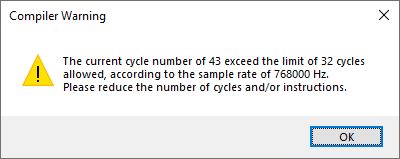
Ok, I found the difference, the dspproj that works had the "New Item Sampling Rate" set at 384 kHz or less, while the one that didn't work had it set at 768 kHz, The project is still broken if I choose "No" for setting the sampling rate for all existing blocks to the new default rate. So I really need to fix the issue of not being able to link-compile-connect a simple project using the fast DSP at 768 kHz, for just a signal pass-through.
Please log in to reply.