Bug in 'New Item Sampling Rate"
Here are steps to reproduce the problem:
1. Create SigmaStudio dspproj as described in the ADAU1787Z Evaluation Board User Guide. See attachment. Note the 'New Item Sampling Rate" is 48 kHz. and confirm the eval board is connected to SigmaStudio.(green USB indicator in the USBi interface).
2. Set the Fast DSP sample rate to 768 kHz.
3. Set the Sigma DSP sample rate to 48 kHz.
4. Click the Link, Compile, Download button and configure the DACs to listen audio pass through at SDSP0 (ADC2), SDPS1 (ADC3), FDSP0 (ADC0), and FDSP1 (ADC1).
5. Set 'New Item Sampling Rate" to 768 kHz. Choose "No" for setting the sampling rate of all existing blocks to this new default rate. Nothing should change with design.
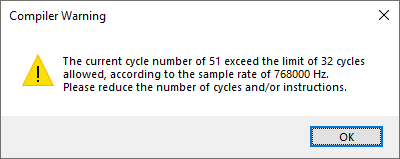
6. Now clicking the Link, Compile, Download button produces a compiler warning shown below.
7. Set 'New Item Sampling Rate" back to 48 kHz. Choose "No" for setting the sampling rate of all existing blocks to this new default rate. Nothing should change with design.
8. Now clicking the Link, Compile, Download button produces no compiler warnings.
Is this a bug or a feature?ADAU1787 Eval Kit Design.dspproj
software
ADAU1787
sample rate
sigmaStudio 4.7
ADAU1787 evaluation board
SigmaStudio 4.7 Rev 1831
sigmastudio bug_report
Show More
Hello Dpan,
Thank you for the report. I will pass this on to the rest of the team.
Dave T
Please log in to reply.