Video Tutorial
Hi,
I am wondering if there are any video tutorials which I can refer to (in English), to learn more about Sigma Studio and related subject in general.
Because, Tho I am going through the existing documentation/examples available at https://wiki.analog.com/resources/tools-software/sigmastudio, many times articles written are not very clear to me or confusing. For example :
https://wiki.analog.com/resources/tools-software/sigmastudio/toolbox/leveldetectorslookuptables/rmstable on this page, I am unable to understand
1. When one should make use of RMS table
2. How to use it
3. If I have to generate the mapped values (user specified) what is the formula
4. How are these mapped values/Indexes are linked with the values displayed in the image - 70 - 0 - 4
Same with Index Lookup table. For a layman like me, documentation without meaningful examples are very difficult to understand. So, if someone here could recommend any audio/video tutorials or docs, and what sort of basic background knowledge one must have before using Sigma Studio, it would be helpful.
Cheers
-Mayuresh
PS. If someone could also respond to my earlier clipping issue it would be of a great help :)
sigma studio
4.2
software
learning
tutorial
sigmastudio
Show More
Hello Mayuresh,
I will try to make a video for you but I am not sure I will have time.
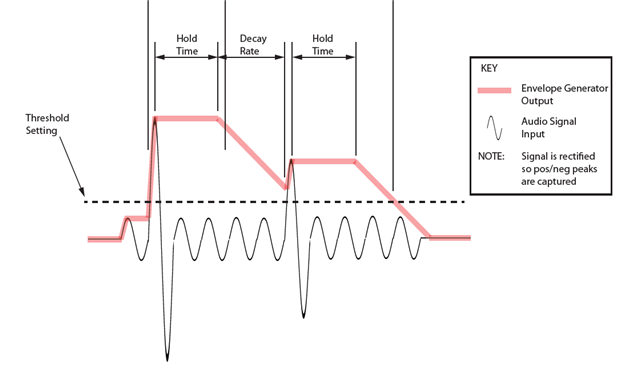
This lookup table does two things. The first is it has an envelope follower for the audio coming in. So it will get the absolute value of the audio and then develop the level of the audio. To do this it uses time constants so the sensed level will slowly rise up until it reaches the level of the audio if the audio is steady. Then if the audio goes away it will hold the value for a period of time ( the hold time) then it will begin to decay. Here is a drawing I did of a peak envelop follower:
An RMS envelop follower will not rise up with the audio but it will slowly rise up. How fast depends on the time constants you enter in the GUI.
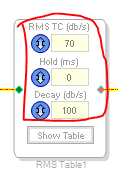
So here are the time constants controls.
The RMS TC is the attack time constant. They are in dB per second. So the larger the number the faster the attack or decay.
Then the output of the envelop follower is passed to a level detector which detects the level of the envelop and hence the level of the audio.
When it detects a level, it will look up the elements in the table that you entered and interpolate between the table values and output a value. The table is in 3dB steps so if you have a -1dBFS level of signal, it will give you a value that is roughly 1/3rd of the way between the value of 0dB and -3dB in the table.
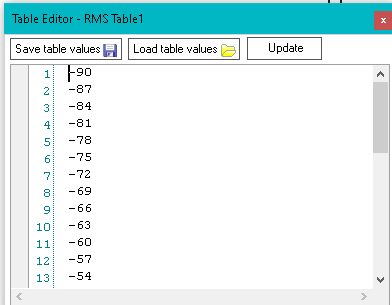
So I put values in the table that exactly mirror the levels for each value. ( Look at the Wiki Help file and you will see a list of level values for each table entry )
So if I put in a -90dBFS signal I will get a -90 out of the block.
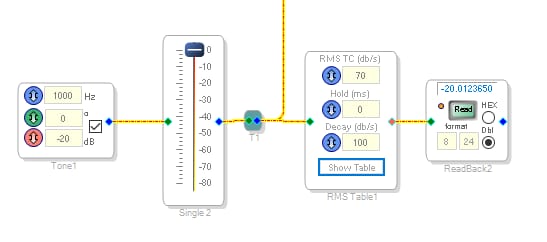
So I wrote a small program to test this. Here is a screenshot.
As you see, I am sending a -20dBFS signal into the block and the output is -20.
So how you would use it is up to you. You can setup a table of gain factors and then use the output to multiply the audio by the gain factor. This will give you a compressor/expander or noise gate. You can use it to linearize some audio. You can use it to sense the input level and then take some action based on the data. It is a tool in the tool-belt to use when needed.
Here is the project:
ADAU1452 RMS Lookup Table test.dspproj
I also am including the text file of the values I used. This is the easiest way to edit the values. Do it in a text file then import it into the block.
Fullscreen
RMS Table Values in dB level of input.txt
Download
-90
-87
-84
-81
-78
-75
-72
-69
-66
-63
-60
-57
-54
-51
-48
-45
-42
-39
-36
-33
-30
-27
-24
-21
-18
-15
-12
-9
-6
-3
0
3
6
Dave T
Hello Dave,
Thank you for the detailed explanation.
-Mayuresh
Please log in to reply.