(adau1451) How to make sure EEPROM settings are correct? if "Check last compilation throught DSP" always retrun fail.
Hi~
I am using adau 1451 design a car audio product.
We had made PCBA, using adau1451 pin 28 (SCL ), pin 28 (SDA) to connect self boot EEPROM (AT24C256).
pin 28, pin 29 using 2.2k resistor to pull up to 5V. (We had tried using 3.3v, but not work.)
The model no of our EEPROM is AT24C256 , it has 256kb size.
As I know, if I want to write and check this EEPROM, I have to use "Write last compilation throught DSP" and "Check last compilation throught DSP".
I am using Sigma studio 4.7 , and it can compile link connect and download code to adau 1451 on PCBA without any error mesage.
My EEPROM settings are :
size: 262144 bits
paeg size: 64 bytes
address bytes: 2 bytes
EEPROM address: 0xA0 (all address on EEPROM connect to GND, WP connect to GND)
When using "Write last compilation throught DSP" , it runs very fast and return without any error.
My question is:
Q1: "Check last compilation throught DSP" always retrun fail. It says somthing like "EEPROM must start with 0xAA but read 0x00". How to fix this problem?
Q2: If I can make sure the binary data in EEPROM is correct (using an third party EEPROM recording tool to write E2Prom.bin into it) , how can I make sure adau 1451 can read my code from EEPROM correctly when self boot?
Q3: We use MP0 (pin 26) for GPIO. Does this effect the read / write of EEPROM through adau1451 DSP ?
Please kindly help us, thank you very much!
Audio Signal Processors
adau1451
software
eeprom
sigma studio 4.7
SigmaDSP Audio Processors
adau 1451
Show More
Hello JYwu,
JYwu said:
We use MP0 (pin 26) for GPIO. Does this effect the read / write of EEPROM through adau1451 DSP ?
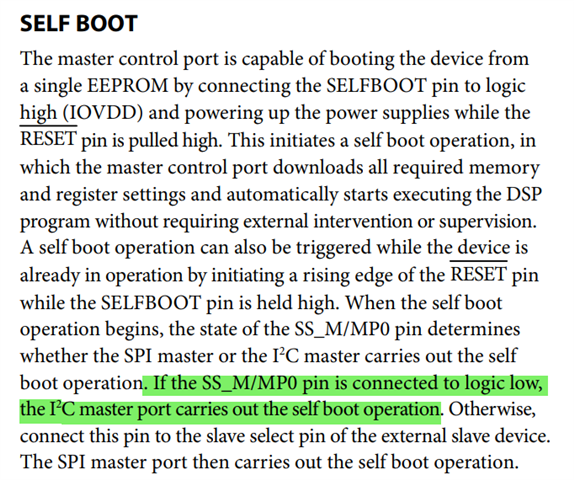
Acc to the datasheet, it says the below.
So, ground that Pin.
JYwu said:
how can I make sure adau 1451 can read my code from EEPROM correctly when self boot?
Just try a basic program with sine tone at the output and a led blink in any MP pin. When it self-boots, verify that you hear the sine tone and see the LED blink.
Make sure that your self-boot switch is OFF (pulled LOW) while writing to the EEPROM.
Regards,
Harish
OK, I will try to connect MP0 to GND and test agin.
Thank you very much!
Hello JYwu,
You wrote:
JYwu said:
pin 28, pin 29 using 2.2k resistor to pull up to 5V. (We had tried using 3.3v, but not work.)
You absolutely should NOT pull these up to 5V. Why are you using 5V anywhere? Nothing on this part operates at 5V. Is your system controller operating at 5V? If the I2C bus operating at 5V? Then you will need level translators to make this work. 5V will violate the absolute maximum of the part.
Harish is correct about the pin that tells the internal state machine what format to use to communicate with the EEPROM. You must be certain that the SS_M/MP0 pin is low until the selfboot process is complete. Then you can switch it to be an MP pin but it must be low when powering up or when you come out of reset.
I addition, I have had problem with writing to an EEPROM that was not empty, if it had an old program on it. If the Selfboot mode is still on then when SigmaStudio goes to program the EEPROM, it loads in a data transfer program. In the process of doing that it resets the part. So then you have the part booting up from the EEPROM while SigmaStudio is trying to program the part also. So that will often cause problems. I have had it not be a problem when the program is small because selfboot is fast and SigmaStudio takes a while to prepare to load in the program so there is no clash. The DSP loads in from EEPROM and SigmaStudioi overrwrites it shortly afterwards. However, if the program is large then they clash. So take the DSP out of Selfboot before trying to write the new program into it.
Another option is to erase the EEPROM then reprogram it.
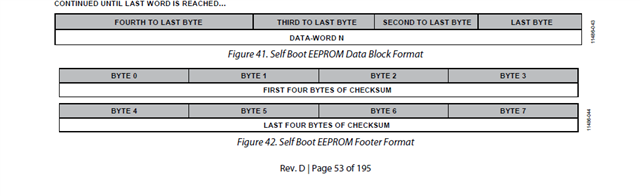
Your question about a 3rd party tool... Usually, those tools are good, if you copy it from the EEPROM it will copy the image. If you just use the Hex file then program one and test it. There is a checksum for the program on the EEPROM. So when it loads into the DSP the DSP will see if the checksum matches. If it does not then it does not run the program and it aborts. It will try it three times then write the error code into the Software Error register. This is all in the datasheet.
Dave T
OK, we will try to use 3.3V EEPROM.
By the way, you said : "If you just use the Hex file then program one and test it. There is a checksum for the program on the EEPROM. So when it loads into the DSP the DSP will see if the checksum matches."
I used the bin file E2Prom.bin generated by Sigma Studio, and write to EEPROM directly.
Do you mean that we have to change the check sum in bin file ?
Because, we have to use 3rd party tool to write EEPROM when mass-production, it souds like there are problems if we chage check sum?
Hello JYwu,
Your 3rd party tool will not know what to do with the checksum that SigmaStudio puts into the EEPROM. SigmaStudio takes care of all of this for you. You were asking to know if the file loaded into the DSP correctly. I was explaining that there is a checksum feature that is included automatically. It is part of the EEPROM format. This is in the datasheet under the Selfboot section.
If you happen to use an advanced feature to write back to the EEPROM to save some values so the DSP will remember settings, then this checksum feature is disabled. This is because the contents of the EERPOM will change. As long as you do not use that feature the DSP will see if the checksum agrees with what it calculated when loading the program.
Your 3rd party tool will not be a problem. It will not be aware of the EEPROM data structure. It will just be data.
Dave T
Got it!
Thank you very much!
Please log in to reply.