Can I use this circuit to use GPIO to control MUX ?
I want to use a GPIO to control a MUX in DSP.
My GPIO connects to a hardware switch, when switch to SRC1 , it pulls high , when switch to SRC2, it pulls low.
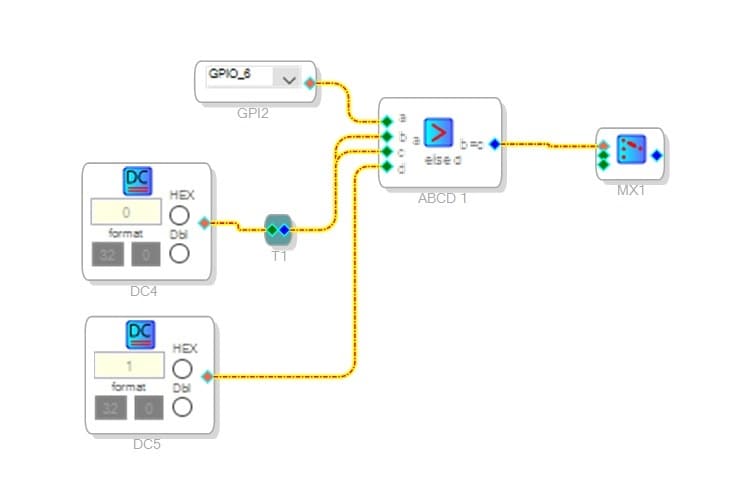
Then , I use this curcuit to control MUX in SigmaStudio 4.7.
The idea is : comapre GPIO input with DC 0 , if greater than DC0, output DC 0 to control MUX. if equal or less than DC0, output DC1 to control MUX.
It's seems work on my hardware.
But I want to make sure: Is this a stable solution?
Audio Signal Processors
adau1452
adau1451
software
sigmaStudio 4.7
SigmaDSP Audio Processors
gpio
mux
switches/multiplexers
Show More
Hello JYwu,
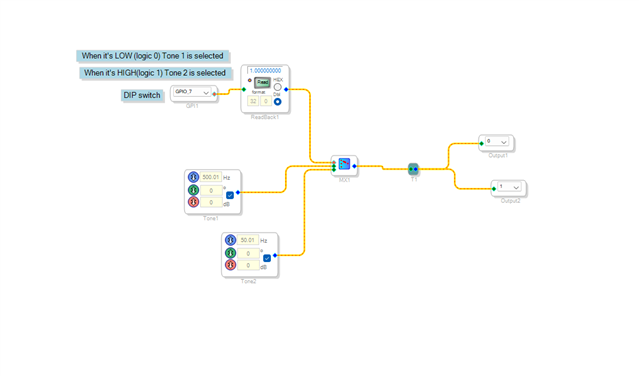
I think there is no need for the ADCD comparator block. If you have 2x1 MUX, then you can directly connect the GPIO (switch) signal to the control input of the MUX like below. If you have more that 2 inputs, then we would have to implement some logic with AUXADC and LUTs. There are a lot of ways and a lot of projects available.
Kindly do reply if you have further queries.
Regards,
Harish
Thanks for your quick response.
per your another suggestion : "we would have to implement some logic with AUXADC and LUTs"
I also need to use 4 segments switch to switch a "4 in 1 out MUX" in this project.
4 segments switch is a hardware swith. I use MP10. MP11, MP12, MP13 as input pins and all pull low.
If MP10 is switched, it will be pull high to 3.3V, then the "4 in 1 out MUX" in DSP has to switch to SRC1.
And MP11 for SRC2, MP12 for SRC3, MP13 for SRC4.
Could you please give me more information or reference URL ?
Hello JYwu,
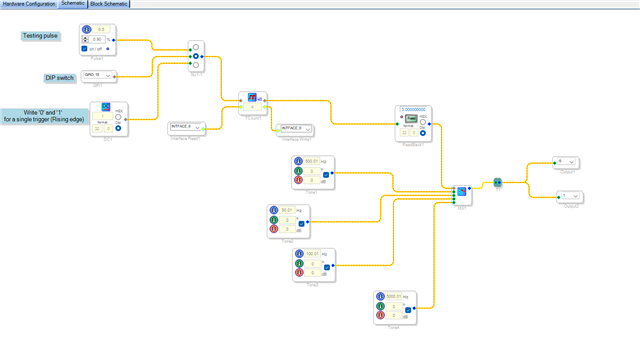
If you have planned to select the input by using MP pins, then you don't need to use 4 MP pins for that. Just use a single MP pin with a counter, every time a rising edge is detected here the counter will be incremented by one. The output value goes up to N-1 and comes to 0 again after another trigger. where N is the number that you enter in the counter box. Please find the attached project below.
input sel gpio.dspproj
Regards,
Harish
Looks great!
But my problem is , PCBA is ready and 4-segmet swith is a hardware component, I can't change them.
So, Is there a DSP element which can accept 4 MP inputs, performs "One hot encoding" and returns 0~3 numbers (maybe index of "1" in one hot encoding ) to switch MUX?
Hello JYwu,
Are the switches latching or momentary?
Do you need for them to cross cancel? I think you do.
I have this project I did a long time ago that is close to what you may need. You will have to invert the logic I think? Use Readbacks to verify that the logic is correct when you press a button.
when using an externally controlled MUX, always make sure the input will never be greater than the number of inputs-1. The input is a pointer so if you give it a larger number it will point to something in memory past the signals for the MUX. It is unknown what you will be pointing to.
ADAU1452 GPIO Controlled Mux Cross Cancelling.dspproj
Dave T
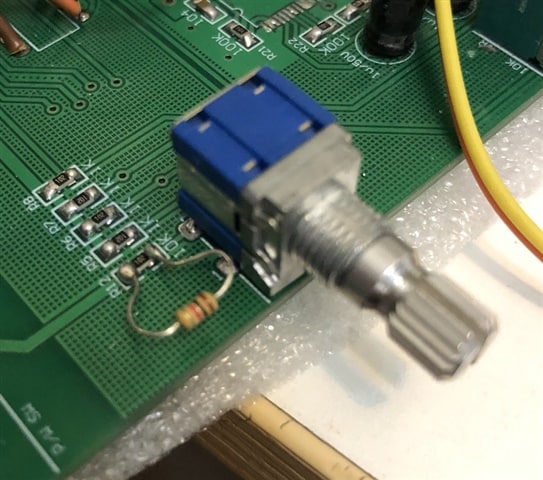
My hardware swiich's picture is here, it''s an old style wheel switch for car audio.
You can see there are 5 resistors in a line.
R12 pull up to 3.3V
R5, R6, R7, R8 are connected to MP10. MP11, MP12, MP13.
User can rotate the switch, and only one pin (MP10, MP11, MP12, MP13) will be pull high. Others pull low.
So, at any time, there will be only one '1' in these four pins, and the other three pins are '0'.
Since the switch keeps pin state, so I think it's one kind of latch.
Your "Cross Cancelling Logic" is too complex to me to understand...
Is there a simple way to put this wheel switch into DSP?
Hello Dave,
Please excuse my reply.
JYwu,
Please try this attached project. I expect it would work as you want. Replace those switches with MP pins once you verified the logic with the switches. I made the MUX to start with index 1 since this logic defaults to output zero that will select the 0th input by default without any MP pin's assertion. So, to select one of the four inputs, MUX's control input pin must be fed with 1,2,3,4 respectively. I filled the 0th index with zero. You can understand that while you test this project.
rotary switch.dspproj
Please try this and do reply if you have any query.
Regards,
Harish
Hi~ Harish:
This curcuit works. Thank you very much!
I have a concern is: when user rotate the switch, there is some transition state that may cause two MP pins at '1' at the same time.
This condition is very short, may be only a few milliseconds.
Should I add any "ceiling" function after the "adder" to limit the input of MUX below max value "3" ?
Hello JYwu,
Please try this below method and see whether it works.
Please give the debounce value as 20ms in the MPx register below.
Regards,
Harish
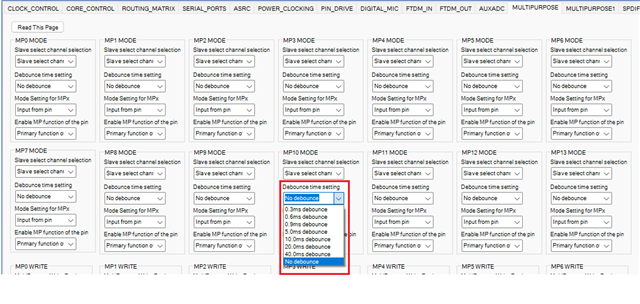
Hi Harish:
Got it!
Quite a smart solution!
Hello JYwu,
Please do not take this wrong. I am saying this for others who read the posts. This is an example of not giving enough information with the initial post. You never said what type of switch it is. They could be momentary or latching. You still did not because the picture shows what looks to me to be a rotary switch. There are many different types of rotary switch. It could be a rotary encoder and there are many types of those as well with different outputs. So is this a five position rotary switch with each position latching? I could make that assumption because there are five resistors. You did good to explain that it is only four positions and they are normally low unless the position is selected then it is high. This information would have been good to know from the start then I would have sent you a much more relevant project rather than the solution for a four position selection with momentary switches normally sitting high.
These details will change the required solution so the more information that can be included from the first post the faster we can help you and provide a correct response. So I apologize for sending a project that did not fit your needs. I made assumptions that you had four different momentary switches not one rotary four position latching switch.
I hope the rest of your project goes well and you enjoy working with the SigmaDSP.. Thank you to Harish who did a great job with the solution.
Dave T
Hi~ Dave :
It's my bad , I did't provide enough information at first.
I had got an answer from you and solved my first problem.
For second problem, I think I should ask second question by posting another post instead of continuing conversation.
Your solutions do help me and others who have similar questions.
Please log in to reply.