Adau 1467 it does not work
hello sorry for my bad english
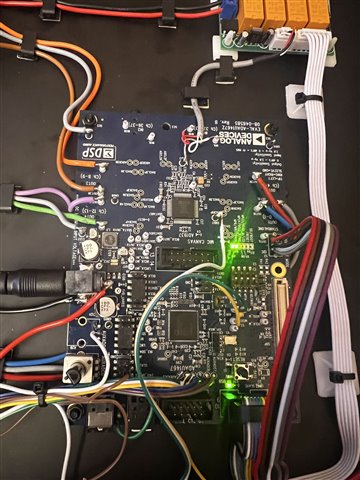
I have an adau 1467, unfortunately it doesn't work, it doesn't let any sound in or out of the log input
if i press compail download it makes a short pips sound but nothing more can someone help me or send me a finished schematic just a volume controll so i can test if i have a wrong setting in the register
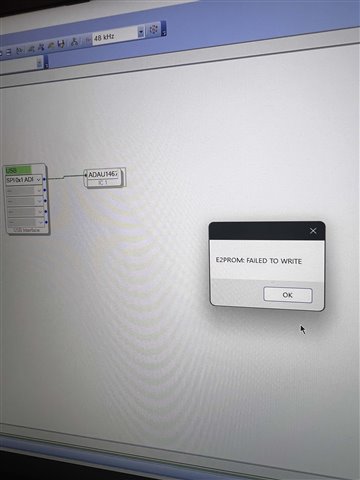
The error message below comes as soon as I want to selfboot write
thank you very much
Audio Signal Processors
help
software
adau1467
sigma
SigmaDSP Audio Processors
ADAU 1467
Show More
Hello Lorenzo4711,
Please try the attached pass thru project where all inputs and outputs of the Eval ADAU1467Z board is already enabled.
Sorry, I unable to attach the project since the forum gives me an error for attaching a project file. However, I have already posted this project in another thread. so, I will pass the link here. You can get the project named "s.port example" in the below link.
link: RE: looking for a help to use ADAU1467 eval board input 2and 3
Try this project and get back to us.
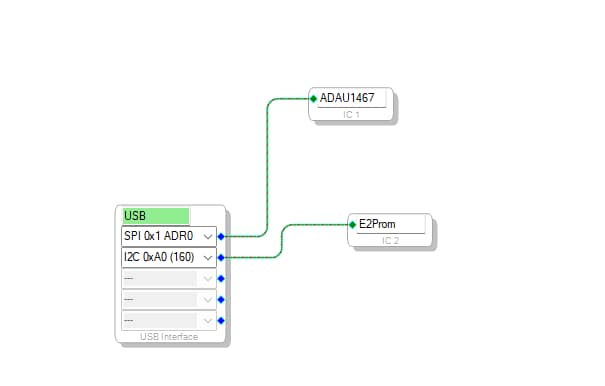
Reg the self-boot error, you must connect the EEPROM block to the USBi like below in order to perform self-boot operation.
Regards,
Harish
how can i save my file on the dsp do i have to use the selfboot button or does the standalone button work?
Hello Lorenzo4711,
The Switch S2 is for CODEC boot, so don't touch it unless you intend to program the CODEC. Let it be in the standalone mode (CODEC is at 48KHz by default).
If you want to store your program into the EEPROM and self-boot it whenever you want, then you have to go thru the self-booting procedure.
The self-boot procedure has been detailed in the user manual here from page no 28 to 30. You can follow those steps.
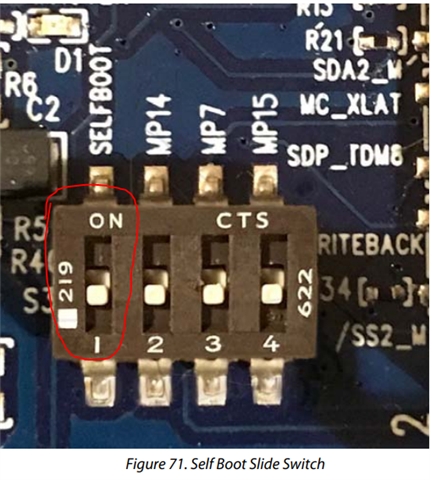
Make sure that EEPROM properties window data are correctly given and turn OFF the self-boot switch (first switch on S3) while writing to the EEPROM.
Regards,
Harish
but the instructions say that you need the switch s2 to boot yourself, because you can't do it
Hello Lorenzo4711,
I apologize for the confusion.
Lorenzo4711 said:
but the instructions say that you need the switch s2 to boot yourself, because you can't do it
This may be a typo with the user manual. The switch S2 is for CODEC booting.
The self-boot switch is the first switch on S3. Please refer below.
Regards,
Harish
Please log in to reply.