ADAU1452 serial port is 16bit but calculations are 32bits
Hi,
I am working with the ADAU1452 on the Sigma Studio 4.6, I stream to its serial input ports accelerometer data (3 axis of adxl317).
The accelerometer is configured to output each channel as 16bit data.
I configured the adau1452 serial port to word length of 16bit and TDM mode of 4ch each is 16bit.
I use the data from the accelerometer for calculations inside the adau1452 dsp.
As far as I know the dsp work with 32bit resolution. Does it affect the calculations somehow?
When I use the dsp readback block I see 32bit data instead of 16bit, why is that?
Thanks,
Sagi.
Audio Signal Processors
adau1452
software
precision
accelerometers
data
i2s
serial port
signals
sigmastudio
SigmaStudio 4.6
SigmaDSP Audio Processors
tdm4
SigmaDSP
ADXL317
Show More

Hello Sagi,
The readback is reading the data in the core. The core is 32 bits.
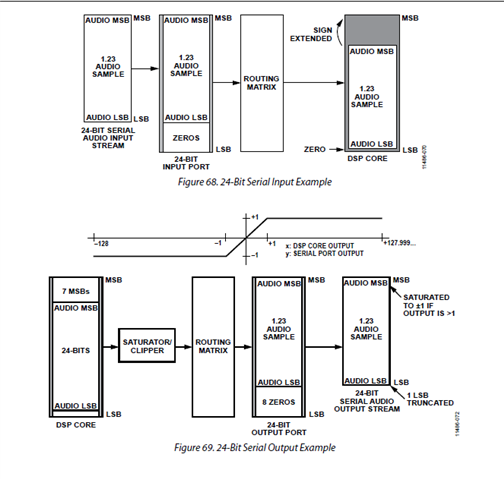
This diagram on page 74 in the datasheet is showing how the data in the serial port is mapped into and out of the core.
This diagram is drawn for default and most common settings of 24 bit. Have a look at it and I will comment more below...
The 24 bit audio sample is normalized to be a 1.23 number and the decimal points will line up with the 8.24 format in the core. So therefore one bit is added to the 1.23 to make is a "1.24" and then seven bits are added to the top to make it an 8.24. So in the core it is 32 bits.
Then on the output of the core the 32 bits are saturated or clipped to put out a 24 bit number in 1.23 format.
For your case you are bringing in a 16 bit number. This will be a 1.15 number. So the hardware will add 9 bits to the bottom and seven bits on the top. Then the bottom nine bits will be truncated when going out of the core and if a number is greater than "1" it will saturate the number to 0x3FFF in the positive direction and 0x8000 in the negative direction. This is what the saturator will do.
It is possible to bypass some of this but in your case you will not be going out of the core with 16 bit data so it is only on the input side that you are concerned with.
If the accelerometer is 2's compliment then it will be a fairly natural process. If you multiply the incoming number by "1" in 8.24 you will not change the data at all. It will sign extend so the negative numbers will also be what you need.
If the data format is an unsigned integer then it can get a little trickier. Still it will always be a positive number unless the MSB came in as a "1" then the core will think it is a negative number and extend the sign.
Let me know your exact situation and the issues you are facing so I can talk more specifically about your situation rather than having to be really general.
Dave T
Thank you for the quick reply!
My exact situation is that I want to read an accelerometer data from its dtx pins (16bit data) and convert it to gravity units.
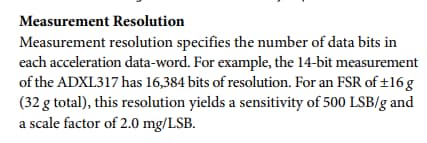
According to the adxl317 datasheet the resolution is 14bit = 16384, +-16g -> 2mg/LSB therefore to convert the samples to gravity units I need to multiply the incoming sample by 0.002
(ex: acc sample = 700 -> 700*0.002 = 1.4g).
I think its output format is unsigned integer though I'm not completely sure.
According to this document : -- ADXL317 Quick Start User Guide -- [Analog Devices Wiki] the accelerometer's data format is 2's complement when reading from tx0,tx1 pins.
The problem is I don't see an unsigned integer data when reading from the ADAU1452 serial port.
Hello SagiS,
If the ADXL guide is saying it is 2's compliment then this is easy. It makes sense to be 2's compliment because acceleration can be positive or negative.
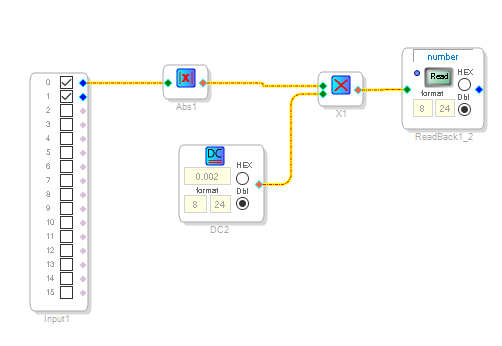
If your application does not care if it is positive or negative then just take the absolute value of the data coming in then do the multiply or do the multiply and then get the absolute value of the result.
You should not have to shift the data at all. It should come in left justified with the MSB on the left. ( I am not talking about the 1-bit delay from the frame clock edge, I am talking about the MSB being left justified so the sign will be extended and you will be able to use it with no modifications at all.
This should give you the results you need:
Dave T
Hi Dave,
I don't quite understand it yet.
My application care if its positive or negative (accelerometer data could be in + or - g units).
The accelerometer data is 16bit and left justified (14bit resolution with 2 zeros in LSB), the serial port take this data and insert 9 bits below the LSB and extend the sign bit (MSB) by 7 bits, so we get 8.24 data inside the core.
Shouldn't we take all this manipulation into account? Don't we need to shift the data by the number of added bits, so we get an actual 16bit data?
The data I multiply by 0.002 should be a 2's complement 14bit data (0-16384), with the schematic you suggest it's still in 8.24 format.
In the ADI quick start guide I linked there should be a left justify to right justify operation before converting the uint16 data to 2's complement and then multiply by the scaling factor 0.002.
Thanks
Sagi.
Hello Saji,
From what you are describing to me there is nothing you need to do. It will all work perfectly. The 14 bit sensor data is left justified to be a 16 bit word. Then the serial port you have setup to pick up 16 bits so that is fine. Then the transfer to the core will being in the data to have the decimal point aligned properly for an 8.24 number. The 16 bit number is a 1.15 number. You add nine bits to the bottom you get a 1.24 number. You extend the sign bit and add 7 bits to the top and you get an 8.24 number. So the calculations will all be aligned to use 8.24. You do not need to shift any bits at all.
If you would like the acceleration to be positive or negative then just do not get the absolute value. Then the results will be positive or negative. Sometimes all an applications needs to know is how many G's were experienced. the direction would not matter. but, some cases an application needs to know the direction so do not get the absolute value and you will know the direction.
You mentioned that the data coming from the sensor is already 2's compliment so no need to convert.
My suggestion is to try it and use readbacks to see the results and it should work fine.
Dave T
Update on 6/2/23
I just talked to one of our digital design engineers in the sensor group and he did confirm that the output is 14 bit 2's compliment and there is no conversion required. Then I am the expert in how the data comes into the DSP and your setup of the data being left justified will bring in the data properly aligned to do the 8.24 math just fine. So it is easier than it might seem at first glance.
Dave T
Hi Dave,
I understand that the data from the accelerometer is converted right to 8.24 format in the core, but I still think there is something wrong because I want to calculate the accelerometer data in g's unit, the result in g units should be in -16 - +16 so 8.24 format should be ok for that but the accelerometer data from the serial port is converted to 8.24 format and therefore we could get numbers between -128 and +128(- 1 LSB).
Applying the scaling factor to convert the data to g units (multiply by 0.002) will result in numbers between -0.256 and roughly +0.256 therefore we don't get the full scale of the accelerometer in g units.
I think we need to scale the scaling factor and the accelerometer limits (-16 - +16), but how do we do it?
This is important to me because I want to check if the sensor's data is within its limits according to the datasheet inside the ADAU1452 core.
Thank you,
Sagi
Hello Sagi,
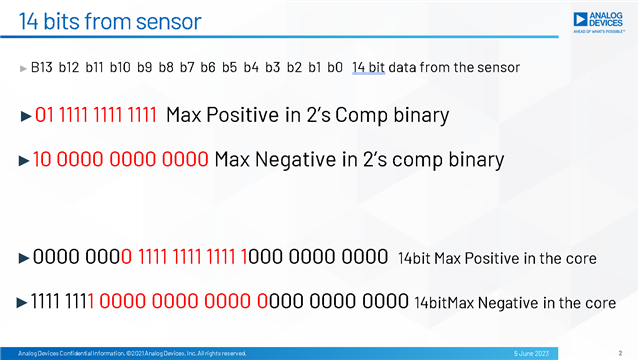
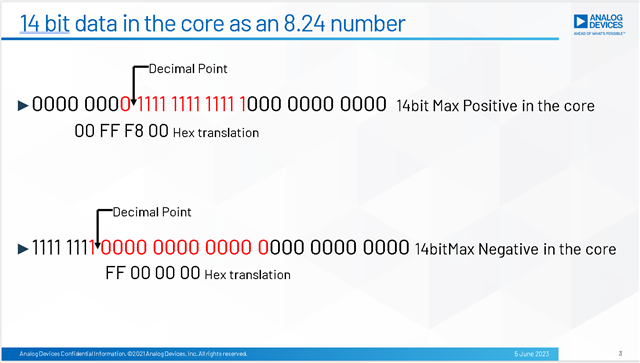
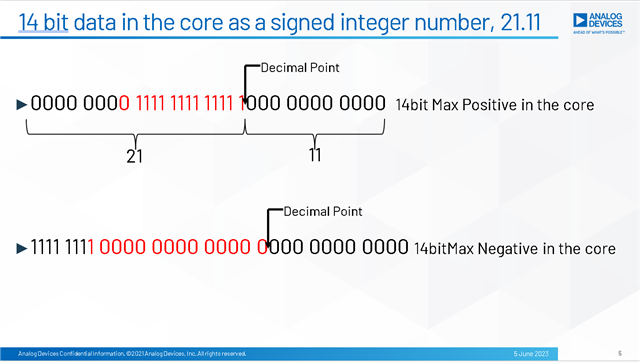
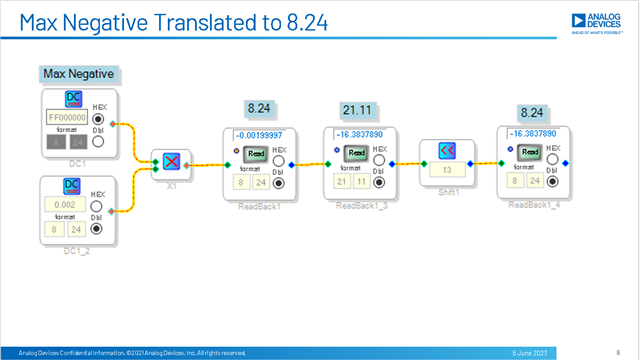
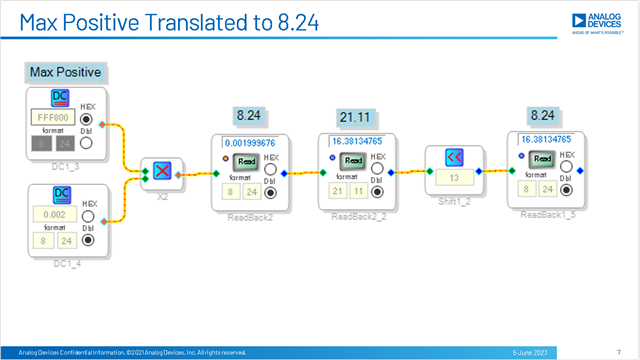
I think this is the way you can do it. I did this experiment to test this and show you how to use the results. I do not know what you plan to do with the result so this still might not be exactly as you need it but I will show you how to get the data into the whole number portion of an 8.24 number. I will do this one step at a time and I will show my work.
I put it in a presentation but it is only 6 slides. I will attach the document here but I will also put it in the post. It will make the post long.
I hope this helps.
Dave T


Please log in to reply.