Audio Level Controller in ADAU1772
ADAU1761 has "Automatic Level Control" (ALC) that controls the analog audio level. I am bound to use ADAU1772 with Zynq-7030 Board for my application requirements. How can I Control the Audio Level in ADAU1772 output using any control registers?
Also, is there any register for Audio Detection in audiocodec?
Any help is appreciated.
Audio Signal Processors
Audio Signal Detection
Audio Products
hardware
ADAU1787
adau1361
adau1772
Integrated/Special Purpose A/D Converters
SigmaDSP Audio Processors
adau1761
zynq
ADAU1772 and Zynq-7030
Vivado 2019.1 and Petalinux 2019.1
Audio CODECs
Show More
DaveThib can you please guide on this?
anlg,
Can you provide more information on your application?
There is no set register to readback to indicate audio detection. There is some limiter functionality in the 1772 within the DSP as well as level detectors. To control the output level, there are registers to control volume for ADC/PGA/DAC VOL.
There are other devices that may have additional functionality to better support your application, including the ADAU1787 and ADAU1761/ADAU1361. The ADAU1361 also has built-in ALC.
galvinpjg ,
Thank you for your quick response.
Regarding my application, I am interfacing audiocodec ADAU1772 with Zynq7030 using I2S. I am able to control the MIC gain through registers and rest of it is also working fine.
I need to control audio level (in mili-Volts) at my microphone output.
I have gone through the datasheet, and was pondering on "DB VALUE REGISTER READ (DBREG)". Can I use this to attain my required level or is this something else?
Also, I am not able to read any register of 1772 in drivers, since it is not showing as a device in the /sys/bus/ directory of embedded linux. So, not able to readback the "dbreg" value.
Hello anlg,
anlg said:
I need to control audio level (in mili-Volts) at my microphone output.
I do not understand what you are really trying to do? How can the DSP/Codec control the output of a microphone? It is an external device?
You mentioned you can control the gain of the mic using the registers. So that I understand as controlling the output of the microphone. So what are you trying to control? Draw a system block diagram?
The DBREG is a register but not one that a Linux system would know about or need to change. You will have to edit the driver to create your own custom driver. You will also need to setup a program to route the audio over to the dBreg. Here is the address of the register:
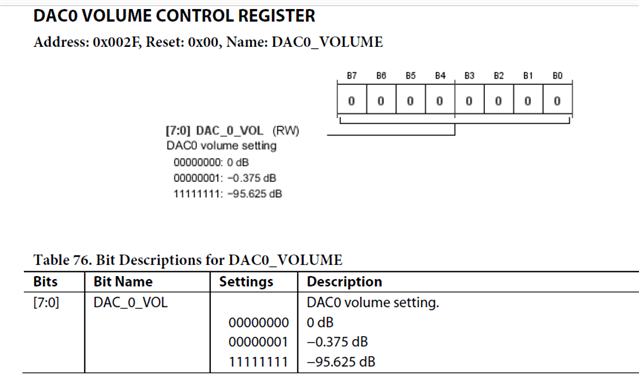
If you actually just need to control the output of the DAC that is coming from the microphone signal, then adjust the DAC level register. It is in dB not millivolts so you will have to do a bit of math to translate this.
I think the current driver may have these registers already defined but I am not sure?
Dave T


Please log in to reply.